Java Is Open Source Programming Language You Can Download From Java and Java Libraries From http://www.oracle.com.
We provide this code related to title for you to solve your developing problem easily. Libraries which is import in this program you can download from http://www.oracle.com.
Draw With Layer
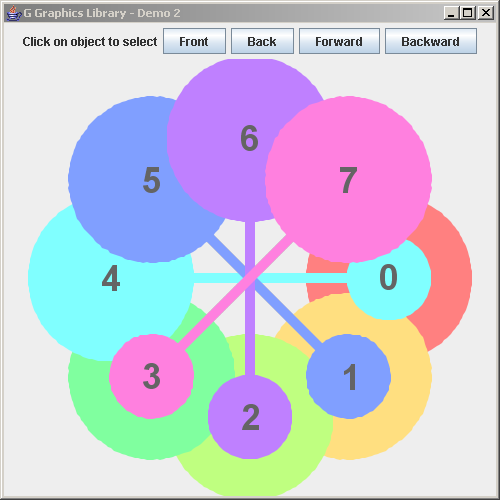
import java.awt.*;
import java.awt.event.*;

import javax.swing.*;

import no.geosoft.cc.geometry.Geometry;
import no.geosoft.cc.geometry.Matrix4x4;
import no.geosoft.cc.graphics.*;


/**
 * G demo program. Demonstrates:
 *
 * <ul>
 * <li>Positional feature among sibling GObjects.
 * <li>Simple selection interaction to choose front object
 * <li>Dynamic style changes
 * <li>Matrix4x4 for geometry generation
 * <li>Text elements and annotation strategy
 * <li>Device relative graphic object
 * </ul>
 *
 * @author <a href="mailto:jacob.dreyer@geosoft.no">Jacob Dreyer</a>
 */
public class Demo2 extends JFrame
  implements ActionListener, GInteraction
{
  private JButton  frontButton_;
  private JButton  backButton_;
  private JButton  forwardButton_;
  private JButton  backwardButton_;

  private GScene   scene_;
  private GObject  interactionObject_;
  private Color    color_;


  /**
   * Class for creating the demo canvas and hande Swing events.
   */
  public Demo2()
  {
    super ("G Graphics Library - Demo 2");
    setDefaultCloseOperation (JFrame.EXIT_ON_CLOSE);

    interactionObject_ = null;
    color_             = null;

    // Create the GUI
    JPanel topLevel = new JPanel();
    topLevel.setLayout (new BorderLayout());
    getContentPane().add (topLevel);

    JPanel buttonPanel = new JPanel();

    buttonPanel.add (new JLabel ("Click on object to select"));

    frontButton_ = new JButton ("Front");
    buttonPanel.add (frontButton_);
    frontButton_.addActionListener (this);

    backButton_ = new JButton ("Back");
    buttonPanel.add (backButton_);
    backButton_.addActionListener (this);

    forwardButton_ = new JButton ("Forward");
    buttonPanel.add (forwardButton_);
    forwardButton_.addActionListener (this);

    backwardButton_ = new JButton ("Backward");
    buttonPanel.add (backwardButton_);
    backwardButton_.addActionListener (this);

    topLevel.add (buttonPanel,   BorderLayout.NORTH);

    // Create the graphic canvas
    GWindow window = new GWindow();
    topLevel.add (window.getCanvas(), BorderLayout.CENTER);

    // Create scane with default viewport and world extent settings
    scene_ = new GScene (window);

    // Create som graphic objects
    createGraphics (scene_);

    pack();
    setSize (new Dimension (500, 500));
    setVisible (true);

    // Install the selection interaction
    window.startInteraction (this);
  }


  private void createGraphics (GScene scene)
  {
    int n = 8;
    for (int i = 0; i < n; i++) {
      Color color = Color.getHSBColor ((float) i / n, (float) 0.5, (float) 1.0);
      GObject object = new TestObject ("" + i, 2.0 * i * Math.PI / n, color);
      scene.add (object);
    }
  }


  /**
   * Handle button interactions.
   *
   * @param event  Event causing call to this method.
   */
  public void actionPerformed (ActionEvent event)
  {
    if (interactionObject_ == null)
      return;

    Object source = event.getSource();

    GObject parent = interactionObject_.getParent();

    if (source == frontButton_)
      parent.reposition (interactionObject_, parent.front());

    else if (source == backButton_)
      parent.reposition (interactionObject_, parent.back());

    else if (source == forwardButton_)
      parent.reposition (interactionObject_, parent.forward());

    else if (source == backwardButton_)
      parent.reposition (interactionObject_, parent.backward());

    frontButton_.setEnabled (!interactionObject_.isInFront());
    forwardButton_.setEnabled (!interactionObject_.isInFront());
    backButton_.setEnabled (!interactionObject_.isInBack());
    backwardButton_.setEnabled (!interactionObject_.isInBack());

    interactionObject_.refresh();
  }


  /**
   * Handle graphic events.
   *
   * @param event  Event type.
   * @param x,y    Cursor position.
   */
  public void event (GScene scene, int event, int x, int y)
  {
    // We care of button 1 clicks only
    if (event == GWindow.BUTTON1_UP) {

      GObject object = scene_.find (x, y);

      if (object != null) {
        if (interactionObject_ != null)
          interactionObject_.getStyle().setBackgroundColor (color_);

        interactionObject_ = object;
        color_ = interactionObject_.getStyle().getBackgroundColor();
        interactionObject_.getStyle().
          setBackgroundColor (new Color (255, 255, 255));

        object.refresh();
      }
    }
  }


  /**
   * Defines the geometry and presentation for a sample
   * graphic object.
   */
  private class TestObject extends GObject
  {
    private double    angle_;  // radians
    private GSegment  largeCircle_;
    private GSegment  smallCircle_;
    private GSegment  arm_;


    TestObject (String name, double angle, Color color)
    {
      angle_ = angle;

      GStyle style = new GStyle();
      style.setBackgroundColor (color);
      style.setLineStyle (GStyle.LINESTYLE_INVISIBLE);
      setStyle (style);

      largeCircle_ = new GSegment();
      addSegment (largeCircle_);

      smallCircle_ = new GSegment();
      addSegment (smallCircle_);

      arm_ = new GSegment();
      addSegment (arm_);

      GText text = new GText (name, GPosition.MIDDLE | GPosition.CENTER);
      GStyle textStyle = new GStyle();
      textStyle.setForegroundColor (new Color (100, 100, 100));
      textStyle.setBackgroundColor (null);
      textStyle.setFont (new Font ("Dialog", Font.BOLD, 36));
      text.setStyle (textStyle);
      largeCircle_.setText (text);
    }


    public void draw()
    {
      // Center of viewport
      int x0     = (int) Math.round (getScene().getViewport().getCenterX());
      int y0     = (int) Math.round (getScene().getViewport().getCenterY());

      int width  = (int) Math.round (getScene().getViewport().getWidth());
      int height = (int) Math.round (getScene().getViewport().getHeight());

      int length  = Math.min (width, height) - 20;
      int qlength = (int) Math.round (length / 3.0);


      int[] largeCircleCoord = Geometry.createCircle (x0, y0,
                                                      (int) Math.round (length * 0.2));
      int[] smallCircleCoord = Geometry.createCircle (x0, y0,
                                                      (int) Math.round (length * 0.1));

      int[] armCoord = new int[] {x0-qlength, y0-5,
                                  x0+qlength, y0-5,
                                  x0+qlength, y0+5,
                                  x0-qlength, y0+5};

      Matrix4x4 matrix = new Matrix4x4();
      matrix.translate (-qlength, 0, 0);
      matrix.transformXyPoints (smallCircleCoord);

      matrix.setIdentity();
      matrix.translate (+qlength, 0, 0);
      matrix.transformXyPoints (largeCircleCoord);

      matrix.setIdentity();
      matrix.translate (-x0, -y0);
      matrix.rotateZ (angle_);
      matrix.translate (+x0, +y0);

      matrix.transformXyPoints (largeCircleCoord);
      matrix.transformXyPoints (smallCircleCoord);
      matrix.transformXyPoints (armCoord);

      largeCircle_.setGeometry (largeCircleCoord);
      smallCircle_.setGeometry (smallCircleCoord);
      arm_.setGeometry (armCoord);
    }
  }


  public static void main (String[] args)
  {
    new Demo2();
  }
}

