Source Code : Draw Radiation: Annotation layout mechanism, Visibility settings, Custom linestyle
Java Is Open Source Programming Language You Can Download From Java and Java Libraries From http://www.oracle.com.
Click Here to download
We provide this code related to title for you to solve your developing problem easily. Libraries which is import in this program you can download from http://www.oracle.com.
Click Here or search from google with Libraries Name you get jar file related it
Draw Radiation: Annotation layout mechanism, Visibility settings, Custom linestyle
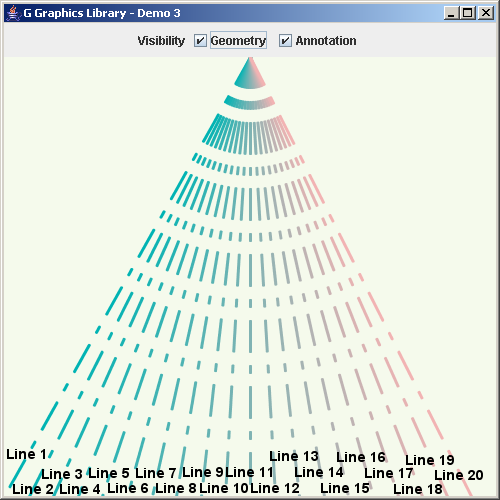
import java.awt.*;
import java.awt.event.*;

import javax.swing.*;

import no.geosoft.cc.geometry.Geometry;
import no.geosoft.cc.geometry.Matrix4x4;
import no.geosoft.cc.graphics.*;


/**
 * G demo program. Demonstrates:
 *
 * <ul>
 * <li>Annotation layout mechanism
 * <li>Visibility settings
 * <li>Custom linestyle
 * </ul>
 *
 * @author <a href="mailto:jacob.dreyer@geosoft.no">Jacob Dreyer</a>
 */
public class Demo3 extends JFrame
  implements ActionListener
{
  private JCheckBox  annotationToggle_;
  private JCheckBox  geometryToggle_;

  private GScene     scene_;


  /**
   * Class for creating the demo canvas and hande Swing events.
   */
  public Demo3()
  {
    super ("G Graphics Library - Demo 3");
    setDefaultCloseOperation (JFrame.EXIT_ON_CLOSE);

    // Create the GUI
    JPanel topLevel = new JPanel();
    topLevel.setLayout (new BorderLayout());
    getContentPane().add (topLevel);

    JPanel buttonPanel = new JPanel();

    buttonPanel.add (new JLabel ("Visibility"));

    geometryToggle_ = new JCheckBox ("Geometry");
    geometryToggle_.setSelected (true);
    buttonPanel.add (geometryToggle_);
    geometryToggle_.addActionListener (this);

    annotationToggle_ = new JCheckBox ("Annotation");
    annotationToggle_.setSelected (true);
    buttonPanel.add (annotationToggle_);
    annotationToggle_.addActionListener (this);

    topLevel.add (buttonPanel, BorderLayout.NORTH);

    // Create the graphic canvas
    GWindow window = new GWindow (new Color (245, 250, 236));
    topLevel.add (window.getCanvas(), BorderLayout.CENTER);

    // Create scene with default viewport and world extent settings
    scene_ = new GScene (window, "Scene");

    // Create som graphic objects
    GObject testObject = new TestObject (20);
    scene_.add (testObject);

    pack();
    setSize (new Dimension (500, 500));
    setVisible (true);
  }


  /**
   * Handle button interactions.
   *
   * @param event  Event causing call to this method.
   */
  public void actionPerformed (ActionEvent event)
  {
    Object source = event.getSource();

    boolean showGeometry   = geometryToggle_.isSelected();
    boolean showAnnotation = annotationToggle_.isSelected();

    if (showGeometry)   scene_.setVisibility (GObject.DATA_VISIBLE);
    else                scene_.setVisibility (GObject.DATA_INVISIBLE);

    if (showAnnotation) scene_.setVisibility (GObject.ANNOTATION_VISIBLE);
    else                scene_.setVisibility (GObject.ANNOTATION_INVISIBLE);

    scene_.refresh();
  }


  /**
   * Defines the geometry and presentation for the sample
   * graphic object.
   */
  private class TestObject extends GObject
  {
    private GSegment[]  lines_;


    TestObject (int nLines)
    {
      lines_ = new GSegment[nLines];

      GStyle textStyle = new GStyle();
      textStyle.setForegroundColor (new Color (0, 0, 0));
      textStyle.setFont (new Font ("Dialog", Font.BOLD, 14));

      for (int i = 0; i < nLines; i++) {
        lines_[i] = new GSegment();
        GStyle lineStyle = new GStyle();
        lineStyle.setForegroundColor (new Color ((float) i / nLines, 0.7f, 0.7f));
        lineStyle.setLineWidth (3);
        lineStyle.setAntialiased (true);
        lineStyle.setLineStyle (new float[] {10.0f, 5.0f, 2.0f, 5.0f});
        lines_[i].setStyle (lineStyle);
        addSegment (lines_[i]);

        GText text = new GText ("Line " + (i+1), GPosition.BOTTOM | GPosition.CENTER);
        text.setStyle (textStyle);
        lines_[i].setText (text);
      }
    }


    public void draw()
    {
      // Center of viewport
      int x0     = (int) Math.round (getScene().getViewport().getCenterX());
      int y0     = (int) Math.round (getScene().getViewport().getCenterY());

      int width  = (int) Math.round (getScene().getViewport().getWidth());
      int height = (int) Math.round (getScene().getViewport().getHeight());

      int nLines = lines_.length;
      for (int i = 0; i < nLines; i++) {
        int x1 = x0;
        int y1 = 0;
        int x2 = (int) Math.round ((double) width / nLines * i);
        int y2 = height;

        lines_[i].setGeometry (x1, y1, x2, y2);
      }
    }
  }


  public static void main (String[] args)
  {
    new Demo3();
  }
}
Thank with us

