Java Is Open Source Programming Language You Can Download From Java and Java Libraries From http://www.oracle.com.
We provide this code related to title for you to solve your developing problem easily. Libraries which is import in this program you can download from http://www.oracle.com.
This is our first simple program that creates a cube
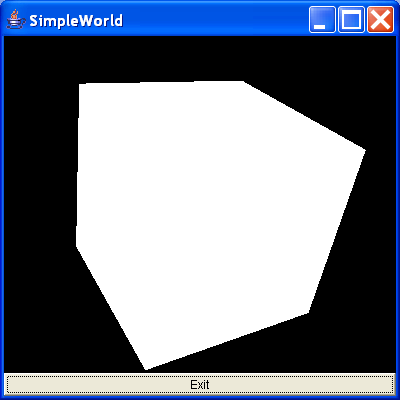
/*
Essential Java 3D Fast

Ian Palmer

Publisher: Springer-Verlag

ISBN: 1-85233-394-4

*/
//Import the Java3D classes

import java.awt.BorderLayout;
import java.awt.Button;
import java.awt.Frame;
import java.awt.event.ActionEvent;
import java.awt.event.ActionListener;

import javax.media.j3d.Appearance;
import javax.media.j3d.BranchGroup;
import javax.media.j3d.Canvas3D;
import javax.media.j3d.Locale;
import javax.media.j3d.Node;
import javax.media.j3d.PhysicalBody;
import javax.media.j3d.PhysicalEnvironment;
import javax.media.j3d.QuadArray;
import javax.media.j3d.Shape3D;
import javax.media.j3d.Transform3D;
import javax.media.j3d.TransformGroup;
import javax.media.j3d.View;
import javax.media.j3d.ViewPlatform;
import javax.media.j3d.VirtualUniverse;
import javax.vecmath.AxisAngle4d;
import javax.vecmath.Vector3f;

/**
 * This is our first simple program that creates a cube. We have no lighting
 * defined so the object appears a bright white colour. The cube is tilted
 * slightly so that we can see its shape by creating a transform group.
 *
 * @author I.J.Palmer
 * @version 1.0
 */
public class SimpleWorld extends Frame implements ActionListener {
  /** The canvas 3D used to display the scene. */
  protected Canvas3D myCanvas3D = new Canvas3D(null);

  /** The AWT button used to exit the application. */
  protected Button myButton = new Button("Exit");

  /**
   * This function builds the view branch of the scene graph. It creates a
   * branch group and then creates the necessary view elements to give a
   * useful view of our content.
   *
   * @param c
   *            Canvas3D that will display the view
   * @return BranchGroup that is the root of the view elements
   */
  protected BranchGroup buildViewBranch(Canvas3D c) {
    //This is the root of our view branch
    BranchGroup viewBranch = new BranchGroup();

    //The transform that will move our view
    //back 5 units along the z-axis
    Transform3D viewXfm = new Transform3D();
    viewXfm.set(new Vector3f(0.0f, 0.0f, 5.0f));

    //The transform group that will be the parent
    //of our view platform elements
    TransformGroup viewXfmGroup = new TransformGroup(viewXfm);
    ViewPlatform myViewPlatform = new ViewPlatform();

    //Next the physical elements are created
    PhysicalBody myBody = new PhysicalBody();
    PhysicalEnvironment myEnvironment = new PhysicalEnvironment();

    //Then we put it all together
    viewXfmGroup.addChild(myViewPlatform);
    viewBranch.addChild(viewXfmGroup);
    View myView = new View();
    myView.addCanvas3D(c);
    myView.attachViewPlatform(myViewPlatform);
    myView.setPhysicalBody(myBody);
    myView.setPhysicalEnvironment(myEnvironment);

    return viewBranch;
  }

  /**
   * This builds the content branch of our scene graph. It uses the buildCube
   * function to create the actual shape, adding to to the transform group so
   * that the shape is slightly tilted to reveal its 3D shape.
   *
   * @param shape
   *            Node that represents the geometry for the content
   * @return BranchGroup that is the root of the content branch
   */
  protected BranchGroup buildContentBranch(Node shape) {
    //Create the branch group that will be the root of the content branch
    BranchGroup contentBranch = new BranchGroup();

    //Create the transform that will cause the shape to appear tilted
    Transform3D rotateCube = new Transform3D();
    rotateCube.set(new AxisAngle4d(1.0, 1.0, 0.0, Math.PI / 4.0));
    TransformGroup rotationGroup = new TransformGroup(rotateCube);

    //Put the branch together
    contentBranch.addChild(rotationGroup);
    rotationGroup.addChild(shape);

    return contentBranch;
  }

  /**
   * This constructs a cube as an array of quadrilateral polygons. There are
   * six faces, each with four vertices (obviously!). The cube extends 1 unit
   * along each axis in the positive and negavtive directions and is centred
   * on the origin.
   *
   * @return Shape3D that is the cube
   */
  protected Shape3D buildCube() {
    //Create the array of numbers that will form the
    //vertex information.
    float[] cubeFaces = { 1.0f, -1.0f, 1.0f, 1.0f, 1.0f, 1.0f, -1.0f, 1.0f,
        1.0f, -1.0f, -1.0f, 1.0f, -1.0f, -1.0f, -1.0f, -1.0f, 1.0f,
        -1.0f, 1.0f, 1.0f, -1.0f, 1.0f, -1.0f, -1.0f, 1.0f, -1.0f,
        -1.0f, 1.0f, 1.0f, -1.0f, 1.0f, 1.0f, 1.0f, 1.0f, -1.0f, 1.0f,
        -1.0f, -1.0f, 1.0f, -1.0f, 1.0f, 1.0f, -1.0f, 1.0f, -1.0f,
        -1.0f, -1.0f, -1.0f, 1.0f, 1.0f, 1.0f, 1.0f, 1.0f, -1.0f,
        -1.0f, 1.0f, -1.0f, -1.0f, 1.0f, 1.0f, -1.0f, -1.0f, 1.0f,
        -1.0f, -1.0f, -1.0f, 1.0f, -1.0f, -1.0f, 1.0f, -1.0f, 1.0f };

    //Create the array of quadrilaterals from the vertices
    QuadArray cubeData = new QuadArray(24, QuadArray.COORDINATES);
    cubeData.setCoordinates(0, cubeFaces);

    //Create a default appearance
    Appearance app = new Appearance();

    //Create and return the cube
    return new Shape3D(cubeData, app);
  }

  /**
   * Handles the exit button action to quit the program.
   */
  public void actionPerformed(ActionEvent e) {
    dispose();
    System.exit(0);
  }

  /**
   * This creates a default universe and locale, creates a window and uses the
   * functions defined in this class to build the view and content branches of
   * the scene graph.
   */
  public SimpleWorld() {
    //Create a default universe and locale
    VirtualUniverse myUniverse = new VirtualUniverse();
    Locale myLocale = new Locale(myUniverse);

    //Use the functions to build the scene graph
    myLocale.addBranchGraph(buildViewBranch(myCanvas3D));
    myLocale.addBranchGraph(buildContentBranch(buildCube()));

    //Do some AWT stuff to set up the window
    setTitle("SimpleWorld");
    setSize(400, 400);
    setLayout(new BorderLayout());
    add("Center", myCanvas3D);
    myButton.addActionListener(this);
    add("South", myButton);
    setVisible(true);
  }

  /**
   * Just create the class and run!
   */
  public static void main(String[] args) {
    SimpleWorld sw = new SimpleWorld();
  }
}

