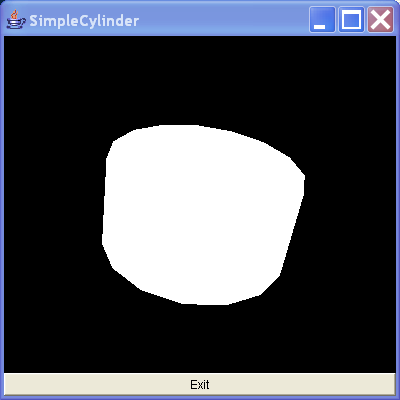
Source Code : This creates a simple cylinder by using the Cylinder utility class
Java Is Open Source Programming Language You Can Download From Java and Java Libraries From http://www.oracle.com.
Click Here to download
We provide this code related to title for you to solve your developing problem easily. Libraries which is import in this program you can download from http://www.oracle.com.
Click Here or search from google with Libraries Name you get jar file related it
This creates a simple cylinder by using the Cylinder utility class
/*
Essential Java 3D Fast

Ian Palmer

Publisher: Springer-Verlag

ISBN: 1-85233-394-4

*/

import java.awt.BorderLayout;
import java.awt.Button;
import java.awt.Frame;
import java.awt.event.ActionEvent;
import java.awt.event.ActionListener;

import javax.media.j3d.Appearance;
import javax.media.j3d.BranchGroup;
import javax.media.j3d.Canvas3D;
import javax.media.j3d.Locale;
import javax.media.j3d.PhysicalBody;
import javax.media.j3d.PhysicalEnvironment;
import javax.media.j3d.Transform3D;
import javax.media.j3d.TransformGroup;
import javax.media.j3d.View;
import javax.media.j3d.ViewPlatform;
import javax.media.j3d.VirtualUniverse;
import javax.vecmath.AxisAngle4d;
import javax.vecmath.Vector3f;

import com.sun.j3d.utils.geometry.Cylinder;

/**
 * This creates a simple cylinder by using the Cylinder utility class.
 *
 * @author I.J.Palmer
 * @version 1.0
 */
public class SimpleCylinder extends Frame implements ActionListener {
  protected Canvas3D myCanvas3D = new Canvas3D(null);

  protected Button myButton = new Button("Exit");

  /**
   * This function builds the view branch of the scene graph. It creates a
   * branch group and then creates the necessary view elements to give a
   * useful view of our content.
   *
   * @param c
   *            Canvas3D that will display the view
   * @return BranchGroup that is the root of the view elements
   */
  protected BranchGroup buildViewBranch(Canvas3D c) {
    BranchGroup viewBranch = new BranchGroup();
    Transform3D viewXfm = new Transform3D();
    viewXfm.set(new Vector3f(0.0f, 0.0f, 5.0f));
    TransformGroup viewXfmGroup = new TransformGroup(viewXfm);
    ViewPlatform myViewPlatform = new ViewPlatform();
    PhysicalBody myBody = new PhysicalBody();
    PhysicalEnvironment myEnvironment = new PhysicalEnvironment();
    viewXfmGroup.addChild(myViewPlatform);
    viewBranch.addChild(viewXfmGroup);
    View myView = new View();
    myView.addCanvas3D(c);
    myView.attachViewPlatform(myViewPlatform);
    myView.setPhysicalBody(myBody);
    myView.setPhysicalEnvironment(myEnvironment);
    return viewBranch;
  }

  /**
   * This builds the content branch of our scene graph. It uses the Cylinder
   * utility class to create the actual shape, adding to to the transform
   * group so that the shape is slightly tilted to reveal its 3D shape.
   *
   * @param shape
   *            Node that represents the geometry for the content
   * @return BranchGroup that is the root of the content branch
   */
  protected BranchGroup buildContentBranch() {
    BranchGroup contentBranch = new BranchGroup();
    Transform3D rotateCube = new Transform3D();
    rotateCube.set(new AxisAngle4d(1.0, 1.0, 0.0, Math.PI / 4.0));
    TransformGroup rotationGroup = new TransformGroup(rotateCube);
    contentBranch.addChild(rotationGroup);
    //Create the shape and add it to the branch
    rotationGroup.addChild(new Cylinder(1.0f, 1.0f, new Appearance()));
    return contentBranch;
  }

  /**
   * Handles the exit button action to quit the program.
   */
  public void actionPerformed(ActionEvent e) {
    dispose();
    System.exit(0);
  }

  public SimpleCylinder() {
    VirtualUniverse myUniverse = new VirtualUniverse();
    Locale myLocale = new Locale(myUniverse);
    myLocale.addBranchGraph(buildViewBranch(myCanvas3D));
    myLocale.addBranchGraph(buildContentBranch());
    setTitle("SimpleCylinder");
    setSize(400, 400);
    setLayout(new BorderLayout());
    add("Center", myCanvas3D);
    add("South", myButton);
    myButton.addActionListener(this);
    setVisible(true);
  }

  public static void main(String[] args) {
    SimpleCylinder sw = new SimpleCylinder();
  }
}
Thank with us

