Java Is Open Source Programming Language You Can Download From Java and Java Libraries From http://www.oracle.com.
We provide this code related to title for you to solve your developing problem easily. Libraries which is import in this program you can download from http://www.oracle.com.
The scene is of nine spheres and one light source
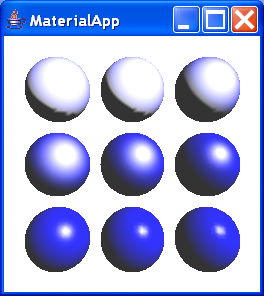
/*
 * MaterialApp.java 1.0 99/04/13
 *
 * Copyright (c) 1999 Sun Microsystems, Inc. All Rights Reserved.
 *
 * Sun grants you ("Licensee") a non-exclusive, royalty free, license to use,
 * modify and redistribute this software in source and binary code form,
 * provided that i) this copyright notice and license appear on all copies of
 * the software; and ii) Licensee does not utilize the software in a manner
 * which is disparaging to Sun.
 *
 * This software is provided "AS IS," without a warranty of any kind. ALL
 * EXPRESS OR IMPLIED CONDITIONS, REPRESENTATIONS AND WARRANTIES, INCLUDING ANY
 * IMPLIED WARRANTY OF MERCHANTABILITY, FITNESS FOR A PARTICULAR PURPOSE OR
 * NON-INFRINGEMENT, ARE HEREBY EXCLUDED. SUN AND ITS LICENSORS SHALL NOT BE
 * LIABLE FOR ANY DAMAGES SUFFERED BY LICENSEE AS A RESULT OF USING, MODIFYING
 * OR DISTRIBUTING THE SOFTWARE OR ITS DERIVATIVES. IN NO EVENT WILL SUN OR ITS
 * LICENSORS BE LIABLE FOR ANY LOST REVENUE, PROFIT OR DATA, OR FOR DIRECT,
 * INDIRECT, SPECIAL, CONSEQUENTIAL, INCIDENTAL OR PUNITIVE DAMAGES, HOWEVER
 * CAUSED AND REGARDLESS OF THE THEORY OF LIABILITY, ARISING OUT OF THE USE OF
 * OR INABILITY TO USE SOFTWARE, EVEN IF SUN HAS BEEN ADVISED OF THE POSSIBILITY
 * OF SUCH DAMAGES.
 *
 * This software is not designed or intended for use in on-line control of
 * aircraft, air traffic, aircraft navigation or aircraft communications; or in
 * the design, construction, operation or maintenance of any nuclear facility.
 * Licensee represents and warrants that it will not use or redistribute the
 * Software for such purposes.
 */

/*
 * This application illustates differences in setting the material properties to
 * different shininess values for visual objects.
 *
 * The scene is of nine spheres and one light source.
 *
 * This application (or a version of it) generated one or more of the images in
 * Chapter 6 of Getting Started with the Java 3D API. The Java 3D Turtorial.
 *
 * See http://www.sun.com/desktop/java3d/collateral for more information.
 *
 */

import java.applet.Applet;
import java.awt.BorderLayout;

import javax.media.j3d.AmbientLight;
import javax.media.j3d.Appearance;
import javax.media.j3d.Background;
import javax.media.j3d.BoundingSphere;
import javax.media.j3d.BranchGroup;
import javax.media.j3d.Canvas3D;
import javax.media.j3d.DirectionalLight;
import javax.media.j3d.Material;
import javax.media.j3d.Transform3D;
import javax.media.j3d.TransformGroup;
import javax.vecmath.Color3f;
import javax.vecmath.Vector3f;

import com.sun.j3d.utils.applet.MainFrame;
import com.sun.j3d.utils.geometry.Sphere;
import com.sun.j3d.utils.universe.SimpleUniverse;

public class MaterialApp extends Applet {

  TransformGroup createTG(float x, float y, float z) {
    Vector3f position = new Vector3f(x, y, z);
    Transform3D translate = new Transform3D();
    translate.set(position);
    TransformGroup trans1 = new TransformGroup(translate);
    return trans1;
  }

  Appearance createMatAppear(Color3f dColor, Color3f sColor, float shine) {

    Appearance appear = new Appearance();
    Material material = new Material();
    material.setDiffuseColor(dColor);
    material.setSpecularColor(sColor);
    material.setShininess(shine);
    appear.setMaterial(material);

    return appear;
  }

  public MaterialApp() {
    setLayout(new BorderLayout());
    Canvas3D c = new Canvas3D(null);
    add("Center", c);

    Color3f white = new Color3f(1.0f, 1.0f, 1.0f);
    Color3f blue = new Color3f(0.0f, 0.0f, 1.0f);

    BranchGroup scene = new BranchGroup();

    TransformGroup trans11 = createTG(-0.7f, 0.7f, -0.5f);
    scene.addChild(trans11);
    trans11.addChild(new Sphere(0.3f, Sphere.GENERATE_NORMALS, 60,
        createMatAppear(blue, white, 0.0f)));

    TransformGroup trans12 = createTG(0.0f, 0.7f, -0.5f);
    scene.addChild(trans12);
    trans12.addChild(new Sphere(0.3f, Sphere.GENERATE_NORMALS, 60,
        createMatAppear(blue, white, 1.0f)));

    TransformGroup trans13 = createTG(0.7f, 0.7f, -0.5f);
    scene.addChild(trans13);
    trans13.addChild(new Sphere(0.3f, Sphere.GENERATE_NORMALS, 60,
        createMatAppear(blue, white, 2.0f)));

    TransformGroup trans21 = createTG(-0.7f, 0.0f, -0.5f);
    scene.addChild(trans21);
    trans21.addChild(new Sphere(0.3f, Sphere.GENERATE_NORMALS, 60,
        createMatAppear(blue, white, 5.0f)));

    TransformGroup trans22 = createTG(0.0f, 0.0f, -0.5f);
    scene.addChild(trans22);
    trans22.addChild(new Sphere(0.3f, Sphere.GENERATE_NORMALS, 60,
        createMatAppear(blue, white, 10.0f)));

    TransformGroup trans23 = createTG(0.7f, 0.0f, -0.5f);
    scene.addChild(trans23);
    trans23.addChild(new Sphere(0.3f, Sphere.GENERATE_NORMALS, 60,
        createMatAppear(blue, white, 20.0f)));

    TransformGroup trans31 = createTG(-0.7f, -0.7f, -0.5f);
    scene.addChild(trans31);
    trans31.addChild(new Sphere(0.3f, Sphere.GENERATE_NORMALS, 60,
        createMatAppear(blue, white, 50.0f)));

    TransformGroup trans32 = createTG(0.0f, -0.7f, -0.5f);
    scene.addChild(trans32);
    trans32.addChild(new Sphere(0.3f, Sphere.GENERATE_NORMALS, 60,
        createMatAppear(blue, white, 100.0f)));

    TransformGroup trans33 = createTG(0.7f, -0.7f, -0.5f);
    scene.addChild(trans33);
    trans33.addChild(new Sphere(0.3f, Sphere.GENERATE_NORMALS, 60,
        createMatAppear(blue, white, 1000.0f)));

    AmbientLight lightA = new AmbientLight();
    lightA.setInfluencingBounds(new BoundingSphere());
    scene.addChild(lightA);

    DirectionalLight lightD1 = new DirectionalLight();
    lightD1.setInfluencingBounds(new BoundingSphere());
    Vector3f direction = new Vector3f(-1.0f, -1.0f, -1.0f);
    direction.normalize();
    lightD1.setDirection(direction);
    lightD1.setColor(new Color3f(1.0f, 1.0f, 1.0f));
    scene.addChild(lightD1);

    Background background = new Background();
    background.setApplicationBounds(new BoundingSphere());
    background.setColor(1.0f, 1.0f, 1.0f);
    scene.addChild(background);

    SimpleUniverse u = new SimpleUniverse(c);

    // This will move the ViewPlatform back a bit so the
    // objects in the scene can be viewed.
    u.getViewingPlatform().setNominalViewingTransform();

    // setLocalEyeViewing
    u.getViewer().getView().setLocalEyeLightingEnable(true);

    u.addBranchGraph(scene);
  }

  public static void main(String argv[]) {
    new MainFrame(new MaterialApp(), 256, 256);
  }
}

