Java Is Open Source Programming Language You Can Download From Java and Java Libraries From http://www.oracle.com.
We provide this code related to title for you to solve your developing problem easily. Libraries which is import in this program you can download from http://www.oracle.com.
Draw canvas with color and text
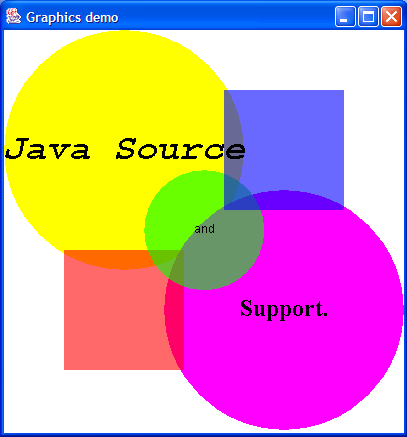
import java.awt.Color;
import java.awt.Dimension;
import java.awt.Font;
import java.awt.FontMetrics;
import java.awt.Graphics;

import javax.swing.ImageIcon;
import javax.swing.JComponent;
import javax.swing.JFrame;

public class MyCanvas extends JComponent {
  private static Color m_tRed = new Color(255, 0, 0, 150);

  private static Color m_tGreen = new Color(0, 255, 0, 150);

  private static Color m_tBlue = new Color(0, 0, 255, 150);

  private static Font monoFont = new Font("Monospaced", Font.BOLD
      | Font.ITALIC, 36);

  private static Font sanSerifFont = new Font("SanSerif", Font.PLAIN, 12);

  private static Font serifFont = new Font("Serif", Font.BOLD, 24);

  private static ImageIcon java2sLogo = new ImageIcon("java2s.gif");

  public void paintComponent(Graphics g) {
    super.paintComponent(g);

    // draw entire component white
    g.setColor(Color.white);
    g.fillRect(0, 0, getWidth(), getHeight());

    // yellow circle
    g.setColor(Color.yellow);
    g.fillOval(0, 0, 240, 240);

    // magenta circle
    g.setColor(Color.magenta);
    g.fillOval(160, 160, 240, 240);

    // paint the icon below blue sqaure
    int w = java2sLogo.getIconWidth();
    int h = java2sLogo.getIconHeight();
    java2sLogo.paintIcon(this, g, 280 - (w / 2), 120 - (h / 2));

    // paint the icon below red sqaure
    java2sLogo.paintIcon(this, g, 120 - (w / 2), 280 - (h / 2));

    // transparent red square
    g.setColor(m_tRed);
    g.fillRect(60, 220, 120, 120);

    // transparent green circle
    g.setColor(m_tGreen);
    g.fillOval(140, 140, 120, 120);

    // transparent blue square
    g.setColor(m_tBlue);
    g.fillRect(220, 60, 120, 120);

    g.setColor(Color.black);

    g.setFont(monoFont);
    FontMetrics fm = g.getFontMetrics();
    w = fm.stringWidth("Java Source");
    h = fm.getAscent();
    g.drawString("Java Source", 120 - (w / 2), 120 + (h / 4));

    g.setFont(sanSerifFont);
    fm = g.getFontMetrics();
    w = fm.stringWidth("and");
    h = fm.getAscent();
    g.drawString("and", 200 - (w / 2), 200 + (h / 4));

    g.setFont(serifFont);
    fm = g.getFontMetrics();
    w = fm.stringWidth("Support.");
    h = fm.getAscent();
    g.drawString("Support.", 280 - (w / 2), 280 + (h / 4));
  }

  public Dimension getPreferredSize() {
    return new Dimension(400, 400);
  }

  public Dimension getMinimumSize() {
    return getPreferredSize();
  }
  public static void main(String args[]) {
    JFrame mainFrame = new JFrame("Graphics demo");
    mainFrame.getContentPane().add(new MyCanvas());
    mainFrame.pack();
    mainFrame.setVisible(true);
  }
}

