Java Is Open Source Programming Language You Can Download From Java and Java Libraries From http://www.oracle.com.
We provide this code related to title for you to solve your developing problem easily. Libraries which is import in this program you can download from http://www.oracle.com.
Color gradient
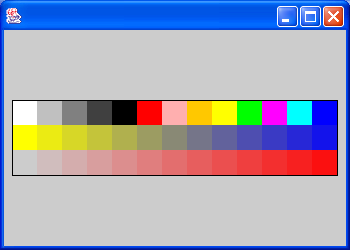
import java.awt.Color;
import java.awt.Dimension;
import java.awt.Graphics;
import java.awt.Graphics2D;
import java.awt.geom.Rectangle2D;

import javax.swing.JFrame;
import javax.swing.JPanel;

public class ColorBlocks extends JPanel{
    public void paint(Graphics g) {
        Graphics2D g2 = (Graphics2D)g;

        Dimension d = getSize();
        g2.translate(d.width / 2, d.height / 2);

        Color[] colors = {
            Color.white, Color.lightGray, Color.gray, Color.darkGray,
            Color.black, Color.red, Color.pink, Color.orange,
            Color.yellow, Color.green, Color.magenta, Color.cyan, Color.blue
        };

        float size = 25;
        float x = -size * colors.length / 2;
        float y = -size * 3 / 2;

        // Show all the predefined colors.
        for (int i = 0; i < colors.length; i++) {
          Rectangle2D r = new Rectangle2D.Float(
              x + size * (float)i, y, size, size);
          g2.setPaint(colors[i]);
          g2.fill(r);
        }

        //a linear gradient.
        y += size;
        Color c1 = Color.yellow;
        Color c2 = Color.blue;
        for (int i = 0; i < colors.length; i++) {
          float ratio = (float)i / (float)colors.length;
          int red = (int)(c2.getRed() * ratio + c1.getRed() * (1 - ratio));
          int green = (int)(c2.getGreen() * ratio +
                            c1.getGreen() * (1 - ratio));
          int blue = (int)(c2.getBlue() * ratio +
                           c1.getBlue() * (1 - ratio));
          Color c = new Color(red, green, blue);
          Rectangle2D r = new Rectangle2D.Float(
              x + size * (float)i, y, size, size);
          g2.setPaint(c);
          g2.fill(r);
        }

        // Show an alpha gradient.
        y += size;
        c1 = Color.red;
        for (int i = 0; i < colors.length; i++) {
          int alpha = (int)(255 * (float)i / (float)colors.length);
          Color c = new Color(c1.getRed(), c1.getGreen(),
                              c1.getBlue(), alpha);
          Rectangle2D r = new Rectangle2D.Float(
              x + size * (float)i, y, size, size);
          g2.setPaint(c);
          g2.fill(r);
        }

        // Draw a frame around the whole thing.
        y -= size * 2;
        Rectangle2D frame = new Rectangle2D.Float(x, y, size * colors.length, size * 3);
        g2.setPaint(Color.black);
        g2.draw(frame);
      }

  public static void main(String[] args) {
    JFrame f = new JFrame();
    f.getContentPane().add(new ColorBlocks());
    f.setSize(350, 250);
    f.show();
  }
}

