Java Is Open Source Programming Language You Can Download From Java and Java Libraries From http://www.oracle.com.
We provide this code related to title for you to solve your developing problem easily. Libraries which is import in this program you can download from http://www.oracle.com.
Show various anchor points
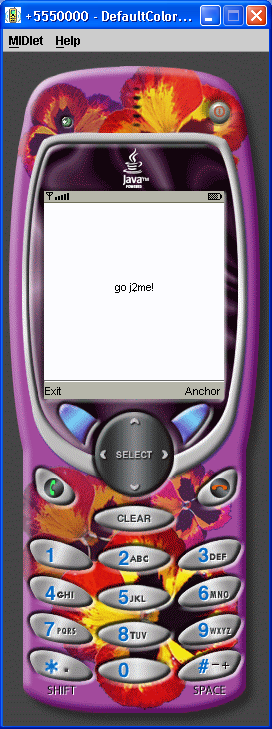
/*--------------------------------------------------
* Text.java
*
* Show various anchor points
*
* Example from the book:     Core J2ME Technology
* Copyright John W. Muchow   http://www.CoreJ2ME.com
* You may use/modify for any non-commercial purpose
*-------------------------------------------------*/
import javax.microedition.midlet.*;
import javax.microedition.lcdui.*;

public class Text extends MIDlet
{
  private Display  display;       // The display
  private TextCanvas canvas;      // Canvas to display text
  private AnchorPtList anchorPt;  // List to query for anchor point
  private int anchorPoint = Graphics.BASELINE | Graphics.HCENTER;

  public Text()
  {
    display = Display.getDisplay(this);
    canvas  = new TextCanvas(this);
    anchorPt = new AnchorPtList("Anchor point", List.IMPLICIT, this);
  }

  protected void startApp()
  {
    showCanvas();
  }

  protected void pauseApp()
  { }

  protected void destroyApp( boolean unconditional )
  { }

  public void showCanvas()
  {
    display.setCurrent(canvas);
  }

  public void showList()
  {
    display.setCurrent(anchorPt);
  }

  public int getAnchorPoint()
  {
    return anchorPoint;
  }

  public void setAnchorPoint(int anchorPoint)
  {
    this.anchorPoint = anchorPoint;
  }

  public void exitMIDlet()
  {
    destroyApp(true);
    notifyDestroyed();
  }
}

/*--------------------------------------------------
* Class TextCanvas
*
* Draw text at specified anchor point
*-------------------------------------------------*/
class TextCanvas extends Canvas implements CommandListener
{
  private Command cmExit;  // Exit midlet
  private Command cmGetAnchorPt;
  private Text midlet;

  public TextCanvas(Text midlet)
  {
    this.midlet = midlet;

    // Create commands & listen for events
    cmExit = new Command("Exit", Command.EXIT, 1);
    cmGetAnchorPt = new Command("Anchor", Command.SCREEN, 2);

    addCommand(cmExit);
    addCommand(cmGetAnchorPt);
    setCommandListener(this);
  }

  /*--------------------------------------------------
  * Draw text
  *-------------------------------------------------*/
  protected void paint(Graphics g)
  {
    int xcenter = getWidth() / 2,
        ycenter = getHeight() / 2;


    // Due to a bug in MIDP 1.0.3 we need to
    // force a clear of the display
    g.setColor(255, 255, 255);                  // White pen
    g.fillRect(0, 0, getWidth(), getHeight());
    g.setColor(0, 0, 0);                        // Black pen

    // Choose a font
    g.setFont(Font.getFont(Font.FACE_SYSTEM, Font.STYLE_PLAIN, Font.SIZE_MEDIUM));

    // Draw a dot at the center of the display
    g.drawLine(xcenter, ycenter, xcenter, ycenter);

    // x and y are always at the center of the display
    // Move the text around x and y based on the anchor point
    g.drawString("go j2me!", xcenter, ycenter, midlet.getAnchorPoint());
  }

  /*--------------------------------------------------
  * Exit midlet or show anchor point selection list
  *-------------------------------------------------*/
  public void commandAction(Command c, Displayable d)
  {
    if (c == cmExit)
      midlet.exitMIDlet();
    else if (c == cmGetAnchorPt)
    {
      midlet.showList();
    }
  }
}

/*--------------------------------------------------
* Class AnchorPtList
*
* List to query for an anchor point
*-------------------------------------------------*/
class AnchorPtList extends List implements CommandListener
{
  private Text midlet;

  public AnchorPtList(String title, int listType, Text midlet)
  {
    // Call list constructor
    super(title, listType);

    this.midlet = midlet;

    append("Top/Left", null);
    append("Top/HCenter", null);
    append("Top/Right", null);

    append("Baseline/Left", null);
    append("Baseline/HCenter", null);
    append("Baseline/Right", null);

    append("Bottom/Left", null);
    append("Bottom/HCenter", null);
    append("Bottom/Right", null);

    setCommandListener(this);
  }

  /*--------------------------------------------------
  * Commands to set anchor point
  *-------------------------------------------------*/
  public void commandAction(Command c, Displayable s)
  {
    switch (getSelectedIndex())
    {
      case 0:
          midlet.setAnchorPoint(Graphics.TOP | Graphics.LEFT);
        break;

      case 1:
          midlet.setAnchorPoint(Graphics.TOP | Graphics.HCENTER);
        break;

      case 2:
        midlet.setAnchorPoint(Graphics.TOP | Graphics.RIGHT);
        break;

      case 3:
        midlet.setAnchorPoint(Graphics.BASELINE | Graphics.LEFT);
        break;

      case 4:
        midlet.setAnchorPoint(Graphics.BASELINE | Graphics.HCENTER);
        break;

      case 5:
        midlet.setAnchorPoint(Graphics.BASELINE | Graphics.RIGHT);
        break;

      case 6:
        midlet.setAnchorPoint(Graphics.BOTTOM | Graphics.LEFT);
        break;

      case 7:
        midlet.setAnchorPoint(Graphics.BOTTOM | Graphics.HCENTER);
        break;

      case 8:
        midlet.setAnchorPoint(Graphics.BOTTOM | Graphics.RIGHT);
        break;

      default:
        midlet.setAnchorPoint(Graphics.BASELINE | Graphics.HCENTER);
    }

    midlet.showCanvas();
  }
}

