Source Code : Send client request and Get server response
Java Is Open Source Programming Language You Can Download From Java and Java Libraries From http://www.oracle.com.
Click Here to download
We provide this code related to title for you to solve your developing problem easily. Libraries which is import in this program you can download from http://www.oracle.com.
Click Here or search from google with Libraries Name you get jar file related it
Send client request and Get server response
/*--------------------------------------------------
* ViewFile.java
*
* Send client request (method, header, body)
* Get server response (status, header, body)
*
* Example from the book:     Core J2ME Technology
* Copyright John W. Muchow   http://www.CoreJ2ME.com
* You may use/modify for any non-commercial purpose
*-------------------------------------------------*/
import javax.microedition.midlet.*;
import javax.microedition.io.*;
import java.io.*;

public class ViewFile extends MIDlet
{
  private String url = "http://www.corej2me.com/midpbook_v1e1/ch14/getHeaderInfo.txt";

  public void startApp()
  {
    try
    {
      processRequest();
    }
    catch (Exception e)
    {
      System.err.println("Msg: " + e.toString());
    }
  }

  private void processRequest() throws IOException
  {
    HttpConnection http = null;
    InputStream iStrm = null;

    try
    {
      // Create the connection
      http = (HttpConnection) Connector.open(url);

      //----------------
      // Client Request
      //----------------
      // 1) Send request method
      http.setRequestMethod(HttpConnection.GET);

      // 2) Send header information (this header is optional)
      http.setRequestProperty("User-Agent", "Profile/MIDP-1.0 Configuration/CLDC-1.0");
//      http.setRequestProperty("If-Modified-Since", "Mon, 16 Jul 2001 22:54:26 GMT");

      // If you experience IO problems, try
      // removing the comment from the following line
      //http.setRequestProperty("Connection", "close");

      // 3) Send body/data - No data for this request


      //----------------
      // Server Response
      //----------------
      System.out.println("url: " + url);
      System.out.println("-------------------------");

      // 1) Get status Line
      System.out.println("Msg: " + http.getResponseMessage());
      System.out.println("Code: " + http.getResponseCode());

      // 2) Get header information
      if (http.getResponseCode() == HttpConnection.HTTP_OK)
      {
        System.out.println("field 0: " + http.getHeaderField(0));
        System.out.println("field 1: " + http.getHeaderField(1));
        System.out.println("field 2: " + http.getHeaderField(2));
        System.out.println("-------------------------");

        System.out.println("key 0: " + http.getHeaderFieldKey(0));
        System.out.println("key 1 : " + http.getHeaderFieldKey(1));
        System.out.println("key 2: " + http.getHeaderFieldKey(2));
        System.out.println("-------------------------");

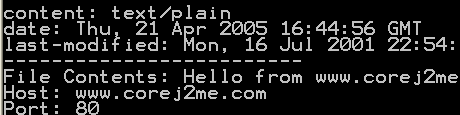
        System.out.println("content: " + http.getHeaderField("content-type"));
        System.out.println("date: " + http.getHeaderField("date"));
        System.out.println("last-modified: " + http.getHeaderField("last-modified"));

        System.out.println("-------------------------");

        // 3) Get data (show the file contents)
        String str;
        iStrm = http.openInputStream();
        int length = (int) http.getLength();
        if (length != -1)
        {
          // Read data in one chunk
          byte serverData[] = new byte[length];
          iStrm.read(serverData);
          str = new String(serverData);
        }
        else  // Length not available...
        {
          ByteArrayOutputStream bStrm = new ByteArrayOutputStream();

          // Read data one character at a time
          int ch;
          while ((ch = iStrm.read()) != -1)
            bStrm.write(ch);

          str = new String(bStrm.toByteArray());
          bStrm.close();
        }

        System.out.println("File Contents: " + str);

        //-----------------------------
        // Show connection information
        //-----------------------------
        System.out.println("Host: " + http.getHost());
        System.out.println("Port: " + http.getPort());
        System.out.println("Type: " + http.getType());

//        System.out.println("File: " + http.getFile());
//        System.out.println("Protocol: " + http.getProtocol());
//        System.out.println("URL: " + http.getURL());
//        System.out.println("Query: " + http.getQuery());
      }
    }catch(Exception e){
       e.printStackTrace();

    }finally{
      // Clean up
      if (iStrm != null)
        iStrm.close();
      if (http != null)
        http.close();
    }
  }

  public void pauseApp(){}

  public void destroyApp(boolean unconditional){ }
}
Thank with us

