Source Code : multiple ChoiceGroup
Java Is Open Source Programming Language You Can Download From Java and Java Libraries From http://www.oracle.com.
Click Here to download
We provide this code related to title for you to solve your developing problem easily. Libraries which is import in this program you can download from http://www.oracle.com.
Click Here or search from google with Libraries Name you get jar file related it
multiple ChoiceGroup
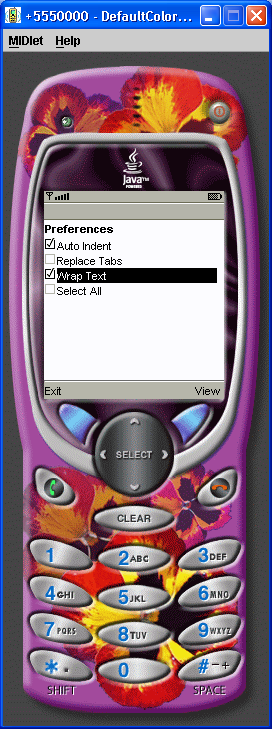
/*--------------------------------------------------
* MultipleChoiceGroup.java
*
* Example from the book:     Core J2ME Technology
* Copyright John W. Muchow   http://www.CoreJ2ME.com
* You may use/modify for any non-commercial purpose
*-------------------------------------------------*/
import javax.microedition.midlet.*;
import javax.microedition.lcdui.*;

public class MultipleChoiceGroup extends MIDlet implements ItemStateListener, CommandListener
{
  private Display display;      // Reference to display object
  private Form fmMain;          // The main form
  private Command cmExit;       // A Command to exit the MIDlet
  private Command cmView;       // View the choice selected
  private int selectAllIndex;   // Index of the "Select All" option
  private ChoiceGroup cgPrefs;  // Choice Group of preferences

  private int choiceGroupIndex; // Index of choice group on form

  public MultipleChoiceGroup()
  {
    display = Display.getDisplay(this);

    // Create a multiple choice group
    cgPrefs = new ChoiceGroup("Preferences", Choice.MULTIPLE);

    // Append options, with no associated images
    cgPrefs.append("Auto Indent", null);
    cgPrefs.append("Replace Tabs", null);
    cgPrefs.append("Wrap Text", null);
    selectAllIndex = cgPrefs.append("Select All", null);

    cmExit = new Command("Exit", Command.EXIT, 1);
    cmView = new Command("View", Command.SCREEN,2);

    // Create Form, add components, listen for events
    fmMain = new Form("");
    choiceGroupIndex = fmMain.append(cgPrefs);
    fmMain.addCommand(cmExit);
    fmMain.addCommand(cmView);
    fmMain.setCommandListener(this);
    fmMain.setItemStateListener(this);
  }

  public void startApp()
  {
    display.setCurrent(fmMain);
  }

  public void pauseApp()
  { }

  public void destroyApp(boolean unconditional)
  { }

  public void commandAction(Command c, Displayable s)
  {
    if (c == cmView)
    {
      boolean selected[] = new boolean[cgPrefs.size()];

      // Fill array indicating whether each element is checked
      cgPrefs.getSelectedFlags(selected);

      for (int i = 0; i < cgPrefs.size(); i++)
        System.out.println(cgPrefs.getString(i) + (selected[i] ? ": selected" : ": not selected"));

    }
    else if (c == cmExit)
    {
      destroyApp(false);
      notifyDestroyed();
    }
  }

  public void itemStateChanged(Item item)
  {
    if (item == cgPrefs)
    {
      // Is "Select all" option checked ?
      if (cgPrefs.isSelected(selectAllIndex))
      {
        // Set all checkboxes to true
        for (int i = 0; i < cgPrefs.size() - 1; i++)
          cgPrefs.setSelectedIndex(i, true);

        // Remove the check by "Select All"
        cgPrefs.setSelectedIndex(selectAllIndex, false);
      }
    }
  }
}
Thank with us

