Java Is Open Source Programming Language You Can Download From Java and Java Libraries From http://www.oracle.com.
We provide this code related to title for you to solve your developing problem easily. Libraries which is import in this program you can download from http://www.oracle.com.
Move a clipping region around a Canvas
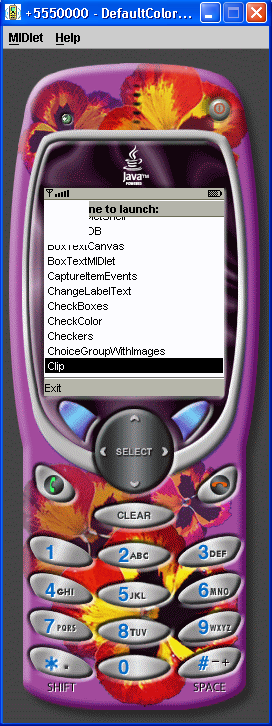
/*--------------------------------------------------
* Clip.java
*
* Move a clipping region around a Canvas
*
* Example from the book:     Core J2ME Technology
* Copyright John W. Muchow   http://www.CoreJ2ME.com
* You may use/modify for any non-commercial purpose
*-------------------------------------------------*/
import javax.microedition.midlet.*;
import javax.microedition.lcdui.*;
import java.util.*;

public class Clip extends MIDlet
{
  private Display  display;     // The display
  private ClipCanvas canvas;    // Canvas

  public Clip()
  {
    display = Display.getDisplay(this);
    canvas  = new ClipCanvas(this);
  }

  protected void startApp()
  {
    display.setCurrent( canvas );
  }

  protected void pauseApp()
  { }

  protected void destroyApp( boolean unconditional )
  { }

  public void exitMIDlet()
  {
    destroyApp(true);
    notifyDestroyed();
  }
}

/*--------------------------------------------------
* Class ClipCanvas
*
* Display the clipping region
*-------------------------------------------------*/
class ClipCanvas extends Canvas implements CommandListener
{
  private Command cmExit;  // Exit
  private Clip midlet;      // Main midlet
  private Image im = null; // Image to display
  private Random random;    // Get random number

  private int clipx = 0,  clipy = 0,  // View port

              clipw = 45, cliph = 45; // (clipping region)

  private int old_clipx = 0, old_clipy = 0; // Last clipping region


  public ClipCanvas(Clip midlet)
  {
    this.midlet = midlet;

    // Create exit command & listen for events
    cmExit = new Command("Exit", Command.EXIT, 1);
    addCommand(cmExit);
    setCommandListener(this);

    // Get random values for starting point
    random = new java.util.Random();

    // Make sure the entire clipping region is
    // visible on the display
    clipx = Math.min((getWidth() - clipw),
                     (random.nextInt() >>> 1) % getWidth());
    clipy = Math.min((getHeight() - cliph),
                     (random.nextInt() >>> 1) % getHeight());
    try
    {
      // Create immutable image
      im = Image.createImage("/house.png");
    }
    catch (java.io.IOException e)
    {
      System.err.println("Unable to locate or read .png file");
    }
  }

  protected void paint(Graphics g)
  {
    if (im != null)
    {
      // Clear only the previous clipping region
      g.setColor(255, 255, 255);
      g.fillRect(old_clipx, old_clipy, clipw, cliph);

      // Set the new clipping region
      g.setClip(clipx, clipy, clipw, cliph);

      // Draw image
      g.drawImage(im, 0, 0, Graphics.LEFT | Graphics.TOP);
    }
  }

  public void commandAction(Command c, Displayable d)
  {
    if (c == cmExit)
      midlet.exitMIDlet();
  }

  protected void keyPressed(int keyCode)
  {
    // Save the last clipping region
    old_clipx = clipx;
    old_clipy = clipy;

    switch (getGameAction(keyCode))
    {
      case UP:
        // Move clipping region up 3 pixels
        if (clipy > 0)
          clipy = Math.max(0, clipy - 3);
        break;

      case DOWN:
        // Move clipping region down 3 pixels
        if (clipy + cliph < getHeight())
          clipy = Math.min(getHeight(), clipy + 3);
        break;

      case LEFT:
       // Move clipping region left 3 pixels
       if (clipx > 0)
          clipx = Math.max(0, clipx - 3);
        break;

      case RIGHT:
        // Move clipping region right 3 pixels
        if (clipx + clipw < getWidth())
          clipx = Math.min(getWidth(), clipx + 3);
       break;

      case FIRE:
        // Show the whole screen by reseting
        // the clipping region to the entire display
        clipx = clipy = 0;
        clipw = getWidth();
        cliph = getHeight();
   }
    repaint();
  }
}

