Source Code : Download and view a png file
Java Is Open Source Programming Language You Can Download From Java and Java Libraries From http://www.oracle.com.
Click Here to download
We provide this code related to title for you to solve your developing problem easily. Libraries which is import in this program you can download from http://www.oracle.com.
Click Here or search from google with Libraries Name you get jar file related it
Download and view a png file
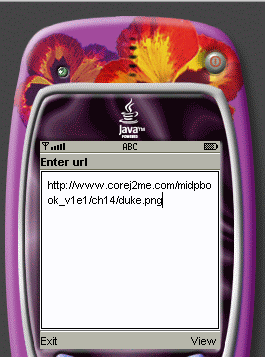
/*--------------------------------------------------
* ViewPng.java
*
* Download and view a png file
*
* Example from the book:     Core J2ME Technology
* Copyright John W. Muchow   http://www.CoreJ2ME.com
* You may use/modify for any non-commercial purpose
*-------------------------------------------------*/
import javax.microedition.midlet.*;
import javax.microedition.lcdui.*;
import javax.microedition.io.*;
import java.io.*;

public class ViewPng extends MIDlet implements CommandListener
{
  private Display display;
  private TextBox tbMain;
  private Form fmViewPng;
  private Command cmExit;
  private Command cmView;
  private Command cmBack;

  public ViewPng()
  {
    display = Display.getDisplay(this);

    // Create the Main textbox with a maximum of 75 characters
    tbMain = new TextBox("Enter url", "http://www.corej2me.com/midpbook_v1e1/ch14/duke.png", 75, 0);

    // Create commands and add to textbox
    cmExit = new Command("Exit", Command.EXIT, 1);
    cmView = new Command("View", Command.SCREEN, 2);
    tbMain.addCommand(cmExit);
    tbMain.addCommand(cmView );

    // Set up a listener for textbox
    tbMain.setCommandListener(this);

    // Create the form that will hold the png image
    fmViewPng = new Form("");

    // Create commands and add to form
    cmBack = new Command("Back", Command.BACK, 1);
    fmViewPng.addCommand(cmBack);

    // Set up a listener for form
    fmViewPng.setCommandListener(this);
  }

  public void startApp()
  {
    display.setCurrent(tbMain);
  }

  public void pauseApp()
  { }

  public void destroyApp(boolean unconditional)
  { }

  /*--------------------------------------------------
  * Process events
  *-------------------------------------------------*/
  public void commandAction(Command c, Displayable s)
  {
    // If the Command button pressed was "Exit"
    if (c == cmExit)
    {
      destroyApp(false);
      notifyDestroyed();
    }
    else if (c == cmView)
    {
      // Download image and place on the form
      try
      {
        Image im;
        if ((im = getImage(tbMain.getString())) != null)
        {
          ImageItem ii = new ImageItem(null, im, ImageItem.LAYOUT_DEFAULT, null);

          // If there is already an image, set (replace) it
          if (fmViewPng.size() != 0)
            fmViewPng.set(0, ii);
          else  // Append the image to the empty form
            fmViewPng.append(ii);
        }
        else
          fmViewPng.append("Unsuccessful download.");

        // Display the form with the image
        display.setCurrent(fmViewPng);
      }
      catch (Exception e)
      {
        System.err.println("Msg: " + e.toString());
      }
    }
    else if (c == cmBack) {
      display.setCurrent(tbMain);
    }
  }

  /*--------------------------------------------------
  * Open connection and download png into a byte array.
  *-------------------------------------------------*/
  private Image getImage(String url) throws IOException
  {
    ContentConnection connection = (ContentConnection) Connector.open(url);

    // * There is a bug in MIDP 1.0.3 in which read() sometimes returns
    //   an invalid length. To work around this, I have changed the
    //   stream to DataInputStream and called readFully() instead of read()
//    InputStream iStrm = connection.openInputStream();
    DataInputStream iStrm = connection.openDataInputStream();

    ByteArrayOutputStream bStrm = null;
    Image im = null;

    try
    {
      // ContentConnection includes a length method
      byte imageData[];
      int length = (int) connection.getLength();
      if (length != -1)
      {
        imageData = new byte[length];

        // Read the png into an array
//        iStrm.read(imageData);
        iStrm.readFully(imageData);
      }
      else  // Length not available...
      {
        bStrm = new ByteArrayOutputStream();

        int ch;
        while ((ch = iStrm.read()) != -1)
          bStrm.write(ch);

        imageData = bStrm.toByteArray();
        bStrm.close();
      }

      // Create the image from the byte array
      im = Image.createImage(imageData, 0, imageData.length);
    }
    finally
    {
      // Clean up
      if (iStrm != null)
        iStrm.close();
      if (connection != null)
        connection.close();
      if (bStrm != null)
        bStrm.close();
    }
    return (im == null ? null : im);
  }
}
Thank with us

