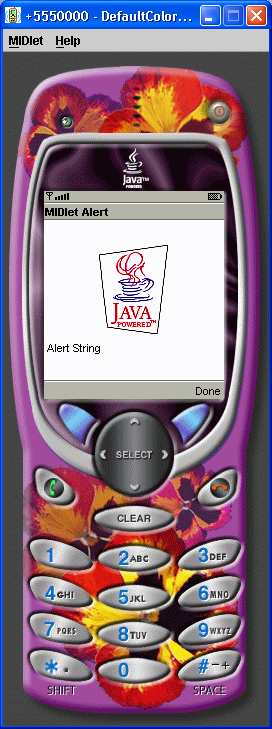
Source Code : An example MIDlet with simple Alert UI component containing an Image.
Java Is Open Source Programming Language You Can Download From Java and Java Libraries From http://www.oracle.com.
Click Here to download
We provide this code related to title for you to solve your developing problem easily. Libraries which is import in this program you can download from http://www.oracle.com.
Click Here or search from google with Libraries Name you get jar file related it
An example MIDlet with simple Alert UI component containing an Image.
import javax.microedition.midlet.*;
import javax.microedition.lcdui.*;

/**
 * An example MIDlet with simple "Alert" UI component containing an Image.
 */
public class AlertImage extends MIDlet
{

    private Display display;    // The display for this MIDlet
   private Alert myAlert = null;

    public AlertImage() {
    }

    /**
     * Call showAlert
     */
    public void startApp() {

       display = Display.getDisplay(this);
     TextBox t = new TextBox("Hello MIDlet", "Hello J2MECamp!", 256, 0);
     display.setCurrent(t);
     System.out.println( "Gonna create Alert.." );
     createAlert();
   }


   /**
   * Puts up an Alert with an Image
   */
   private void createAlert()
    {
     myAlert = new Alert("MIDlet Alert");
     String[] alertString = { " Alert String" };
     myAlert.setTimeout(Alert.FOREVER);

       // Add an image to Alert
       if (display.numColors() > 2)
       {
          String icon = (display.isColor()) ?"/JavaPowered-8.png" : "/JavaPowered-2.png";
           try
           {
              Image image = Image.createImage( icon );
              if (image != null)
              {
                  myAlert.setImage(image);
                  System.out.println( "Image created and added to alert.. " );
              }
              else
              {
                 System.out.println( "No Image created... " );
              }
              // Add string to Alert
              for ( int i = 0; i < alertString.length; i++ ) {
                 myAlert.setString( alertString[i] );
              }

              if ( myAlert != null ) {
                display.setCurrent( myAlert );
              }
           }
           catch( Exception e )
           {
              System.out.println( "Exception in CreateImage() " );
           }
     }
    }


    /**
     * Pause is a no-op since there are no background activities or
     * record stores that need to be closed.
     */
    public void pauseApp() {
    }

    /**
     * Destroy must cleanup everything not handled by the garbage collector.
     * In this case there is nothing to cleanup.
     */
    public void destroyApp(boolean unconditional) {
    }

}
Thank with us

