Source Code : Set Draggable for the header (Ext GWT)
Java Is Open Source Programming Language You Can Download From Java and Java Libraries From http://www.oracle.com.
Click Here to download
We provide this code related to title for you to solve your developing problem easily. Libraries which is import in this program you can download from http://www.oracle.com.
Click Here or search from google with Libraries Name you get jar file related it
Set Draggable for the header (Ext GWT)
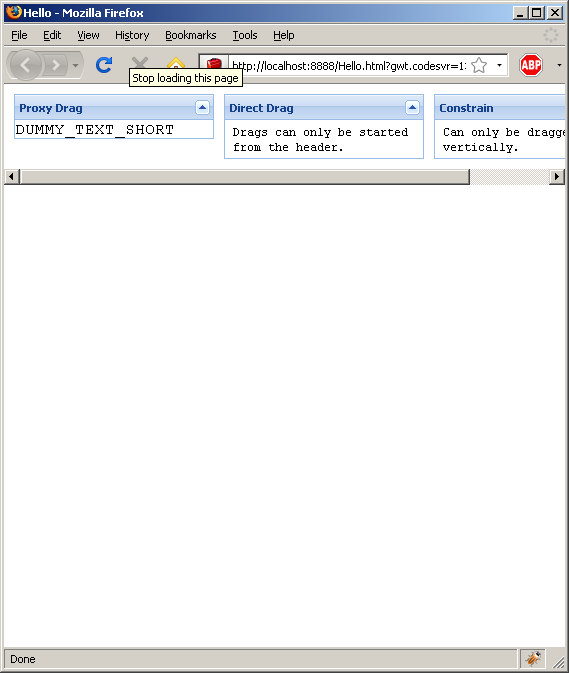
/*
 * Ext GWT - Ext for GWT
 * Copyright(c) 2007-2009, Ext JS, LLC.
 * licensing@extjs.com
 *
 * http://extjs.com/license
 */
package com.google.gwt.sample.hello.client;

import com.extjs.gxt.ui.client.Style.Scroll;
import com.extjs.gxt.ui.client.Style.VerticalAlignment;
import com.extjs.gxt.ui.client.fx.Draggable;
import com.extjs.gxt.ui.client.widget.ContentPanel;
import com.extjs.gxt.ui.client.widget.HorizontalPanel;
import com.extjs.gxt.ui.client.widget.LayoutContainer;
import com.google.gwt.core.client.EntryPoint;
import com.google.gwt.user.client.Element;
import com.google.gwt.user.client.impl.WindowImplIE.Resources;
import com.google.gwt.user.client.ui.RootPanel;

public class Hello implements EntryPoint {
  public void onModuleLoad() {
    RootPanel.get().add(new DraggableExample());
  }
}
class DraggableExample extends LayoutContainer {

  @Override
  protected void onRender(Element parent, int pos) {
    super.onRender(parent, pos);

    HorizontalPanel vp = new HorizontalPanel();
    vp.setVerticalAlign(VerticalAlignment.TOP);
    vp.setSpacing(10);

    ContentPanel cp = new ContentPanel();
    cp.setCollapsible(true);
    //cp.setIcon(Resources.ICONS.text());
    cp.setBodyStyleName("pad-text");
    cp.setHeading("Proxy Drag");
    cp.addText("DUMMY_TEXT_SHORT");
    cp.setWidth(200);

    Draggable d = new Draggable(cp);

    vp.add(cp);

    cp = new ContentPanel();
    cp.setCollapsible(true);
    cp.setBodyStyle("padding: 4 8px;fontSize: 12px");
    cp.setHeading("Direct Drag");
    //cp.setIcon(Resources.ICONS.text());
    cp.addText("Drags can only be started from the header.");
    cp.setWidth(200);
    vp.add(cp);

    d = new Draggable(cp, cp.getHeader());
    d.setContainer(this);
    d.setUseProxy(false);

    cp = new ContentPanel();
    cp.setBodyStyle("padding: 4 8px;fontSize: 12px");
    cp.setHeading("Constrain");
    //cp.setIcon(Resources.ICONS.text());
    cp.addText("Can only be dragged vertically.");
    cp.setWidth(200);
    vp.add(cp);

    d = new Draggable(cp, cp.getHeader());
    d.setContainer(this);
    d.setConstrainHorizontal(true);

    add(vp);
    setScrollMode(Scroll.AUTO);
  }

}
Thank with us

