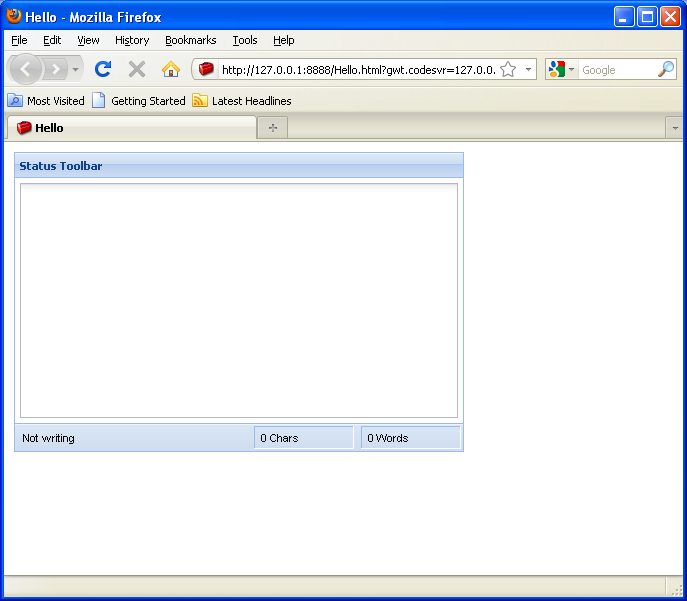
Source Code : Set busy status for Status control (Ext GWT)
Java Is Open Source Programming Language You Can Download From Java and Java Libraries From http://www.oracle.com.
Click Here to download
We provide this code related to title for you to solve your developing problem easily. Libraries which is import in this program you can download from http://www.oracle.com.
Click Here or search from google with Libraries Name you get jar file related it
Set busy status for Status control (Ext GWT)
/*
* Ext GWT - Ext for GWT
* Copyright(c) 2007-2009, Ext JS, LLC.
* licensing@extjs.com
*
* http://extjs.com/license
*/
package com.google.gwt.sample.hello.client;
import com.extjs.gxt.ui.client.event.BaseEvent;
import com.extjs.gxt.ui.client.event.Events;
import com.extjs.gxt.ui.client.event.FieldEvent;
import com.extjs.gxt.ui.client.event.Listener;
import com.extjs.gxt.ui.client.util.DelayedTask;
import com.extjs.gxt.ui.client.widget.LayoutContainer;
import com.extjs.gxt.ui.client.widget.Status;
import com.extjs.gxt.ui.client.widget.form.FormPanel;
import com.extjs.gxt.ui.client.widget.form.TextArea;
import com.extjs.gxt.ui.client.widget.layout.FlowLayout;
import com.extjs.gxt.ui.client.widget.layout.FormData;
import com.extjs.gxt.ui.client.widget.toolbar.FillToolItem;
import com.extjs.gxt.ui.client.widget.toolbar.LabelToolItem;
import com.extjs.gxt.ui.client.widget.toolbar.ToolBar;
import com.google.gwt.core.client.EntryPoint;
import com.google.gwt.user.client.Element;
import com.google.gwt.user.client.ui.RootPanel;
public class Hello implements EntryPoint {
public void onModuleLoad() {
RootPanel.get().add(new StatusToolBarExample());
}
}
class StatusToolBarExample extends LayoutContainer {
private DelayedTask task = new DelayedTask(new Listener<BaseEvent>() {
public void handleEvent(BaseEvent be) {
status.clearStatus("Not writing");
}
});
private Status charCount;
private Status wordCount;
private Status status;
@Override
protected void onRender(Element parent, int pos) {
super.onRender(parent, pos);
setLayout(new FlowLayout(10));
ToolBar toolBar = new ToolBar();
status = new Status();
status.setText("Not writing");
status.setWidth(150);
toolBar.add(status);
toolBar.add(new FillToolItem());
charCount = new Status();
charCount.setWidth(100);
charCount.setText("0 Chars");
charCount.setBox(true);
toolBar.add(charCount);
toolBar.add(new LabelToolItem(" "));
wordCount = new Status();
wordCount.setWidth(100);
wordCount.setText("0 Words");
wordCount.setBox(true);
toolBar.add(wordCount);
FormPanel form = new FormPanel();
form.setHeading("Status Toolbar");
form.setSize(450, 300);
form.setPadding(5);
form.setBottomComponent(toolBar);
TextArea textArea = new TextArea();
textArea.setHideLabel(true);
textArea.addListener(Events.OnKeyPress, new Listener<FieldEvent>() {
public void handleEvent(FieldEvent be) {
status.setBusy("writing...");
TextArea t = (TextArea) be.getField();
String value = t.getValue();
int length = value != null ? value.length() : 0;
charCount.setText(length + (length == 1 ? " Char" : " Chars"));
if (value != null) {
int wc = getWordCount(value);
wordCount.setText(wc + (wc == 1 ? " Word" : " Words"));
}
task.delay(1000);
}
});
form.add(textArea, new FormData("100% 100%"));
add(form);
}
public native int getWordCount(String v) /*-{
if(v) {
var wc = v.match(/�/g);
return wc ? wc.length/2:0;
}
return 0;
}-*/;
}
Thank with us

