Source Code : ProgressBar Sample (Smart GWT)
Java Is Open Source Programming Language You Can Download From Java and Java Libraries From http://www.oracle.com.
Click Here to download
We provide this code related to title for you to solve your developing problem easily. Libraries which is import in this program you can download from http://www.oracle.com.
Click Here or search from google with Libraries Name you get jar file related it
ProgressBar Sample (Smart GWT)
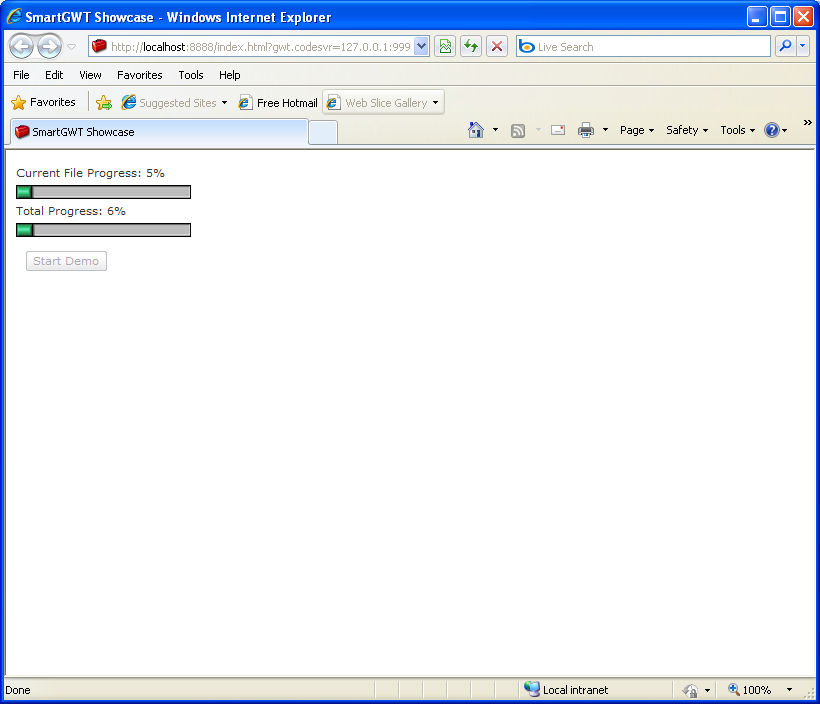
/*
 * SmartGWT (GWT for SmartClient)
 * Copyright 2008 and beyond, Isomorphic Software, Inc.
 *
 * SmartGWT is free software; you can redistribute it and/or modify it
 * under the terms of the GNU Lesser General Public License version 3
 * as published by the Free Software Foundation.  SmartGWT is also
 * available under typical commercial license terms - see
 * http://smartclient.com/license
 * This software is distributed in the hope that it will be useful,
 * but WITHOUT ANY WARRANTY; without even the implied warranty of
 * MERCHANTABILITY or FITNESS FOR A PARTICULAR PURPOSE. See the GNU
 * Lesser General Public License for more details.
 */
package com.smartgwt.sample.showcase.client;

import com.google.gwt.core.client.EntryPoint;
import com.google.gwt.user.client.Timer;
import com.google.gwt.user.client.ui.RootPanel;
import com.smartgwt.client.widgets.Canvas;
import com.smartgwt.client.widgets.IButton;
import com.smartgwt.client.widgets.Label;
import com.smartgwt.client.widgets.Progressbar;
import com.smartgwt.client.widgets.events.ClickEvent;
import com.smartgwt.client.widgets.events.ClickHandler;
import com.smartgwt.client.widgets.layout.HLayout;
import com.smartgwt.client.widgets.layout.VLayout;

public class Showcase implements EntryPoint {

  public void onModuleLoad() {
    RootPanel.get().add(getViewPanel());
  }

  private int hBar1Value;
  private int hBar2Value;

  public Canvas getViewPanel() {

      VLayout horizontalBars = new VLayout(4);
      horizontalBars.setWidth(175);

      final Label hBar1Label = new Label("Current File Progress");
      hBar1Label.setHeight(16);
      horizontalBars.addMember(hBar1Label);

      final Progressbar hBar1 = new Progressbar();
      hBar1.setVertical(false);
      hBar1.setHeight(14);
      hBar1.setLength(175);
      horizontalBars.addMember(hBar1);

      final Label hBar2Label = new Label("Total Progress");
      hBar2Label.setHeight(16);
      horizontalBars.addMember(hBar2Label);

      final Progressbar hBar2 = new Progressbar();
      hBar2.setVertical(false);
      hBar2.setHeight(14);
      hBar2.setLength(175);
      horizontalBars.addMember(hBar2);


      final IButton buttonStart = new IButton("Start Demo");
      buttonStart.setAutoFit(true);
      buttonStart.addClickHandler(new ClickHandler(){
          public void onClick(ClickEvent event) {
              buttonStart.setDisabled(true);
              hBar1Value = 0;
              hBar2Value = 0;
              hBar1.setPercentDone(hBar1Value);
              hBar1Label.setContents("Current File Progress");
              hBar2.setPercentDone(hBar2Value);
              hBar2Label.setContents("Total Progress");

              new Timer() {
                  public void run() {
                      hBar1Value += 1 + (int) (10 * Math.random());
                      if (hBar1Value > 100) {

                          hBar1Value = 0;
                          hBar2Value += 1 + (int) (5 * Math.random());
                          if (hBar2Value >= 100)
                              hBar1Value = hBar2Value = 100;

                          hBar2.setPercentDone(hBar2Value);
                          hBar2Label.setContents("Total Progress: "+hBar2Value+"%");
                      }
                      hBar1.setPercentDone(hBar1Value);
                      hBar1Label.setContents("Current File Progress: "+hBar1Value+"%");

                      if(hBar2Value!=100)
                          schedule(5 + (int) (50 * Math.random()));
                      else
                          buttonStart.setDisabled(false);
                  }
              }.schedule(50);
          }
      });

      HLayout buttonCanvas = new HLayout();
      buttonCanvas.setMargin(10);
      buttonCanvas.addMember(buttonStart);

      horizontalBars.addMember(buttonCanvas);

      Canvas canvas = new Canvas();
      canvas.addChild(horizontalBars);
      return canvas;
  }

}
Thank with us

