Source Code : Form Dependent Selects Sample (Smart GWT)
Java Is Open Source Programming Language You Can Download From Java and Java Libraries From http://www.oracle.com.
Click Here to download
We provide this code related to title for you to solve your developing problem easily. Libraries which is import in this program you can download from http://www.oracle.com.
Click Here or search from google with Libraries Name you get jar file related it
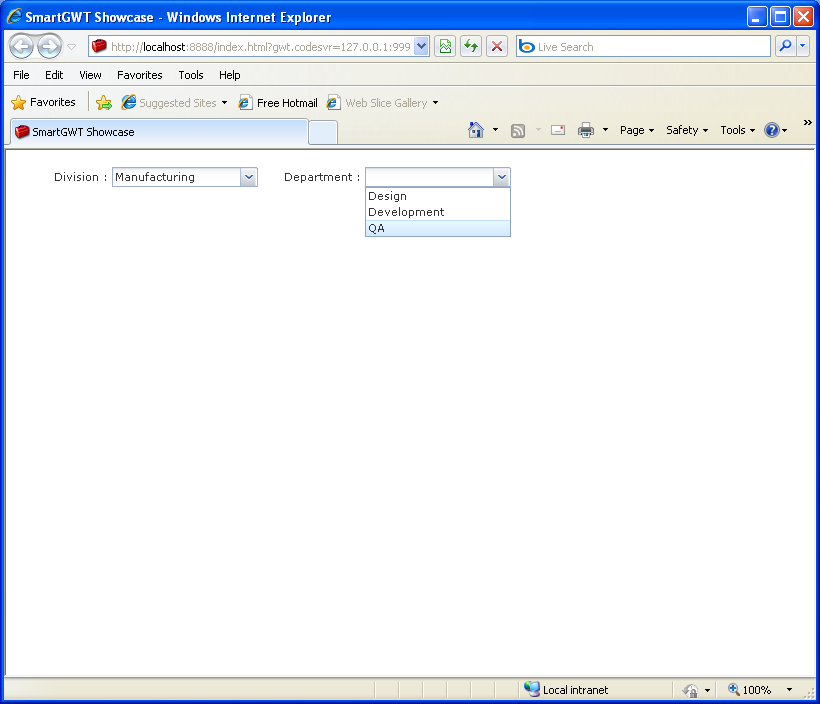
Form Dependent Selects Sample (Smart GWT)
/*
 * SmartGWT (GWT for SmartClient)
 * Copyright 2008 and beyond, Isomorphic Software, Inc.
 *
 * SmartGWT is free software; you can redistribute it and/or modify it
 * under the terms of the GNU Lesser General Public License version 3
 * as published by the Free Software Foundation.  SmartGWT is also
 * available under typical commercial license terms - see
 * http://smartclient.com/license
 * This software is distributed in the hope that it will be useful,
 * but WITHOUT ANY WARRANTY; without even the implied warranty of
 * MERCHANTABILITY or FITNESS FOR A PARTICULAR PURPOSE. See the GNU
 * Lesser General Public License for more details.
 */

package com.smartgwt.sample.showcase.client;

import java.util.HashMap;
import java.util.Map;

import com.google.gwt.core.client.EntryPoint;
import com.google.gwt.user.client.ui.RootPanel;
import com.smartgwt.client.widgets.Canvas;
import com.smartgwt.client.widgets.form.DynamicForm;
import com.smartgwt.client.widgets.form.fields.SelectItem;
import com.smartgwt.client.widgets.form.fields.events.ChangeEvent;
import com.smartgwt.client.widgets.form.fields.events.ChangeHandler;

public class Showcase implements EntryPoint {
  public void onModuleLoad() {
    RootPanel.get().add(getViewPanel());
  }

  public Canvas getViewPanel() {

    final DynamicForm form = new DynamicForm();
    form.setWidth(500);
    form.setNumCols(4);

    final Map<String, String[]> departments = new HashMap<String, String[]>();
    departments.put("Marketing", new String[] { "Advertising", "Community Relations" });
    departments.put("Sales", new String[] { "Channel Sales", "Direct Sales" });
    departments.put("Manufacturing", new String[] { "Design", "Development", "QA" });
    departments.put("Services", new String[] { "Support", "Consulting" });

    SelectItem divisionItem = new SelectItem();
    divisionItem.setName("division");
    divisionItem.setTitle("Division");
    divisionItem.setValueMap("Marketing", "Sales", "Manufacturing", "Services");
    divisionItem.addChangeHandler(new ChangeHandler() {
      public void onChange(ChangeEvent event) {
        String selectedItem = (String) event.getValue();
        form.getField("department").setValueMap(departments.get(selectedItem));
      }
    });

    SelectItem departmentItem = new SelectItem();
    departmentItem.setName("department");
    departmentItem.setTitle("Department");
    departmentItem.setAddUnknownValues(false);

    form.setItems(divisionItem, departmentItem);

    return form;

  }

}
Thank with us

