Java Is Open Source Programming Language You Can Download From Java and Java Libraries From http://www.oracle.com.
We provide this code related to title for you to solve your developing problem easily. Libraries which is import in this program you can download from http://www.oracle.com.
Form data validation (Smart GWT)
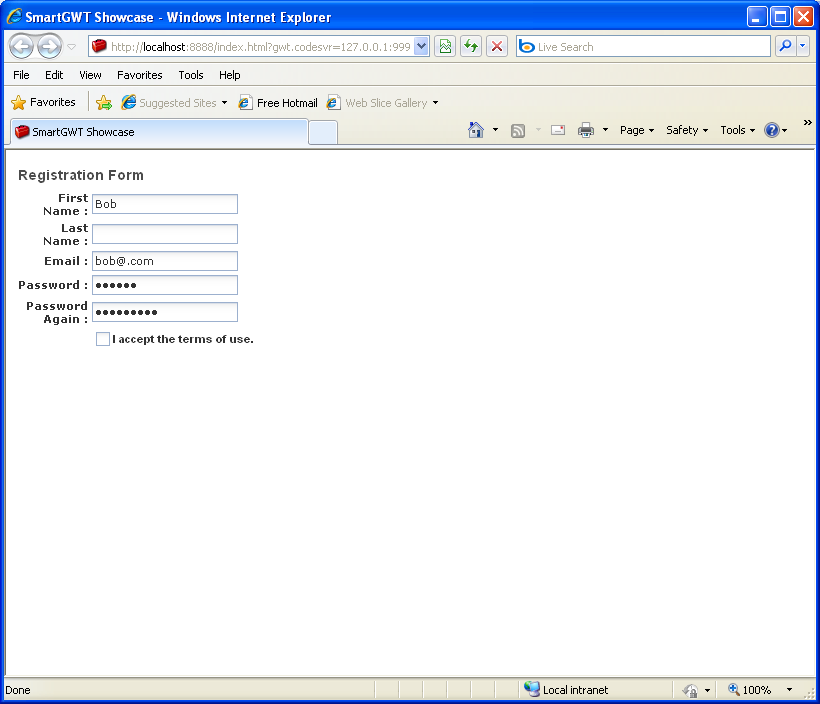
/*
 * SmartGWT (GWT for SmartClient)
 * Copyright 2008 and beyond, Isomorphic Software, Inc.
 *
 * SmartGWT is free software; you can redistribute it and/or modify it
 * under the terms of the GNU Lesser General Public License version 3
 * as published by the Free Software Foundation.  SmartGWT is also
 * available under typical commercial license terms - see
 * http://smartclient.com/license
 * This software is distributed in the hope that it will be useful,
 * but WITHOUT ANY WARRANTY; without even the implied warranty of
 * MERCHANTABILITY or FITNESS FOR A PARTICULAR PURPOSE. See the GNU
 * Lesser General Public License for more details.
 */
package com.smartgwt.sample.showcase.client;

import com.google.gwt.core.client.EntryPoint;
import com.google.gwt.user.client.ui.RootPanel;
import com.smartgwt.client.data.DataSource;
import com.smartgwt.client.data.fields.DataSourcePasswordField;
import com.smartgwt.client.data.fields.DataSourceTextField;
import com.smartgwt.client.widgets.Canvas;
import com.smartgwt.client.widgets.form.DynamicForm;
import com.smartgwt.client.widgets.form.fields.ButtonItem;
import com.smartgwt.client.widgets.form.fields.CheckboxItem;
import com.smartgwt.client.widgets.form.fields.HeaderItem;
import com.smartgwt.client.widgets.form.fields.PasswordItem;
import com.smartgwt.client.widgets.form.fields.events.ClickEvent;
import com.smartgwt.client.widgets.form.fields.events.ClickHandler;
import com.smartgwt.client.widgets.form.validator.MatchesFieldValidator;
import com.smartgwt.client.widgets.form.validator.RegExpValidator;
public class Showcase implements EntryPoint {
  public void onModuleLoad() {
    RootPanel.get().add(getViewPanel());
  }

  public Canvas getViewPanel() {

    DataSource dataSource = new DataSource();

    DataSourceTextField firstNameField = new DataSourceTextField("firstName", "First Name", 50, true);
    DataSourceTextField lastNameField = new DataSourceTextField("lastName", "Last Name", 50, true);
    DataSourceTextField emailField = new DataSourceTextField("email", "Email", 100, true);

    RegExpValidator emailValidator = new RegExpValidator();
    emailValidator.setErrorMessage("Invalid email address");
    emailValidator.setExpression("^([a-zA-Z0-9_.\-+])+@(([a-zA-Z0-9\-])+\.)+[a-zA-Z0-9]{2,4}$");

    emailField.setValidators(emailValidator);

    DataSourcePasswordField passwordField = new DataSourcePasswordField("password", "Password", 20, true);

    dataSource.setFields(firstNameField, lastNameField, emailField, passwordField);

    final DynamicForm form = new DynamicForm();
    form.setDataSource(dataSource);
    form.setUseAllDataSourceFields(true);

    HeaderItem header = new HeaderItem();
    header.setDefaultValue("Registration Form");

    PasswordItem passwordItem = new PasswordItem();
    passwordItem.setName("password");

    PasswordItem passwordItem2 = new PasswordItem();
    passwordItem2.setName("password2");
    passwordItem2.setTitle("Password Again");
    passwordItem2.setRequired(true);
    passwordItem2.setLength(20);

    MatchesFieldValidator matchesValidator = new MatchesFieldValidator();
    matchesValidator.setOtherField("password");
    matchesValidator.setErrorMessage("Passwords do not match");
    passwordItem2.setValidators(matchesValidator);

    CheckboxItem acceptItem = new CheckboxItem();
    acceptItem.setName("acceptTerms");
    acceptItem.setTitle("I accept the terms of use.");
    acceptItem.setRequired(true);
    acceptItem.setWidth(150);

    ButtonItem validateItem = new ButtonItem();
    validateItem.setTitle("Validate");
    validateItem.addClickHandler(new ClickHandler() {
        public void onClick(ClickEvent event) {
            form.validate(false);
        }
    });

    form.setFields(header, passwordItem, passwordItem2, acceptItem, validateItem);

    form.setValue("firstName", "Bob");
    form.setValue("email", "bob@.com");
    form.setValue("password", "sekrit");
    form.setValue("password2", "fatfinger");

    return form;
  }

}

