Java Is Open Source Programming Language You Can Download From Java and Java Libraries From http://www.oracle.com.
We provide this code related to title for you to solve your developing problem easily. Libraries which is import in this program you can download from http://www.oracle.com.
Drag and move back and forth (Smart GWT)
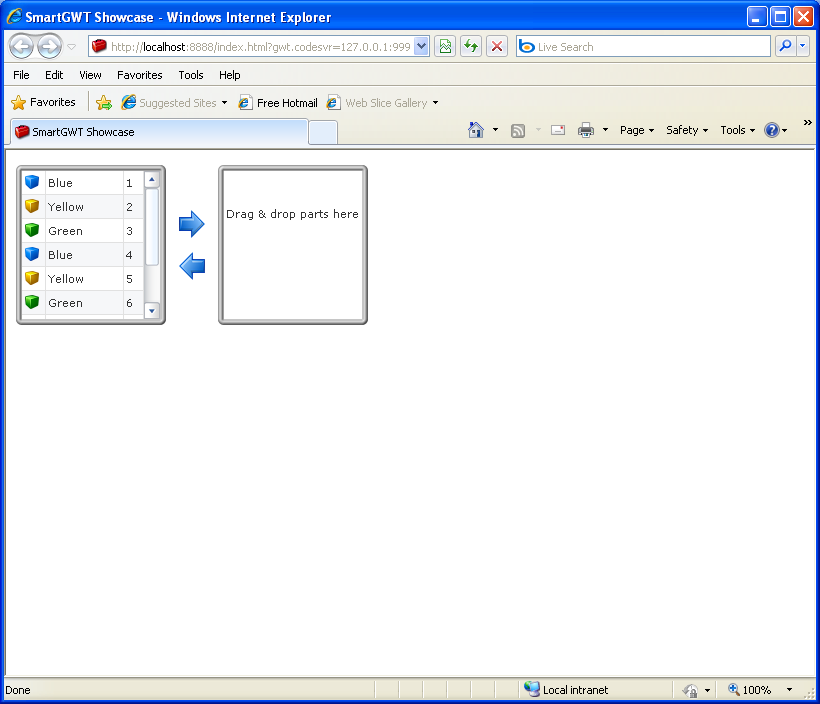
/*
* SmartGWT (GWT for SmartClient)
* Copyright 2008 and beyond, Isomorphic Software, Inc.
*
* SmartGWT is free software; you can redistribute it and/or modify it
* under the terms of the GNU Lesser General Public License version 3
* as published by the Free Software Foundation. SmartGWT is also
* available under typical commercial license terms - see
* http://smartclient.com/license
* This software is distributed in the hope that it will be useful,
* but WITHOUT ANY WARRANTY; without even the implied warranty of
* MERCHANTABILITY or FITNESS FOR A PARTICULAR PURPOSE. See the GNU
* Lesser General Public License for more details.
*/
package com.smartgwt.sample.showcase.client;
import com.google.gwt.core.client.EntryPoint;
import com.google.gwt.user.client.ui.RootPanel;
import com.smartgwt.client.types.Alignment;
import com.smartgwt.client.types.DragDataAction;
import com.smartgwt.client.types.ListGridFieldType;
import com.smartgwt.client.widgets.Canvas;
import com.smartgwt.client.widgets.Img;
import com.smartgwt.client.widgets.ImgProperties;
import com.smartgwt.client.widgets.events.ClickEvent;
import com.smartgwt.client.widgets.events.ClickHandler;
import com.smartgwt.client.widgets.grid.ListGrid;
import com.smartgwt.client.widgets.grid.ListGridField;
import com.smartgwt.client.widgets.grid.ListGridRecord;
import com.smartgwt.client.widgets.layout.HStack;
import com.smartgwt.client.widgets.layout.VStack;
public class Showcase implements EntryPoint {
public void onModuleLoad() {
RootPanel.get().add(getViewPanel());
}
public Canvas getViewPanel() {
HStack hStack = new HStack(10);
hStack.setHeight(160);
final PartsListGrid myList1 = new PartsListGrid();
myList1.setCanDragRecordsOut(true);
myList1.setCanAcceptDroppedRecords(true);
myList1.setCanReorderFields(true);
myList1.setDragDataAction(DragDataAction.MOVE);
myList1.setData(getRecords());
hStack.addMember(myList1);
final PartsListGrid myList2 = new PartsListGrid();
myList2.setCanDragRecordsOut(true);
myList2.setCanAcceptDroppedRecords(true);
myList2.setCanReorderRecords(true);
VStack vStack = new VStack(10);
vStack.setWidth(32);
vStack.setHeight(74);
vStack.setLayoutAlign(Alignment.CENTER);
Img rightImg = new Img("icons/32/arrow_right.png", 32, 32);
rightImg.setLayoutAlign(Alignment.CENTER);
rightImg.addClickHandler(new ClickHandler() {
public void onClick(ClickEvent event) {
myList2.transferSelectedData(myList1);
}
});
vStack.addMember(rightImg);
Img leftImg = new Img("icons/32/arrow_left.png", 32, 32);
leftImg.setLayoutAlign(Alignment.CENTER);
leftImg.addClickHandler(new ClickHandler() {
public void onClick(ClickEvent event) {
myList1.transferSelectedData(myList2);
}
});
vStack.addMember(leftImg);
hStack.addMember(vStack);
hStack.addMember(myList2);
return hStack;
}
public PartRecord[] getRecords() {
return new PartRecord[]{
new PartRecord("Blue", "cube_blue.png", 1),
new PartRecord("Yellow", "cube_yellow.png", 2),
new PartRecord("Green", "cube_green.png", 3),
new PartRecord("Blue", "cube_blue.png", 4),
new PartRecord("Yellow", "cube_yellow.png", 5),
new PartRecord("Green", "cube_green.png", 6),
new PartRecord("Blue", "cube_blue.png", 7),
new PartRecord("Yellow", "cube_yellow.png", 8),
new PartRecord("Green", "cube_green.png", 9),
};
}
}
class PartRecord extends ListGridRecord {
public PartRecord() {
}
public PartRecord(String partName, String partSrc, int partNum) {
setPartName(partName);
setPartSrc(partSrc);
setPartNum(partNum);
}
public void setPartName(String partName) {
setAttribute("partName", partName);
}
public void setPartSrc(String partSrc) {
setAttribute("partSrc", partSrc);
}
public void setPartNum(int partNum) {
setAttribute("partNum", partNum);
}
}
class PartsListGrid extends ListGrid {
PartsListGrid() {
setWidth(150);
setCellHeight(24);
setImageSize(16);
setShowEdges(true);
setBorder("0px");
setBodyStyleName("normal");
setAlternateRecordStyles(true);
setShowHeader(false);
setLeaveScrollbarGap(false);
setEmptyMessage("<br><br>Drag & drop parts here");
ListGridField partSrcField = new ListGridField("partSrc", 24);
partSrcField.setType(ListGridFieldType.IMAGE);
partSrcField.setImgDir("pieces/16/");
ListGridField partNameField = new ListGridField("partName");
ListGridField partNumField = new ListGridField("partNum", 20);
setFields(partSrcField, partNameField, partNumField);
setTrackerImage(new ImgProperties("pieces/24/cubes_all.png", 24, 24));
}
}

