Java Is Open Source Programming Language You Can Download From Java and Java Libraries From http://www.oracle.com.
We provide this code related to title for you to solve your developing problem easily. Libraries which is import in this program you can download from http://www.oracle.com.
Unicode Display
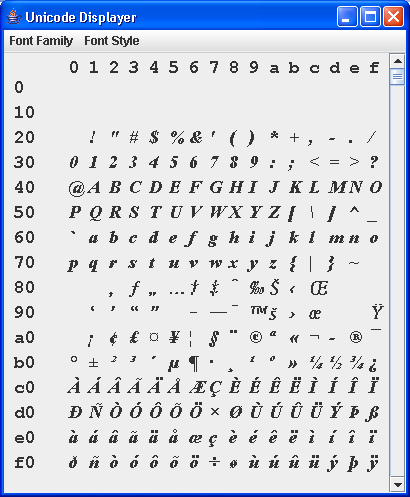
/*
 * Copyright (c) 2000 David Flanagan.  All rights reserved.
 * This code is from the book Java Examples in a Nutshell, 2nd Edition.
 * It is provided AS-IS, WITHOUT ANY WARRANTY either expressed or implied.
 * You may study, use, and modify it for any non-commercial purpose.
 * You may distribute it non-commercially as long as you retain this notice.
 * For a commercial use license, or to purchase the book (recommended),
 * visit http://www.davidflanagan.com/javaexamples2.
 */

import java.awt.Dimension;
import java.awt.Font;
import java.awt.Graphics;
import java.awt.Scrollbar;
import java.awt.event.ActionEvent;
import java.awt.event.ActionListener;
import java.awt.event.AdjustmentEvent;
import java.awt.event.AdjustmentListener;
import java.awt.event.KeyAdapter;
import java.awt.event.KeyEvent;
import java.awt.event.WindowAdapter;
import java.awt.event.WindowEvent;

import javax.swing.JComponent;
import javax.swing.JFrame;
import javax.swing.JMenu;
import javax.swing.JMenuBar;
import javax.swing.JMenuItem;
import javax.swing.JScrollBar;


/**
 * This program displays Unicode glyphs using user-specified fonts and font
 * styles.
 */
public class UnicodeDisplay extends JFrame implements ActionListener {
  int page = 0;

  UnicodePanel p;

  JScrollBar b;

  String fontfamily = "Serif";

  int fontstyle = Font.PLAIN;

  /**
   * This constructor creates the frame, menubar, and scrollbar that work
   * along with the UnicodePanel class, defined below
   */
  public UnicodeDisplay(String name) {
    super(name);
    p = new UnicodePanel(); // Create the panel
    p.setBase((char) (page * 0x100)); // Initialize it
    getContentPane().add(p, "Center"); // Center it

    // Create and set up a scrollbar, and put it on the right
    b = new JScrollBar(Scrollbar.VERTICAL, 0, 1, 0, 0xFF);
    b.setUnitIncrement(1);
    b.setBlockIncrement(0x10);
    b.addAdjustmentListener(new AdjustmentListener() {
      public void adjustmentValueChanged(AdjustmentEvent e) {
        page = e.getValue();
        p.setBase((char) (page * 0x100));
      }
    });
    getContentPane().add(b, "East");

    // Set things up so we respond to window close requests
    this.addWindowListener(new WindowAdapter() {
      public void windowClosing(WindowEvent e) {
        System.exit(0);
      }
    });

    // Handle Page Up and Page Down and the up and down arrow keys
    this.addKeyListener(new KeyAdapter() {
      public void keyPressed(KeyEvent e) {
        int code = e.getKeyCode();
        int oldpage = page;
        if ((code == KeyEvent.VK_PAGE_UP) || (code == KeyEvent.VK_UP)) {
          if (e.isShiftDown())
            page -= 0x10;
          else
            page -= 1;
          if (page < 0)
            page = 0;
        } else if ((code == KeyEvent.VK_PAGE_DOWN)
            || (code == KeyEvent.VK_DOWN)) {
          if (e.isShiftDown())
            page += 0x10;
          else
            page += 1;
          if (page > 0xff)
            page = 0xff;
        }
        if (page != oldpage) { // if anything has changed...
          p.setBase((char) (page * 0x100)); // update the display
          b.setValue(page); // and update scrollbar to match
        }
      }
    });

    // Set up a menu system to change fonts. Use a convenience method.
    JMenuBar menubar = new JMenuBar();
    this.setJMenuBar(menubar);
    menubar.add(makemenu("Font Family", new String[] { "Serif",
        "SansSerif", "Monospaced" }, this));
    menubar.add(makemenu("Font Style", new String[] { "Plain", "Italic",
        "Bold", "BoldItalic" }, this));
  }

  /** This method handles the items in the menubars */
  public void actionPerformed(ActionEvent e) {
    String cmd = e.getActionCommand();
    if (cmd.equals("Serif"))
      fontfamily = "Serif";
    else if (cmd.equals("SansSerif"))
      fontfamily = "SansSerif";
    else if (cmd.equals("Monospaced"))
      fontfamily = "Monospaced";
    else if (cmd.equals("Plain"))
      fontstyle = Font.PLAIN;
    else if (cmd.equals("Italic"))
      fontstyle = Font.ITALIC;
    else if (cmd.equals("Bold"))
      fontstyle = Font.BOLD;
    else if (cmd.equals("BoldItalic"))
      fontstyle = Font.BOLD + Font.ITALIC;
    p.setFont(fontfamily, fontstyle);
  }

  /** A convenience method to create a Menu from an array of items */
  private JMenu makemenu(String name, String[] itemnames,
      ActionListener listener) {
    JMenu m = new JMenu(name);
    for (int i = 0; i < itemnames.length; i++) {
      JMenuItem item = new JMenuItem(itemnames[i]);
      item.addActionListener(listener);
      item.setActionCommand(itemnames[i]); // okay here, though
      m.add(item);
    }
    return m;
  }

  /** The main() program just create a window, packs it, and shows it */
  public static void main(String[] args) {
    UnicodeDisplay f = new UnicodeDisplay("Unicode Displayer");
    f.pack();
    f.show();
  }

  /**
   * This nested class is the one that displays one "page" of Unicode glyphs
   * at a time. Each "page" is 256 characters, arranged into 16 rows of 16
   * columns each.
   */
  public static class UnicodePanel extends JComponent {
    protected char base; // What character we start the display at

    protected Font font = new Font("serif", Font.PLAIN, 18);

    protected Font headingfont = new Font("monospaced", Font.BOLD, 18);

    static final int lineheight = 25;

    static final int charspacing = 20;

    static final int x0 = 65;

    static final int y0 = 40;

    /** Specify where to begin displaying, and re-display */
    public void setBase(char base) {
      this.base = base;
      repaint();
    }

    /** Set a new font name or style, and redisplay */
    public void setFont(String family, int style) {
      this.font = new Font(family, style, 18);
      repaint();
    }

    /**
     * The paintComponent() method actually draws the page of glyphs
     */
    public void paintComponent(Graphics g) {
      int start = (int) base & 0xFFF0; // Start on a 16-character boundary

      // Draw the headings in a special font
      g.setFont(headingfont);

      // Draw 0..F on top
      for (int i = 0; i < 16; i++) {
        String s = Integer.toString(i, 16);
        g.drawString(s, x0 + i * charspacing, y0 - 20);
      }

      // Draw column down left.
      for (int i = 0; i < 16; i++) {
        int j = start + i * 16;
        String s = Integer.toString(j, 16);
        g.drawString(s, 10, y0 + i * lineheight);
      }

      // Now draw the characters
      g.setFont(font);
      char[] c = new char[1];
      for (int i = 0; i < 16; i++) {
        for (int j = 0; j < 16; j++) {
          c[0] = (char) (start + j * 16 + i);
          g.drawChars(c, 0, 1, x0 + i * charspacing, y0 + j
              * lineheight);
        }
      }
    }

    /** Custom components like this one should always have this method */
    public Dimension getPreferredSize() {
      return new Dimension(x0 + 16 * charspacing, y0 + 16 * lineheight);
    }
  }
}

