Source Code : Displaying Formatted Numbers for Alternate Locales
Java Is Open Source Programming Language You Can Download From Java and Java Libraries From http://www.oracle.com.
Click Here to download
We provide this code related to title for you to solve your developing problem easily. Libraries which is import in this program you can download from http://www.oracle.com.
Click Here or search from google with Libraries Name you get jar file related it
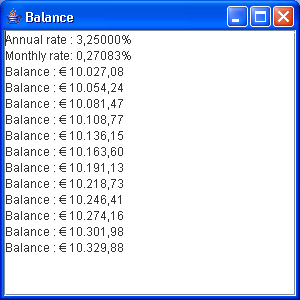
Displaying Formatted Numbers for Alternate Locales
import java.math.BigDecimal;
import java.text.DecimalFormat;
import java.text.NumberFormat;
import java.util.Locale;

import javax.swing.JFrame;
import javax.swing.JScrollPane;
import javax.swing.JTextArea;

public class BigDecFormat {
  public static void main(String args[]) {
    StringBuffer buffer = new StringBuffer();
    Locale italian = new Locale("it", "IT", "EURO");
    Locale.setDefault(italian);
    BigDecimal rate = new BigDecimal(".03250000");
    BigDecimal months = new BigDecimal("12");
    BigDecimal monthlyRate = rate
        .divide(months, BigDecimal.ROUND_HALF_DOWN);
    NumberFormat pf = new DecimalFormat("#,##0.00000%");
    buffer.append("Annual rate : " + pf.format(rate.doubleValue()) + "
");
    buffer.append("Monthly rate: " + pf.format(monthlyRate.doubleValue())
        + "
");
    BigDecimal balance = new BigDecimal("10000.0000");
    NumberFormat nf = NumberFormat.getCurrencyInstance();
    for (int i = 0; i < 12; i++) {
      BigDecimal interest = balance.multiply(monthlyRate);
      balance = balance.add(interest);
      buffer.append("Balance : " + nf.format(balance.doubleValue())
          + "
");
    }
    JFrame frame = new JFrame("Balance");
    JTextArea text = new JTextArea(buffer.toString());
    JScrollPane pane = new JScrollPane(text);
    frame.getContentPane().add(pane);
    frame.setDefaultCloseOperation(JFrame.EXIT_ON_CLOSE);
    frame.setSize(300, 300);
    frame.show();
  }
}
Thank with us

