Source Code : Java program to demonstrate multidimensional arrays
Java Is Open Source Programming Language You Can Download From Java and Java Libraries From http://www.oracle.com.
Click Here to download
We provide this code related to title for you to solve your developing problem easily. Libraries which is import in this program you can download from http://www.oracle.com.
Click Here or search from google with Libraries Name you get jar file related it
Java program to demonstrate multidimensional arrays
/*
Java Programming for Engineers
Julio Sanchez
Maria P. Canton


ISBN: 0849308100
Publisher: CRC Press
*/


// File name: MultiArray.java
//Reference: Chapter 6
//
//Java program to demonstrate multidimensional arrays
//Topics:
// 1. Simultaneous declaration and initialization
// 2. Use of the length operator to obtain the size
//    of multidimensional arrays

public class MultiArray {
  // Declare constants
  final static int ROWS = 10;

  final static int COLS = 5;

  public static void main(String[] args) {

    // Local varaibles
    int rowCount;
    int colCount;
    int totalSize;

    // Declare and allocate an array of bytes
    byte[][] screenPix = new byte[ROWS][COLS];

    // Obtain and store array dimensions
    rowCount = screenPix.length;
    colCount = screenPix[COLS].length;
    totalSize = rowCount * colCount;

    // To obtain the total number of elements of a
    // two-dimensional ragged array you need to get the size of
    // each array dimension separately

    // Display array dimensions
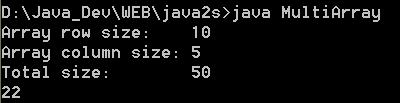
    System.out.println("Array row size:    " + rowCount);
    System.out.println("Array column size: " + colCount);
    System.out.println("Total size:        " + totalSize);

    //*************************
    //      ragged arrays
    //*************************
    // First allocate the rows of an array
    byte[][] raggedArray = new byte[5][];

    // Now allocate the columns
    raggedArray[0] = new byte[2];
    raggedArray[1] = new byte[2];
    raggedArray[2] = new byte[4];
    raggedArray[3] = new byte[8];
    raggedArray[4] = new byte[3];

    // The resulting ragged array is as follows:
    //  x x
    //  x x
    //  x x x x
    //  x x x x x x x x
    //  x x x

    //************************************
    //     static array initialization
    //************************************
    byte[][] smallArray = { { 10, 11, 12, 13 }, { 20, 21, 22, 23 },
        { 30, 31, 32, 33 }, { 40, 41, 42, 43 }, };

    // Display the array element at row 2, column 3
    System.out.println(smallArray[1][2]); // Value is 21
  }
}
Thank with us

