Source Code : Calendar Demo
Java Is Open Source Programming Language You Can Download From Java and Java Libraries From http://www.oracle.com.
Click Here to download
We provide this code related to title for you to solve your developing problem easily. Libraries which is import in this program you can download from http://www.oracle.com.
Click Here or search from google with Libraries Name you get jar file related it
Calendar Demo
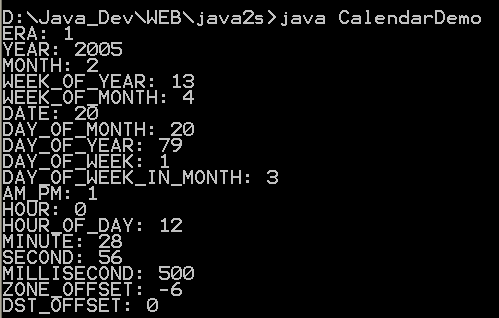
import java.util.Calendar;
import java.util.Date;
import java.util.GregorianCalendar;

public class CalendarDemo {
  /** The Date we are about to format */
  Date timeNow;

  /**
   * A calendar formatting object, used throughout. Note that other forms of
   * the Calendar constructor let you pass in Locale, TimeZone, or both, or
   * yy,mm,dd,[hh, mm [, ss]] You can also set your own Daylight Saving rules,
   * fiddle the Gregorian cutover of 1582, and probably the phase of the moon!
   */
  Calendar calendar = new GregorianCalendar();

  public static void main(String[] a) {
    new CalendarDemo().format();
  }

  /** Construct a CalendarDemo object with the current date/time */
  CalendarDemo() {
    timeNow = new Date();
  }

  public void format() {

    // Tell the calendar what date/time to format
    calendar.setTime(timeNow);

    // print out most of the known fields
    System.out.println("ERA: " + calendar.get(Calendar.ERA));
    System.out.println("YEAR: " + calendar.get(Calendar.YEAR));
    System.out.println("MONTH: " + calendar.get(Calendar.MONTH));
    System.out.println("WEEK_OF_YEAR: "
        + calendar.get(Calendar.WEEK_OF_YEAR));
    System.out.println("WEEK_OF_MONTH: "
        + calendar.get(Calendar.WEEK_OF_MONTH));
    System.out.println("DATE: " + calendar.get(Calendar.DATE));
    System.out.println("DAY_OF_MONTH: "
        + calendar.get(Calendar.DAY_OF_MONTH));
    System.out
        .println("DAY_OF_YEAR: " + calendar.get(Calendar.DAY_OF_YEAR));
    System.out
        .println("DAY_OF_WEEK: " + calendar.get(Calendar.DAY_OF_WEEK));
    System.out.println("DAY_OF_WEEK_IN_MONTH: "
        + calendar.get(Calendar.DAY_OF_WEEK_IN_MONTH));
    System.out.println("AM_PM: " + calendar.get(Calendar.AM_PM));
    System.out.println("HOUR: " + calendar.get(Calendar.HOUR));
    System.out
        .println("HOUR_OF_DAY: " + calendar.get(Calendar.HOUR_OF_DAY));
    System.out.println("MINUTE: " + calendar.get(Calendar.MINUTE));
    System.out.println("SECOND: " + calendar.get(Calendar.SECOND));
    System.out
        .println("MILLISECOND: " + calendar.get(Calendar.MILLISECOND));
    System.out.println("ZONE_OFFSET: "
        + (calendar.get(Calendar.ZONE_OFFSET) / (60 * 60 * 1000)));
    System.out.println("DST_OFFSET: "
        + (calendar.get(Calendar.DST_OFFSET) / (60 * 60 * 1000)));
  }
}
Thank with us

