Source Code : Use the Event queue to retrieve event
Java Is Open Source Programming Language You Can Download From Java and Java Libraries From http://www.oracle.com.
Click Here to download
We provide this code related to title for you to solve your developing problem easily. Libraries which is import in this program you can download from http://www.oracle.com.
Click Here or search from google with Libraries Name you get jar file related it
Use the Event queue to retrieve event
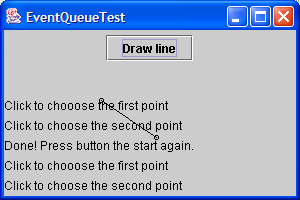
import java.awt.AWTEvent;
import java.awt.Container;
import java.awt.EventQueue;
import java.awt.Frame;
import java.awt.Graphics;
import java.awt.Point;
import java.awt.Toolkit;
import java.awt.event.ActionEvent;
import java.awt.event.ActionListener;
import java.awt.event.MouseEvent;
import java.awt.event.WindowAdapter;
import java.awt.event.WindowEvent;

import javax.swing.JButton;
import javax.swing.JFrame;
import javax.swing.JPanel;

public class EventQueuePanel extends JPanel implements ActionListener {
  EventQueuePanel() {
    JButton button = new JButton("Draw line");
    add(button);
    button.addActionListener(this);
  }

  public void actionPerformed(ActionEvent evt) {
    Graphics g = getGraphics();

    displayPrompt(g, "Click to chooose the first point");
    Point p = getClick();
    g.drawOval(p.x - 2, p.y - 2, 4, 4);
    displayPrompt(g, "Click to choose the second point");
    Point q = getClick();
    g.drawOval(q.x - 2, q.y - 2, 4, 4);
    g.drawLine(p.x, p.y, q.x, q.y);
    displayPrompt(g, "Done! Press button the start again.");
    g.dispose();
  }

  public void displayPrompt(Graphics g, String s) {
    y += 20;
    g.drawString(s, 0, y);
  }

  public Point getClick() {
    EventQueue eq = Toolkit.getDefaultToolkit().getSystemEventQueue();
    while (true) {
      try {
        AWTEvent evt = eq.getNextEvent();
        if (evt.getID() == MouseEvent.MOUSE_PRESSED) {
          MouseEvent mevt = (MouseEvent) evt;
          Point p = mevt.getPoint();
          Point top = getRootPane().getLocation();
          p.x -= top.x;
          p.y -= top.y;
          return p;
        }
      } catch (InterruptedException e) {
      }
    }
  }

  private int y = 60;
  public static void main(String[] args) {
    JFrame frame = new JFrame();
    frame.setTitle("EventQueueTest");
    frame.setSize(300, 200);
    frame.addWindowListener(new WindowAdapter() {
      public void windowClosing(WindowEvent e) {
        System.exit(0);
      }
    });

    Container contentPane = frame.getContentPane();
    contentPane.add(new EventQueuePanel());

    frame.show();
  }

}
Thank with us

