Source Code : Move Shape with mouse
Java Is Open Source Programming Language You Can Download From Java and Java Libraries From http://www.oracle.com.
Click Here to download
We provide this code related to title for you to solve your developing problem easily. Libraries which is import in this program you can download from http://www.oracle.com.
Click Here or search from google with Libraries Name you get jar file related it
Move Shape with mouse
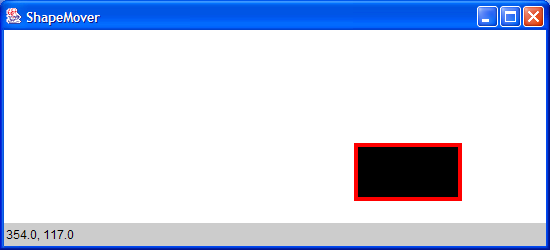
import java.applet.Applet;
import java.awt.BasicStroke;
import java.awt.BorderLayout;
import java.awt.Canvas;
import java.awt.Color;
import java.awt.Dimension;
import java.awt.Frame;
import java.awt.Graphics;
import java.awt.Graphics2D;
import java.awt.Label;
import java.awt.Rectangle;
import java.awt.event.MouseEvent;
import java.awt.event.MouseListener;
import java.awt.event.MouseMotionListener;
import java.awt.event.WindowAdapter;
import java.awt.event.WindowEvent;

import javax.swing.JApplet;
//Use double buffering to remove rectangle flickers and make it repaint faster.
public class ShapeMover extends JApplet {
  static protected Label label = new Label(
      "Drag rectangle around within the area");

  public void init() {

    getContentPane().setLayout(new BorderLayout());
    getContentPane().add(new MyCanvas());

    getContentPane().add("South", label);
  }

  public static void main(String s[]) {
    Frame f = new Frame("ShapeMover");
    f.addWindowListener(new WindowAdapter() {
      public void windowClosing(WindowEvent e) {
        System.exit(0);
      }
    });
    Applet applet = new ShapeMover();
    f.add("Center", applet);
    applet.init();
    f.pack();
    f.setSize(new Dimension(550, 250));
    f.show();
  }
}

class MyCanvas extends Canvas implements MouseListener, MouseMotionListener {
  Rectangle rect = new Rectangle(0, 0, 100, 50);

  Graphics2D g2;

  int preX, preY;

  boolean isFirstTime = true;

  Rectangle area;

  boolean pressOut = false;

  public MyCanvas() {
    setBackground(Color.white);
    addMouseMotionListener(this);
    addMouseListener(this);
  }

  public void mousePressed(MouseEvent e) {
    preX = rect.x - e.getX();
    preY = rect.y - e.getY();

    if (rect.contains(e.getX(), e.getY()))
      updateLocation(e);
    else {
      ShapeMover.label.setText("Drag it.");
      pressOut = true;
    }
  }

  public void mouseDragged(MouseEvent e) {
    if (!pressOut)
      updateLocation(e);
    else
      ShapeMover.label.setText("Drag it.");
  }

  public void mouseReleased(MouseEvent e) {
    if (rect.contains(e.getX(), e.getY()))
      updateLocation(e);
    else {
      ShapeMover.label.setText("Drag it.");
      pressOut = false;
    }
  }

  public void mouseMoved(MouseEvent e) {
  }

  public void mouseClicked(MouseEvent e) {
  }

  public void mouseExited(MouseEvent e) {
  }

  public void mouseEntered(MouseEvent e) {
  }

  public void updateLocation(MouseEvent e) {
    rect.setLocation(preX + e.getX(), preY + e.getY());

    if (checkRect()) {
      ShapeMover.label.setText(rect.getX() + ", " + rect.getY());
    } else {
      ShapeMover.label.setText("drag inside the area.");
    }

    repaint();
  }

  public void paint(Graphics g) {
    update(g);
  }

  public void update(Graphics g) {
    Graphics2D g2 = (Graphics2D) g;
    Dimension dim = getSize();
    int w = (int) dim.getWidth();
    int h = (int) dim.getHeight();
    g2.setStroke(new BasicStroke(8.0f));

    if (isFirstTime) {
      area = new Rectangle(dim);
      rect.setLocation(w / 2 - 50, h / 2 - 25);
      isFirstTime = false;
    }

    // Clears the rectangle that was previously drawn.
    g2.setPaint(Color.white);
    g2.fillRect(0, 0, w, h);

    g2.setColor(Color.red);
    g2.draw(rect);
    g2.setColor(Color.black);
    g2.fill(rect);
  }

  boolean checkRect() {
    if (area == null) {
      return false;
    }

    if (area.contains(rect.x, rect.y, 100, 50)) {
      return true;
    }
    int new_x = rect.x;
    int new_y = rect.y;

    if ((rect.x + 100) > area.getWidth()) {
      new_x = (int) area.getWidth() - 99;
    }
    if (rect.x < 0) {
      new_x = -1;
    }
    if ((rect.y + 50) > area.getHeight()) {
      new_y = (int) area.getHeight() - 49;
    }
    if (rect.y < 0) {
      new_y = -1;
    }
    rect.setLocation(new_x, new_y);
    return false;
  }
}
Thank with us

