Source Code : Word OLE
Java Is Open Source Programming Language You Can Download From Java and Java Libraries From http://www.oracle.com.
Click Here to download
We provide this code related to title for you to solve your developing problem easily. Libraries which is import in this program you can download from http://www.oracle.com.
Click Here or search from google with Libraries Name you get jar file related it
Word OLE
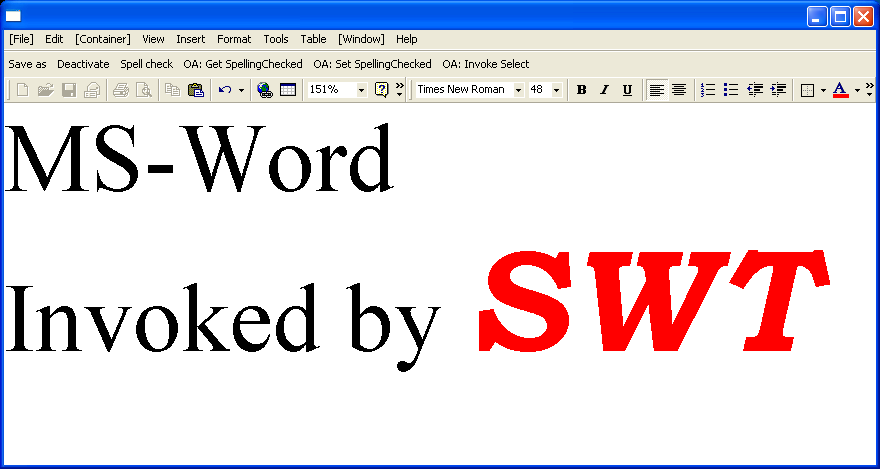
/*******************************************************************************
 * All Right Reserved. Copyright (c) 1998, 2004 Jackwind Li Guojie
 *
 * Created on 2004-6-21 18:48:57 by JACK $Id$
 *
 ******************************************************************************/


import java.io.File;

import org.eclipse.jface.action.Action;
import org.eclipse.jface.action.ToolBarManager;
import org.eclipse.jface.window.ApplicationWindow;
import org.eclipse.swt.SWT;
import org.eclipse.swt.layout.FillLayout;
import org.eclipse.swt.ole.win32.OLE;
import org.eclipse.swt.ole.win32.OleAutomation;
import org.eclipse.swt.ole.win32.OleClientSite;
import org.eclipse.swt.ole.win32.OleControlSite;
import org.eclipse.swt.ole.win32.OleFrame;
import org.eclipse.swt.ole.win32.Variant;
import org.eclipse.swt.widgets.Composite;
import org.eclipse.swt.widgets.Control;
import org.eclipse.swt.widgets.Display;
import org.eclipse.swt.widgets.FileDialog;
import org.eclipse.swt.widgets.MenuItem;
import org.eclipse.swt.widgets.Shell;

public class WordOLE extends ApplicationWindow {
  OleFrame oleFrame;
  OleClientSite clientSite;
  OleControlSite controlSite;

  /**
   * @param parentShell
   */
  public WordOLE(Shell parentShell) {
    super(parentShell);

    addMenuBar();
    addToolBar(SWT.FLAT);
  }

  /*
   * (non-Javadoc)
   *
   * @see org.eclipse.jface.window.Window#createContents(org.eclipse.swt.widgets.Composite)
   */
  protected Control createContents(Composite parent) {
    Composite composite = new Composite(parent, SWT.NULL);
    composite.setLayout(new FillLayout());

    oleFrame = new OleFrame(composite, SWT.NULL);

    if (getMenuBarManager() != null) {
      MenuItem windowMenu =
        new MenuItem(getMenuBarManager().getMenu(), SWT.CASCADE);
      windowMenu.setText("[Window]");

      MenuItem containerMenu =
        new MenuItem(getMenuBarManager().getMenu(), SWT.CASCADE);
      containerMenu.setText("[Container]");

      MenuItem fileMenu =
        new MenuItem(getMenuBarManager().getMenu(), SWT.CASCADE);
      fileMenu.setText("[File]");

      oleFrame.setWindowMenus(new MenuItem[] { windowMenu });
      oleFrame.setContainerMenus(new MenuItem[] { containerMenu });
      oleFrame.setFileMenus(new MenuItem[] { fileMenu });

      System.out.println("menu set");
    }

    clientSite =
      new OleClientSite(oleFrame, SWT.NULL, new File("test.doc"));
    // clientSite = new OleClientSite(oleFrame, SWT.NONE,
    // "Word.Document.8");

    //   clientSite = new OleControlSite(oleFrame, SWT.NONE,
    //   "Word.Document.8");

    System.out.println(clientSite.getProgramID() + ", " + clientSite);
    clientSite.doVerb(OLE.OLEIVERB_SHOW);

    return composite;
  }

  /*
   * (non-Javadoc)
   *
   * @see org.eclipse.jface.window.ApplicationWindow#createToolBarManager(int)
   */
  protected ToolBarManager createToolBarManager(int style) {
    ToolBarManager manager = new ToolBarManager(style);

    Action actionSaveAs = new Action("Save as") {
      public void run() {
        FileDialog dialog = new FileDialog(getShell(), SWT.SAVE);
        String path = dialog.open();
        if (path != null) {
          if (clientSite.save(new File(path), false)) {
            System.out.println("Saved to file successfully.");
          } else {
            System.err.println("Failed to save to file");
          }
        }
      }
    };

    Action actionDeactivate = new Action("Deactivate") {
      public void run() {
        clientSite.deactivateInPlaceClient();
      }
    };

    Action actionSpellCheck = new Action("Spell check") {
      public void run() {
        if ((clientSite.queryStatus(OLE.OLECMDID_SPELL)
          & OLE.OLECMDF_ENABLED)
          != 0) {
          clientSite.exec(
            OLE.OLECMDID_SPELL,
            OLE.OLECMDEXECOPT_PROMPTUSER,
            null,
            null);
        }
      }
    };

    Action actionOAGetSpellingChecked = new Action("OA: Get SpellingChecked") {
      public void run() {

        OleAutomation automation = new OleAutomation(clientSite);

        // looks up the ID for property SpellingChecked.
        int[] propertyIDs = automation.getIDsOfNames(new String[]{"SpellingChecked"});
        int propertyID = propertyIDs[0];

        Variant result = automation.getProperty(propertyID);
        System.out.println("SpellingChecked: " + result.getBoolean());

        automation.dispose();
      }
    };

    Action actionOASetSpellingChecked = new Action("OA: Set SpellingChecked") {
      public void run() {

        OleAutomation automation = new OleAutomation(clientSite);

        // looks up the ID for property SpellingChecked.
        int[] propertyIDs = automation.getIDsOfNames(new String[]{"SpellingChecked"});
        int propertyID = propertyIDs[0];

        boolean result = automation.setProperty(propertyID, new Variant(true));
        System.out.println(result ? "Successful" : "Failed");

        automation.dispose();
      }
    };

    Action actionOAInvokePrintPreview = new Action("OA: Invoke Select") {
      public void run() {
        OleAutomation automation = new OleAutomation(clientSite);

        // looks up the ID for method Select.
        int[] methodIDs = automation.getIDsOfNames(new String[]{"Select"});
        int methodID = methodIDs[0];

        Variant result = automation.invoke(methodID);
        System.out.println(result != null ? "Successful" : "Failed");
        System.out.println(result);
        automation.dispose();
      }
    };

    manager.add(actionSaveAs);
    manager.add(actionDeactivate);
    manager.add(actionSpellCheck);
    manager.add(actionOAGetSpellingChecked);
    manager.add(actionOASetSpellingChecked);
    manager.add(actionOAInvokePrintPreview);

    return manager;
  }

  public static void main(String[] args) {
    WordOLE wordOLE = new WordOLE(null);
    wordOLE.setBlockOnOpen(true);
    wordOLE.open();

    Display.getCurrent().dispose();
  }

}
Thank with us

