Source Code : SWT Table Simple Demo
Java Is Open Source Programming Language You Can Download From Java and Java Libraries From http://www.oracle.com.
Click Here to download
We provide this code related to title for you to solve your developing problem easily. Libraries which is import in this program you can download from http://www.oracle.com.
Click Here or search from google with Libraries Name you get jar file related it
SWT Table Simple Demo
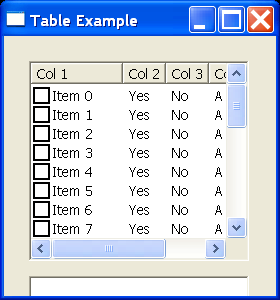
import org.eclipse.swt.SWT;
import org.eclipse.swt.widgets.Display;
import org.eclipse.swt.widgets.Event;
import org.eclipse.swt.widgets.Listener;
import org.eclipse.swt.widgets.Shell;
import org.eclipse.swt.widgets.Table;
import org.eclipse.swt.widgets.TableColumn;
import org.eclipse.swt.widgets.TableItem;
import org.eclipse.swt.widgets.Text;

public class TableClass {
  public static void main(String[] args) {
    Display display = new Display();
    Shell shell = new Shell(display);
    shell.setSize(280, 300);
    shell.setText("Table Example");

    final Text text = new Text(shell, SWT.BORDER);
    text.setBounds(25, 240, 220, 25);

    Table table = new Table(shell, SWT.CHECK | SWT.BORDER | SWT.V_SCROLL
        | SWT.H_SCROLL);
    table.setHeaderVisible(true);
    String[] titles = { "Col 1", "Col 2", "Col 3", "Col 4" };

    for (int loopIndex = 0; loopIndex < titles.length; loopIndex++) {
      TableColumn column = new TableColumn(table, SWT.NULL);
      column.setText(titles[loopIndex]);
    }

    for (int loopIndex = 0; loopIndex < 24; loopIndex++) {
      TableItem item = new TableItem(table, SWT.NULL);
      item.setText("Item " + loopIndex);
      item.setText(0, "Item " + loopIndex);
      item.setText(1, "Yes");
      item.setText(2, "No");
      item.setText(3, "A table item");
    }

    for (int loopIndex = 0; loopIndex < titles.length; loopIndex++) {
      table.getColumn(loopIndex).pack();
    }

    table.setBounds(25, 25, 220, 200);

    table.addListener(SWT.Selection, new Listener() {
      public void handleEvent(Event event) {
        if (event.detail == SWT.CHECK) {
          text.setText("You checked " + event.item);
        } else {
          text.setText("You selected " + event.item);
        }
      }
    });

    shell.open();
    while (!shell.isDisposed()) {
      if (!display.readAndDispatch())
        display.sleep();
    }
    display.dispose();
  }
}
Thank with us

