Java Is Open Source Programming Language You Can Download From Java and Java Libraries From http://www.oracle.com.
We provide this code related to title for you to solve your developing problem easily. Libraries which is import in this program you can download from http://www.oracle.com.
SWT Shell : create a non-rectangular window
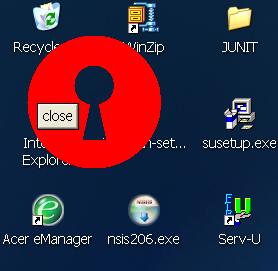
/*
 * Shell example snippet: create a non-rectangular window
 *
 * For a list of all SWT example snippets see
 * http://dev.eclipse.org/viewcvs/index.cgi/%7Echeckout%7E/platform-swt-home/dev.html#snippets
 */
import org.eclipse.swt.SWT;
import org.eclipse.swt.graphics.Point;
import org.eclipse.swt.graphics.Rectangle;
import org.eclipse.swt.graphics.Region;
import org.eclipse.swt.widgets.Button;
import org.eclipse.swt.widgets.Display;
import org.eclipse.swt.widgets.Event;
import org.eclipse.swt.widgets.Listener;
import org.eclipse.swt.widgets.Shell;

public class Snippet134 {

  static int[] circle(int r, int offsetX, int offsetY) {
    int[] polygon = new int[8 * r + 4];
    // x^2 + y^2 = r^2
    for (int i = 0; i < 2 * r + 1; i++) {
      int x = i - r;
      int y = (int) Math.sqrt(r * r - x * x);
      polygon[2 * i] = offsetX + x;
      polygon[2 * i + 1] = offsetY + y;
      polygon[8 * r - 2 * i - 2] = offsetX + x;
      polygon[8 * r - 2 * i - 1] = offsetY - y;
    }
    return polygon;
  }

  public static void main(String[] args) {
    final Display display = new Display();
    // Shell must be created with style SWT.NO_TRIM
    final Shell shell = new Shell(display, SWT.NO_TRIM | SWT.ON_TOP);
    shell.setBackground(display.getSystemColor(SWT.COLOR_RED));
    // define a region that looks like a key hole
    Region region = new Region();
    region.add(circle(67, 67, 67));
    region.subtract(circle(20, 67, 50));
    region.subtract(new int[] { 67, 50, 55, 105, 79, 105 });
    // define the shape of the shell using setRegion
    shell.setRegion(region);
    Rectangle size = region.getBounds();
    shell.setSize(size.width, size.height);
    // add ability to move shell around
    Listener l = new Listener() {
      Point origin;

      public void handleEvent(Event e) {
        switch (e.type) {
        case SWT.MouseDown:
          origin = new Point(e.x, e.y);
          break;
        case SWT.MouseUp:
          origin = null;
          break;
        case SWT.MouseMove:
          if (origin != null) {
            Point p = display.map(shell, null, e.x, e.y);
            shell.setLocation(p.x - origin.x, p.y - origin.y);
          }
          break;
        }
      }
    };
    shell.addListener(SWT.MouseDown, l);
    shell.addListener(SWT.MouseUp, l);
    shell.addListener(SWT.MouseMove, l);
    // add ability to close shell
    Button b = new Button(shell, SWT.PUSH);
    b.setBackground(shell.getBackground());
    b.setText("close");
    b.pack();
    b.setLocation(10, 68);
    b.addListener(SWT.Selection, new Listener() {
      public void handleEvent(Event e) {
        shell.close();
      }
    });
    shell.open();
    while (!shell.isDisposed()) {
      if (!display.readAndDispatch())
        display.sleep();
    }
    region.dispose();
    display.dispose();
  }
}

