Java Is Open Source Programming Language You Can Download From Java and Java Libraries From http://www.oracle.com.
We provide this code related to title for you to solve your developing problem easily. Libraries which is import in this program you can download from http://www.oracle.com.
SWT Button Action
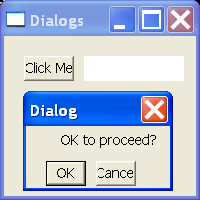
/*
 * Created on Nov 20, 2003
 *
 * To change the template for this generated file go to
 * Window>Preferences>Java>Code Generation>Code and Comments
 */

import org.eclipse.swt.SWT;
import org.eclipse.swt.widgets.Button;
import org.eclipse.swt.widgets.Display;
import org.eclipse.swt.widgets.Event;
import org.eclipse.swt.widgets.Label;
import org.eclipse.swt.widgets.Listener;
import org.eclipse.swt.widgets.Shell;
import org.eclipse.swt.widgets.Text;

/**
 * @author Steven Holzner
 *
 * To change the template for this generated type comment go to
 * Window>Preferences>Java>Code Generation>Code and Comments
 */
public class SWTButtonAction {

  public static void main(String[] args) {
    Display display = new Display();
    Shell shell = new Shell(display);
    shell.setSize(200, 200);
    shell.setText("Dialogs");
    shell.open();

    final Button opener = new Button(shell, SWT.PUSH);
    opener.setText("Click Me");
    opener.setBounds(20, 20, 50, 25);

    final Text text = new Text(shell, SWT.SHADOW_IN);
    text.setBounds(80, 20, 100, 25);

    final Shell dialog = new Shell(shell, SWT.APPLICATION_MODAL
        | SWT.DIALOG_TRIM);
    dialog.setText("Dialog");
    dialog.setSize(150, 100);

    final Label label = new Label(dialog, SWT.NONE);
    label.setText("OK to proceed?");
    label.setBounds(35, 5, 100, 20);

    final Button okButton = new Button(dialog, SWT.PUSH);
    okButton.setBounds(20, 35, 40, 25);
    okButton.setText("OK");

    Button cancelButton = new Button(dialog, SWT.PUSH);
    cancelButton.setBounds(70, 35, 40, 25);
    cancelButton.setText("Cancel");

    final boolean[] response = new boolean[1];
    response[0] = true;

    Listener listener = new Listener() {
      public void handleEvent(Event event) {
        if (event.widget == okButton) {
          response[0] = true;
        } else {
          response[0] = false;
        }
        dialog.close();
      }
    };

    okButton.addListener(SWT.Selection, listener);
    cancelButton.addListener(SWT.Selection, listener);

    Listener openerListener = new Listener() {
      public void handleEvent(Event event) {
        dialog.open();
      }
    };

    opener.addListener(SWT.Selection, openerListener);

    while (!dialog.isDisposed()) {
      if (!display.readAndDispatch())
        display.sleep();
    }

    if (response[0]) {
      text.setText("You clicked OK");
    } else {
      text.setText("You clicked Cancel");
    }

    while (!shell.isDisposed()) {
      if (!display.readAndDispatch())
        display.sleep();
    }
    display.dispose();
  }
}

