Java Is Open Source Programming Language You Can Download From Java and Java Libraries From http://www.oracle.com.
We provide this code related to title for you to solve your developing problem easily. Libraries which is import in this program you can download from http://www.oracle.com.
SWT 2D Unicode
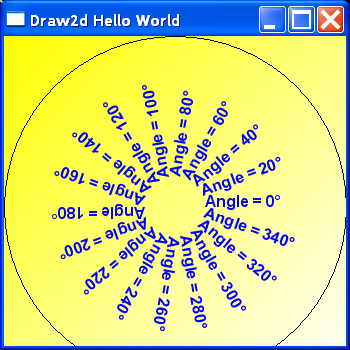
/*
 * -----------------------------------------------------------------------------
 * (c) Copyright IBM Corp. 2004 All rights reserved.
 *
 * The sample program(s) is/are owned by International Business Machines
 * Corporation or one of its subsidiaries ("IBM") and is/are copyrighted and
 * licensed, not sold.
 *
 * You may copy, modify, and distribute this/these sample program(s) in any form
 * without payment to IBM, for any purpose including developing, using,
 * marketing or distributing programs that include or are derivative works of
 * the sample program(s).
 *
 * The sample program(s) is/are provided to you on an "AS IS" basis, without
 * warranty of any kind. IBM HEREBY EXPRESSLY DISCLAIMS ALL WARRANTIES, EITHER
 * EXPRESS OR IMPLIED, INCLUDING, BUT NOT LIMITED TO, THE IMPLIED WARRANTIES OF
 * MERCHANTABILITY AND FITNESS FOR A PARTICULAR PURPOSE. Some jurisdictions do
 * not allow for the exclusion or limitation of implied warranties, so the above
 * limitations or exclusions may not apply to you. IBM shall not be liable for
 * any damages you suffer as a result of using, modifying or distributing the
 * sample program(s) or its/their derivatives.
 *
 * Each copy of any portion of this/these sample program(s) or any derivative
 * work, must include the above copyright notice and disclaimer of warranty.
 *
 * -----------------------------------------------------------------------------
 */

import java.awt.GradientPaint;
import java.awt.Graphics2D;
import java.awt.RenderingHints;
import java.awt.image.BufferedImage;

import org.eclipse.draw2d.Figure;
import org.eclipse.draw2d.IFigure;
import org.eclipse.draw2d.LightweightSystem;
import org.eclipse.draw2d.geometry.Dimension;
import org.eclipse.swt.graphics.GC;
import org.eclipse.swt.graphics.Image;
import org.eclipse.swt.graphics.ImageData;
import org.eclipse.swt.graphics.PaletteData;
import org.eclipse.swt.widgets.Display;
import org.eclipse.swt.widgets.Shell;

public class Draw2DTest {

  public static void main(String[] args) {
    final Graphics2DRenderer renderer = new Graphics2DRenderer();
    Shell shell = new Shell();
    shell.setSize(350, 350);

    shell.open();
    shell.setText("Draw2d Hello World");
    LightweightSystem lws = new LightweightSystem(shell);
    IFigure figure = new Figure() {
      protected void paintClientArea(org.eclipse.draw2d.Graphics graphics) {
        Dimension controlSize = getSize();

        renderer.prepareRendering(graphics);
        // prepares the Graphics2D renderer

        // gets the Graphics2D context and switch on the antialiasing
        Graphics2D g2d = renderer.getGraphics2D();
        g2d.setRenderingHint(RenderingHints.KEY_TEXT_ANTIALIASING,
            RenderingHints.VALUE_TEXT_ANTIALIAS_ON);

        // paints the background with a color gradient
        g2d.setPaint(new GradientPaint(0.0f, 0.0f,
            java.awt.Color.yellow, (float) controlSize.width,
            (float) controlSize.width, java.awt.Color.white));
        g2d.fillRect(0, 0, controlSize.width, controlSize.width);

        // draws rotated text
        g2d.setFont(new java.awt.Font("SansSerif", java.awt.Font.BOLD,
            16));
        g2d.setColor(java.awt.Color.blue);

        g2d.translate(controlSize.width / 2, controlSize.width / 2);
        int nbOfSlices = 18;
        for (int i = 0; i < nbOfSlices; i++) {
          g2d.drawString("Angle = " + (i * 360 / nbOfSlices)
              + "u00B0", 30, 0);
          g2d.rotate(-2 * Math.PI / nbOfSlices);
        }

        // now that we are done with Java2D, renders Graphics2D
        // operation
        // on the SWT graphics context
        renderer.render(graphics);

        // now we can continue with pure SWT paint operations
        graphics.drawOval(0, 0, controlSize.width, controlSize.width);
      }
    };
    lws.setContents(figure);
    Display display = Display.getDefault();
    while (!shell.isDisposed()) {
      if (!display.readAndDispatch())
        display.sleep();
    }
    renderer.dispose();
  }
}

/*
 * -----------------------------------------------------------------------------
 * (c) Copyright IBM Corp. 2004 All rights reserved.
 *
 * The sample program(s) is/are owned by International Business Machines
 * Corporation or one of its subsidiaries ("IBM") and is/are copyrighted and
 * licensed, not sold.
 *
 * You may copy, modify, and distribute this/these sample program(s) in any form
 * without payment to IBM, for any purpose including developing, using,
 * marketing or distributing programs that include or are derivative works of
 * the sample program(s).
 *
 * The sample program(s) is/are provided to you on an "AS IS" basis, without
 * warranty of any kind. IBM HEREBY EXPRESSLY DISCLAIMS ALL WARRANTIES, EITHER
 * EXPRESS OR IMPLIED, INCLUDING, BUT NOT LIMITED TO, THE IMPLIED WARRANTIES OF
 * MERCHANTABILITY AND FITNESS FOR A PARTICULAR PURPOSE. Some jurisdictions do
 * not allow for the exclusion or limitation of implied warranties, so the above
 * limitations or exclusions may not apply to you. IBM shall not be liable for
 * any damages you suffer as a result of using, modifying or distributing the
 * sample program(s) or its/their derivatives.
 *
 * Each copy of any portion of this/these sample program(s) or any derivative
 * work, must include the above copyright notice and disclaimer of warranty.
 *
 * -----------------------------------------------------------------------------
 */

/**
 * Helper class allowing the use of Java2D on SWT or Draw2D graphical context.
 *
 * @author Yannick Saillet
 */

class Graphics2DRenderer {
  private static final PaletteData PALETTE_DATA = new PaletteData(0xFF0000,
      0xFF00, 0xFF);

  private BufferedImage awtImage;

  private Image swtImage;

  private ImageData swtImageData;

  private int[] awtPixels;

  /** RGB value to use as transparent color */
  private static final int TRANSPARENT_COLOR = 0x123456;

  /**
   * Prepare to render on a SWT graphics context.
   */
  public void prepareRendering(GC gc) {
    org.eclipse.swt.graphics.Rectangle clip = gc.getClipping();
    prepareRendering(clip.x, clip.y, clip.width, clip.height);
  }

  /**
   * Prepare to render on a Draw2D graphics context.
   */
  public void prepareRendering(org.eclipse.draw2d.Graphics graphics) {
    org.eclipse.draw2d.geometry.Rectangle clip = graphics
        .getClip(new org.eclipse.draw2d.geometry.Rectangle());
    prepareRendering(clip.x, clip.y, clip.width, clip.height);
  }

  /**
   * Prepare the AWT offscreen image for the rendering of the rectangular
   * region given as parameter.
   */
  private void prepareRendering(int clipX, int clipY, int clipW, int clipH) {
    // check that the offscreen images are initialized and large enough
    checkOffScreenImages(clipW, clipH);
    // fill the region in the AWT image with the transparent color
    java.awt.Graphics awtGraphics = awtImage.getGraphics();
    awtGraphics.setColor(new java.awt.Color(TRANSPARENT_COLOR));
    awtGraphics.fillRect(clipX, clipY, clipW, clipH);
  }

  /**
   * Returns the Graphics2D context to use.
   */
  public Graphics2D getGraphics2D() {
    if (awtImage == null)
      return null;
    return (Graphics2D) awtImage.getGraphics();
  }

  /**
   * Complete the rendering by flushing the 2D renderer on a SWT graphical
   * context.
   */
  public void render(GC gc) {
    if (awtImage == null)
      return;

    org.eclipse.swt.graphics.Rectangle clip = gc.getClipping();
    transferPixels(clip.x, clip.y, clip.width, clip.height);
    gc.drawImage(swtImage, clip.x, clip.y, clip.width, clip.height, clip.x,
        clip.y, clip.width, clip.height);
  }

  /**
   * Complete the rendering by flushing the 2D renderer on a Draw2D graphical
   * context.
   */
  public void render(org.eclipse.draw2d.Graphics graphics) {
    if (awtImage == null)
      return;

    org.eclipse.draw2d.geometry.Rectangle clip = graphics
        .getClip(new org.eclipse.draw2d.geometry.Rectangle());
    transferPixels(clip.x, clip.y, clip.width, clip.height);
    graphics.drawImage(swtImage, clip.x, clip.y, clip.width, clip.height,
        clip.x, clip.y, clip.width, clip.height);
  }

  /**
   * Transfer a rectangular region from the AWT image to the SWT image.
   */
  private void transferPixels(int clipX, int clipY, int clipW, int clipH) {
    int step = swtImageData.depth / 8;
    byte[] data = swtImageData.data;
    awtImage.getRGB(clipX, clipY, clipW, clipH, awtPixels, 0, clipW);
    for (int i = 0; i < clipH; i++) {
      int idx = (clipY + i) * swtImageData.bytesPerLine + clipX * step;
      for (int j = 0; j < clipW; j++) {
        int rgb = awtPixels[j + i * clipW];
        for (int k = swtImageData.depth - 8; k >= 0; k -= 8) {
          data[idx++] = (byte) ((rgb >> k) & 0xFF);
        }
      }
    }
    if (swtImage != null)
      swtImage.dispose();
    swtImage = new Image(Display.getDefault(), swtImageData);
  }

  /**
   * Dispose the resources attached to this 2D renderer.
   */
  public void dispose() {
    if (awtImage != null)
      awtImage.flush();
    if (swtImage != null)
      swtImage.dispose();
    awtImage = null;
    swtImageData = null;
    awtPixels = null;
  }

  /**
   * Ensure that the offscreen images are initialized and are at least as
   * large as the size given as parameter.
   */
  private void checkOffScreenImages(int width, int height) {
    int currentImageWidth = 0;
    int currentImageHeight = 0;
    if (swtImage != null) {
      currentImageWidth = swtImage.getImageData().width;
      currentImageHeight = swtImage.getImageData().height;
    }

    // if the offscreen images are too small, recreate them
    if (width > currentImageWidth || height > currentImageHeight) {
      dispose();
      width = Math.max(width, currentImageWidth);
      height = Math.max(height, currentImageHeight);
      awtImage = new BufferedImage(width, height,
          BufferedImage.TYPE_INT_ARGB);
      swtImageData = new ImageData(width, height, 24, PALETTE_DATA);
      swtImageData.transparentPixel = TRANSPARENT_COLOR;
      awtPixels = new int[width * height];
    }
  }
}

