Java Is Open Source Programming Language You Can Download From Java and Java Libraries From http://www.oracle.com.
We provide this code related to title for you to solve your developing problem easily. Libraries which is import in this program you can download from http://www.oracle.com.
Shows the various styles of Decorations
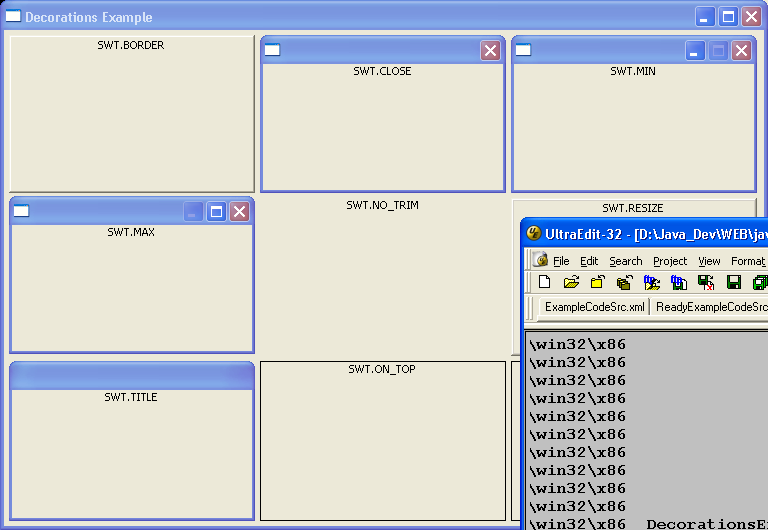
//Send questions, comments, bug reports, etc. to the authors:

//Rob Warner (rwarner@interspatial.com)
//Robert Harris (rbrt_harris@yahoo.com)

import org.eclipse.swt.*;
import org.eclipse.swt.layout.*;
import org.eclipse.swt.widgets.*;

/**
 * This application shows the various styles of Decorations
 */
public class DecorationsExample {
  /**
   * Runs the application
   */
  public void run() {
    Display display = new Display();
    Shell shell = new Shell(display);
    shell.setText("Decorations Example");
    createContents(shell);
    shell.open();
    while (!shell.isDisposed()) {
      if (!display.readAndDispatch()) {
        display.sleep();
      }
    }
    display.dispose();
  }

  /**
   * Creates the various Decorations
   *
   * @param composite the parent composite
   */
  public void createContents(Composite composite) {
    // There are nine distinct styles, so create
    // a 3x3 grid
    composite.setLayout(new GridLayout(3, true));

    // The SWT.BORDER style
    Decorations d = new Decorations(composite, SWT.BORDER);
    d.setLayoutData(new GridData(GridData.FILL_BOTH));
    d.setLayout(new FillLayout());
    new Label(d, SWT.CENTER).setText("SWT.BORDER");

    // The SWT.CLOSE style
    d = new Decorations(composite, SWT.CLOSE);
    d.setLayoutData(new GridData(GridData.FILL_BOTH));
    d.setLayout(new FillLayout());
    new Label(d, SWT.CENTER).setText("SWT.CLOSE");

    // The SWT.MIN style
    d = new Decorations(composite, SWT.MIN);
    d.setLayoutData(new GridData(GridData.FILL_BOTH));
    d.setLayout(new FillLayout());
    new Label(d, SWT.CENTER).setText("SWT.MIN");

    // The SWT.MAX style
    d = new Decorations(composite, SWT.MAX);
    d.setLayoutData(new GridData(GridData.FILL_BOTH));
    d.setLayout(new FillLayout());
    new Label(d, SWT.CENTER).setText("SWT.MAX");

    // The SWT.NO_TRIM style
    d = new Decorations(composite, SWT.NO_TRIM);
    d.setLayoutData(new GridData(GridData.FILL_BOTH));
    d.setLayout(new FillLayout());
    new Label(d, SWT.CENTER).setText("SWT.NO_TRIM");

    // The SWT.RESIZE style
    d = new Decorations(composite, SWT.RESIZE);
    d.setLayoutData(new GridData(GridData.FILL_BOTH));
    d.setLayout(new FillLayout());
    new Label(d, SWT.CENTER).setText("SWT.RESIZE");

    // The SWT.TITLE style
    d = new Decorations(composite, SWT.TITLE);
    d.setLayoutData(new GridData(GridData.FILL_BOTH));
    d.setLayout(new FillLayout());
    new Label(d, SWT.CENTER).setText("SWT.TITLE");

    // The SWT.ON_TOP style
    d = new Decorations(composite, SWT.ON_TOP);
    d.setLayoutData(new GridData(GridData.FILL_BOTH));
    d.setLayout(new FillLayout());
    new Label(d, SWT.CENTER).setText("SWT.ON_TOP");

    // The SWT.TOOL style
    d = new Decorations(composite, SWT.TOOL);
    d.setLayoutData(new GridData(GridData.FILL_BOTH));
    d.setLayout(new FillLayout());
    new Label(d, SWT.CENTER).setText("SWT.TOOL");
  }

  /**
   * The entry point for the application
   *
   * @param args the command line arguments
   */
  public static void main(String[] args) {
    new DecorationsExample().run();
  }
}

