Java Is Open Source Programming Language You Can Download From Java and Java Libraries From http://www.oracle.com.
We provide this code related to title for you to solve your developing problem easily. Libraries which is import in this program you can download from http://www.oracle.com.
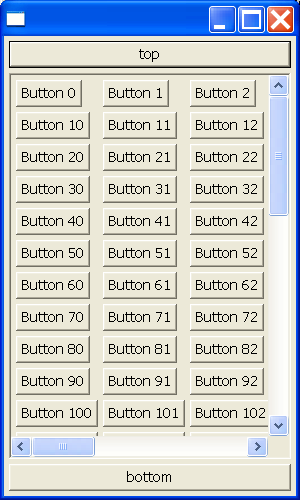
Scroll SWT widgets into view when they get focus
import org.eclipse.swt.SWT;
import org.eclipse.swt.custom.ScrolledComposite;
import org.eclipse.swt.graphics.Point;
import org.eclipse.swt.graphics.Rectangle;
import org.eclipse.swt.layout.GridData;
import org.eclipse.swt.layout.GridLayout;
import org.eclipse.swt.widgets.Button;
import org.eclipse.swt.widgets.Composite;
import org.eclipse.swt.widgets.Control;
import org.eclipse.swt.widgets.Display;
import org.eclipse.swt.widgets.Event;
import org.eclipse.swt.widgets.Listener;
import org.eclipse.swt.widgets.Shell;

/*
 * Scroll widgets into view when they get focus
 *
 * For a list of all SWT example snippets see
 * http://dev.eclipse.org/viewcvs/index.cgi/%7Echeckout%7E/platform-swt-home/dev.html#snippets
 */

public class Snippet188 {

  public static void main(String[] args) {
    Display display = new Display();
    Shell shell = new Shell(display);
    shell.setLayout(new GridLayout());
    Button b1 = new Button(shell, SWT.PUSH);
    b1.setText("top");
    b1
        .setLayoutData(new GridData(SWT.FILL, SWT.CENTER, false, false,
            1, 1));
    final ScrolledComposite sc = new ScrolledComposite(shell, SWT.BORDER
        | SWT.H_SCROLL | SWT.V_SCROLL);
    sc.setLayoutData(new GridData(SWT.FILL, SWT.FILL, true, true, 1, 1));
    Composite c = new Composite(sc, SWT.NONE);
    c.setLayout(new GridLayout(10, true));
    for (int i = 0; i < 300; i++) {
      Button b = new Button(c, SWT.PUSH);
      b.setText("Button " + i);
    }
    Button b2 = new Button(shell, SWT.PUSH);
    b2.setText("bottom");
    b2
        .setLayoutData(new GridData(SWT.FILL, SWT.CENTER, false, false,
            1, 1));

    sc.setContent(c);
    sc.setExpandHorizontal(true);
    sc.setExpandVertical(true);
    sc.setMinSize(c.computeSize(SWT.DEFAULT, SWT.DEFAULT));

    Listener listener = new Listener() {
      public void handleEvent(Event e) {
        Control child = (Control) e.widget;
        Rectangle bounds = child.getBounds();
        Rectangle area = sc.getClientArea();
        Point origin = sc.getOrigin();
        if (origin.x > bounds.x)
          origin.x = Math.max(0, bounds.x);
        if (origin.y > bounds.y)
          origin.y = Math.max(0, bounds.y);
        if (origin.x + area.width < bounds.x + bounds.width)
          origin.x = Math
              .max(0, bounds.x + bounds.width - area.width);
        if (origin.y + area.height < bounds.y + bounds.height)
          origin.y = Math.max(0, bounds.y + bounds.height
              - area.height);
        sc.setOrigin(origin);
      }
    };
    Control[] controls = c.getChildren();
    for (int i = 0; i < controls.length; i++) {
      controls[i].addListener(SWT.Activate, listener);
    }
    shell.setSize(300, 500);
    shell.open();
    while (!shell.isDisposed()) {
      if (!display.readAndDispatch())
        display.sleep();
    }
    display.dispose();
  }
}

