Java Is Open Source Programming Language You Can Download From Java and Java Libraries From http://www.oracle.com.
We provide this code related to title for you to solve your developing problem easily. Libraries which is import in this program you can download from http://www.oracle.com.
scroll an image (flicker free, no double buffering)
/*
 * Canvas example snippet: scroll an image (flicker free, no double buffering)
 *
 * For a list of all SWT example snippets see
 * http://dev.eclipse.org/viewcvs/index.cgi/%7Echeckout%7E/platform-swt-home/dev.html#snippets
 */
import org.eclipse.swt.SWT;
import org.eclipse.swt.graphics.GC;
import org.eclipse.swt.graphics.Image;
import org.eclipse.swt.graphics.Point;
import org.eclipse.swt.graphics.Rectangle;
import org.eclipse.swt.widgets.Display;
import org.eclipse.swt.widgets.Event;
import org.eclipse.swt.widgets.FileDialog;
import org.eclipse.swt.widgets.Listener;
import org.eclipse.swt.widgets.ScrollBar;
import org.eclipse.swt.widgets.Shell;

public class Snippet48 {

  public static void main(String[] args) {
    Display display = new Display();
    final Shell shell = new Shell(display, SWT.SHELL_TRIM
        | SWT.NO_BACKGROUND | SWT.NO_REDRAW_RESIZE | SWT.V_SCROLL
        | SWT.H_SCROLL);
    Image originalImage = null;
    FileDialog dialog = new FileDialog(shell, SWT.OPEN);
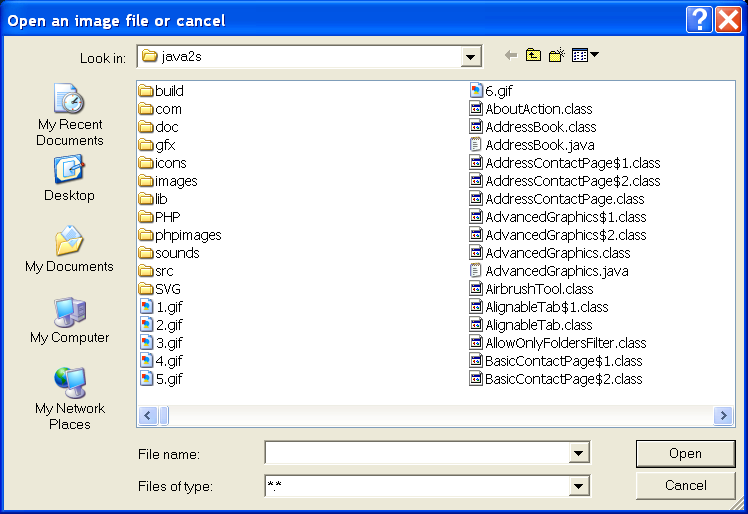
    dialog.setText("Open an image file or cancel");
    String string = dialog.open();
    if (string != null) {
      originalImage = new Image(display, string);
    }
    if (originalImage == null) {
      int width = 150, height = 200;
      originalImage = new Image(display, width, height);
      GC gc = new GC(originalImage);
      gc.fillRectangle(0, 0, width, height);
      gc.drawLine(0, 0, width, height);
      gc.drawLine(0, height, width, 0);
      gc.drawText("Default Image", 10, 10);
      gc.dispose();
    }
    final Image image = originalImage;
    final Point origin = new Point(0, 0);
    final ScrollBar hBar = shell.getHorizontalBar();
    hBar.addListener(SWT.Selection, new Listener() {
      public void handleEvent(Event e) {
        int hSelection = hBar.getSelection();
        int destX = -hSelection - origin.x;
        Rectangle rect = image.getBounds();
        shell.scroll(destX, 0, 0, 0, rect.width, rect.height, false);
        origin.x = -hSelection;
      }
    });
    final ScrollBar vBar = shell.getVerticalBar();
    vBar.addListener(SWT.Selection, new Listener() {
      public void handleEvent(Event e) {
        int vSelection = vBar.getSelection();
        int destY = -vSelection - origin.y;
        Rectangle rect = image.getBounds();
        shell.scroll(0, destY, 0, 0, rect.width, rect.height, false);
        origin.y = -vSelection;
      }
    });
    shell.addListener(SWT.Resize, new Listener() {
      public void handleEvent(Event e) {
        Rectangle rect = image.getBounds();
        Rectangle client = shell.getClientArea();
        hBar.setMaximum(rect.width);
        vBar.setMaximum(rect.height);
        hBar.setThumb(Math.min(rect.width, client.width));
        vBar.setThumb(Math.min(rect.height, client.height));
        int hPage = rect.width - client.width;
        int vPage = rect.height - client.height;
        int hSelection = hBar.getSelection();
        int vSelection = vBar.getSelection();
        if (hSelection >= hPage) {
          if (hPage <= 0)
            hSelection = 0;
          origin.x = -hSelection;
        }
        if (vSelection >= vPage) {
          if (vPage <= 0)
            vSelection = 0;
          origin.y = -vSelection;
        }
        shell.redraw();
      }
    });
    shell.addListener(SWT.Paint, new Listener() {
      public void handleEvent(Event e) {
        GC gc = e.gc;
        gc.drawImage(image, origin.x, origin.y);
        Rectangle rect = image.getBounds();
        Rectangle client = shell.getClientArea();
        int marginWidth = client.width - rect.width;
        if (marginWidth > 0) {
          gc.fillRectangle(rect.width, 0, marginWidth, client.height);
        }
        int marginHeight = client.height - rect.height;
        if (marginHeight > 0) {
          gc
              .fillRectangle(0, rect.height, client.width,
                  marginHeight);
        }
      }
    });
    shell.setSize(200, 150);
    shell.open();
    while (!shell.isDisposed()) {
      if (!display.readAndDispatch())
        display.sleep();
    }
    display.dispose();
  }

}

