Source Code : navigate a SWT table cells with arrow keys
Java Is Open Source Programming Language You Can Download From Java and Java Libraries From http://www.oracle.com.
Click Here to download
We provide this code related to title for you to solve your developing problem easily. Libraries which is import in this program you can download from http://www.oracle.com.
Click Here or search from google with Libraries Name you get jar file related it
navigate a SWT table cells with arrow keys
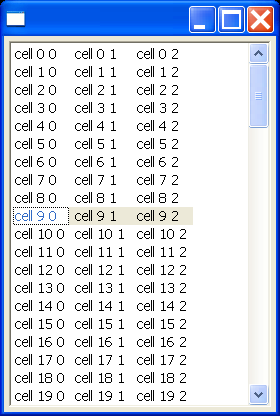
/*
 * TableCursor example snippet: navigate a table cells with arrow keys.
 * Edit when user hits Return key.  Exit edit mode by hitting Escape (cancels edit)
 * or Return (applies edit to table).
 *
 * For a list of all SWT example snippets see
 * http://dev.eclipse.org/viewcvs/index.cgi/%7Echeckout%7E/platform-swt-home/dev.html#snippets
 */
import org.eclipse.swt.SWT;
import org.eclipse.swt.custom.ControlEditor;
import org.eclipse.swt.custom.TableCursor;
import org.eclipse.swt.events.KeyAdapter;
import org.eclipse.swt.events.KeyEvent;
import org.eclipse.swt.events.SelectionAdapter;
import org.eclipse.swt.events.SelectionEvent;
import org.eclipse.swt.layout.GridData;
import org.eclipse.swt.layout.GridLayout;
import org.eclipse.swt.widgets.Display;
import org.eclipse.swt.widgets.Shell;
import org.eclipse.swt.widgets.Table;
import org.eclipse.swt.widgets.TableColumn;
import org.eclipse.swt.widgets.TableItem;
import org.eclipse.swt.widgets.Text;

public class Snippet96 {

  public static void main(String[] args) {
    Display display = new Display();
    Shell shell = new Shell(display);
    shell.setLayout(new GridLayout());

    // create a a table with 3 columns and fill with data
    final Table table = new Table(shell, SWT.BORDER | SWT.MULTI
        | SWT.FULL_SELECTION);
    table.setLayoutData(new GridData(GridData.FILL_BOTH));
    TableColumn column1 = new TableColumn(table, SWT.NONE);
    TableColumn column2 = new TableColumn(table, SWT.NONE);
    TableColumn column3 = new TableColumn(table, SWT.NONE);
    for (int i = 0; i < 100; i++) {
      TableItem item = new TableItem(table, SWT.NONE);
      item.setText(new String[] { "cell " + i + " 0", "cell " + i + " 1",
          "cell " + i + " 2" });
    }
    column1.pack();
    column2.pack();
    column3.pack();

    // create a TableCursor to navigate around the table
    final TableCursor cursor = new TableCursor(table, SWT.NONE);
    // create an editor to edit the cell when the user hits "ENTER"
    // while over a cell in the table
    final ControlEditor editor = new ControlEditor(cursor);
    editor.grabHorizontal = true;
    editor.grabVertical = true;

    cursor.addSelectionListener(new SelectionAdapter() {
      // when the TableEditor is over a cell, select the corresponding row
      // in
      // the table
      public void widgetSelected(SelectionEvent e) {
        table.setSelection(new TableItem[] { cursor.getRow() });
      }

      // when the user hits "ENTER" in the TableCursor, pop up a text
      // editor so that
      // they can change the text of the cell
      public void widgetDefaultSelected(SelectionEvent e) {
        final Text text = new Text(cursor, SWT.NONE);
        TableItem row = cursor.getRow();
        int column = cursor.getColumn();
        text.setText(row.getText(column));
        text.addKeyListener(new KeyAdapter() {
          public void keyPressed(KeyEvent e) {
            // close the text editor and copy the data over
            // when the user hits "ENTER"
            if (e.character == SWT.CR) {
              TableItem row = cursor.getRow();
              int column = cursor.getColumn();
              row.setText(column, text.getText());
              text.dispose();
            }
            // close the text editor when the user hits "ESC"
            if (e.character == SWT.ESC) {
              text.dispose();
            }
          }
        });
        editor.setEditor(text);
        text.setFocus();
      }
    });
    // Hide the TableCursor when the user hits the "CTRL" or "SHIFT" key.
    // This alows the user to select multiple items in the table.
    cursor.addKeyListener(new KeyAdapter() {
      public void keyPressed(KeyEvent e) {
        if (e.keyCode == SWT.CTRL || e.keyCode == SWT.SHIFT
            || (e.stateMask & SWT.CONTROL) != 0
            || (e.stateMask & SWT.SHIFT) != 0) {
          cursor.setVisible(false);
        }
      }
    });
    // Show the TableCursor when the user releases the "SHIFT" or "CTRL"
    // key.
    // This signals the end of the multiple selection task.
    table.addKeyListener(new KeyAdapter() {
      public void keyReleased(KeyEvent e) {
        if (e.keyCode == SWT.CONTROL && (e.stateMask & SWT.SHIFT) != 0)
          return;
        if (e.keyCode == SWT.SHIFT && (e.stateMask & SWT.CONTROL) != 0)
          return;
        if (e.keyCode != SWT.CONTROL
            && (e.stateMask & SWT.CONTROL) != 0)
          return;
        if (e.keyCode != SWT.SHIFT && (e.stateMask & SWT.SHIFT) != 0)
          return;

        TableItem[] selection = table.getSelection();
        TableItem row = (selection.length == 0) ? table.getItem(table
            .getTopIndex()) : selection[0];
        table.showItem(row);
        cursor.setSelection(row, 0);
        cursor.setVisible(true);
        cursor.setFocus();
      }
    });

    shell.open();
    while (!shell.isDisposed()) {
      if (!display.readAndDispatch())
        display.sleep();
    }
    display.dispose();
  }
}
Thank with us

