Java Is Open Source Programming Language You Can Download From Java and Java Libraries From http://www.oracle.com.
We provide this code related to title for you to solve your developing problem easily. Libraries which is import in this program you can download from http://www.oracle.com.
implement tab traversal (behave like a tab group)
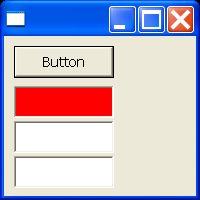
/*
 * Canvas example snippet: implement tab traversal (behave like a tab group)
 *
 * For a list of all SWT example snippets see
 * http://dev.eclipse.org/viewcvs/index.cgi/%7Echeckout%7E/platform-swt-home/dev.html#snippets
 */
import org.eclipse.swt.SWT;
import org.eclipse.swt.graphics.Color;
import org.eclipse.swt.widgets.Button;
import org.eclipse.swt.widgets.Canvas;
import org.eclipse.swt.widgets.Display;
import org.eclipse.swt.widgets.Event;
import org.eclipse.swt.widgets.Listener;
import org.eclipse.swt.widgets.Shell;
import org.eclipse.swt.widgets.Text;

public class Snippet21 {

  public static void main(String[] args) {
    Display display = new Display();
    final Color red = display.getSystemColor(SWT.COLOR_RED);
    final Color blue = display.getSystemColor(SWT.COLOR_BLUE);
    Shell shell = new Shell(display);
    Button b = new Button(shell, SWT.PUSH);
    b.setBounds(10, 10, 100, 32);
    b.setText("Button");
    shell.setDefaultButton(b);
    final Canvas c = new Canvas(shell, SWT.BORDER);
    c.setBounds(10, 50, 100, 32);
    c.addListener(SWT.Traverse, new Listener() {
      public void handleEvent(Event e) {
        switch (e.detail) {
        /* Do tab group traversal */
        case SWT.TRAVERSE_ESCAPE:
        case SWT.TRAVERSE_RETURN:
        case SWT.TRAVERSE_TAB_NEXT:
        case SWT.TRAVERSE_TAB_PREVIOUS:
        case SWT.TRAVERSE_PAGE_NEXT:
        case SWT.TRAVERSE_PAGE_PREVIOUS:
          e.doit = true;
          break;
        }
      }
    });
    c.addListener(SWT.FocusIn, new Listener() {
      public void handleEvent(Event e) {
        c.setBackground(red);
      }
    });
    c.addListener(SWT.FocusOut, new Listener() {
      public void handleEvent(Event e) {
        c.setBackground(blue);
      }
    });
    c.addListener(SWT.KeyDown, new Listener() {
      public void handleEvent(Event e) {
        System.out.println("KEY");
        for (int i = 0; i < 64; i++) {
          Color c1 = red, c2 = blue;
          if (c.isFocusControl()) {
            c1 = blue;
            c2 = red;
          }
          c.setBackground(c1);
          c.update();
          c.setBackground(c2);
        }
      }
    });
    Text t = new Text(shell, SWT.SINGLE | SWT.BORDER);
    t.setBounds(10, 85, 100, 32);

    Text r = new Text(shell, SWT.MULTI | SWT.BORDER);
    r.setBounds(10, 120, 100, 32);

    c.setFocus();
    shell.setSize(200, 200);
    shell.open();
    while (!shell.isDisposed()) {
      if (!display.readAndDispatch())
        display.sleep();
    }
    display.dispose();
  }
}

