Source Code : HTML Form
Java Is Open Source Programming Language You Can Download From Java and Java Libraries From http://www.oracle.com.
Click Here to download
We provide this code related to title for you to solve your developing problem easily. Libraries which is import in this program you can download from http://www.oracle.com.
Click Here or search from google with Libraries Name you get jar file related it
HTML Form
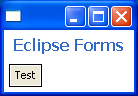
/*******************************************************************************
 * All Right Reserved. Copyright (c) 1998, 2004 Jackwind Li Guojie
 *
 * Created on 2004-6-11 15:12:57 by JACK $Id$
 *
 ******************************************************************************/
import org.eclipse.swt.SWT;
import org.eclipse.swt.layout.FillLayout;
import org.eclipse.swt.layout.GridLayout;
import org.eclipse.swt.widgets.Button;
import org.eclipse.swt.widgets.Composite;
import org.eclipse.swt.widgets.Display;
import org.eclipse.swt.widgets.Label;
import org.eclipse.swt.widgets.Shell;
import org.eclipse.swt.widgets.Text;
import org.eclipse.ui.forms.widgets.Form;
import org.eclipse.ui.forms.widgets.FormText;
import org.eclipse.ui.forms.widgets.FormToolkit;
import org.eclipse.ui.forms.widgets.Hyperlink;
import org.eclipse.ui.forms.widgets.Section;

public class SWTTest {

  private FormToolkit toolkit;
  private Form form;
  private Display display;
  private Shell shell;
  private Hyperlink link;
  private Section section1, section2, section3;
  private FormText rtext;
  private Composite client1, client2, client3;
  private Text text;
  private Button button2;
  private Label label;

  static public void main(String args[]) {

    new SWTTest().run();

  }

  private void run() {

    setupShell();

    setupToolkit();

    createFormStructure();

    addLayout();

    addHooks();

    shell.pack();

    while (!shell.isDisposed()) {
      if (!display.readAndDispatch())
        display.sleep();

    }

    display.dispose();

  }

  private void createFormStructure() {

    // form

    form = toolkit.createForm(shell);

    form.setText("Eclipse Forms");

    Button button = toolkit.createButton(form.getBody(), "Test", SWT.NULL);

    form.getBody().setLayout(new GridLayout());

    //form.setBackgroundImage(new Image(display, "java2s.gif"));
  }

  private String getHTML() {

    StringBuffer buf = new StringBuffer();

    buf.append("<form>");

    buf.append("<p>");

    buf.append("Here is some plain text for the text to render; ");

    buf.append(
      "this text is at <a href="http://www.eclipse.org" nowrap="true">http://www.eclipse.org</a> web site.");

    buf.append("</p>");

    buf.append("<p>");

    buf.append(
      "<span color="header" font="header">This text is in header font and color.</span>");

    buf.append("</p>");

    buf.append(
      "<p>This line will contain some <b>bold</b> and some <span font="text">source</span> text. ");

    buf.append("We can also add <img href="image"/> an image. ");

    buf.append("</p>");

    buf.append("<li>A default (bulleted) list item.</li>");

    buf.append("<li>Another bullet list item.</li>");

    buf.append(
      "<li style="text" value="1.">A list item with text.</li>");

    buf.append(
      "<li style="text" value="2.">Another list item with text</li>");

    buf.append(
      "<li style="image" value="image">List item with an image bullet</li>");

    buf.append(
      "<li style="text" bindent="20" indent="40" value="3.">A list item with text.</li>");

    buf.append(
      "<li style="text" bindent="20" indent="40" value="4.">A list item with text.</li>");

    buf.append("</form>");

    return buf.toString();

  }

  private void setupToolkit() {

    toolkit = new FormToolkit(display);

  }

  private void setupShell() {

    display = new Display();

    shell = new Shell(display);

    shell.open();

  }

  private void addLayout() {

    // shell

    shell.setLayout(new FillLayout());

    //form

//    form.getBody().setLayout(new TableWrapLayout());
//
//    section1.setLayoutData(new TableWrapData(TableWrapData.FILL));
//
//    section2.setLayoutData(new TableWrapData(TableWrapData.FILL));
//
//    section3.setLayoutData(new TableWrapData(TableWrapData.FILL));
//
//    // client1
//
//    client1.setLayout(new GridLayout());
//
//    // client2
//
//    client2.setLayout(new GridLayout());
//
//    // // client3
//
//    GridLayout layout = new GridLayout();
//
//    client3.setLayout(layout);
//
//    layout.numColumns = 2;
//
//    // client3->text
//
//    text.setLayoutData(new GridData(GridData.FILL_HORIZONTAL));
//
//    // client3->button2
//
//    GridData gd = new GridData();
//
//    gd.horizontalSpan = 2;
//
//    button2.setLayoutData(gd);

  }

  private void addHooks() {

//    section1.addExpansionListener(new ExpansionAdapter() {
//
//      public void expansionStateChanged(ExpansionEvent e) {
//
//        System.out.println("expansionbutton clicked!");
//
//      }
//
//    });
//
//    link.addHyperlinkListener(new HyperlinkAdapter() {
//
//      public void linkActivated(HyperlinkEvent e) {
//
//        System.out.println("Link active: " + e.getLabel());
//
//      }
//
//    });

  }
}
Thank with us

