Source Code : GridLayout Sample Grab Space
Java Is Open Source Programming Language You Can Download From Java and Java Libraries From http://www.oracle.com.
Click Here to download
We provide this code related to title for you to solve your developing problem easily. Libraries which is import in this program you can download from http://www.oracle.com.
Click Here or search from google with Libraries Name you get jar file related it
GridLayout Sample Grab Space
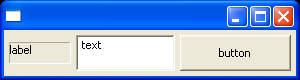
/******************************************************************************
 * Copyright (c) 1998, 2004 Jackwind Li Guojie
 * All right reserved.
 *
 * Created on Jan 29, 2004 1:57:48 PM by JACK
 * $Id$
 *
 * visit: http://www.asprise.com/swt
 *****************************************************************************/


import org.eclipse.swt.SWT;
import org.eclipse.swt.layout.GridData;
import org.eclipse.swt.layout.GridLayout;
import org.eclipse.swt.widgets.Button;
import org.eclipse.swt.widgets.Display;
import org.eclipse.swt.widgets.Label;
import org.eclipse.swt.widgets.Shell;
import org.eclipse.swt.widgets.Text;

public class GridLayoutSampleGrabSpace {
  public GridLayoutSampleGrabSpace() {
    Display display = new Display();
    Shell shell = new Shell(display);

    GridLayout gridLayout = new GridLayout();
    gridLayout.numColumns = 3;
    shell.setLayout(gridLayout);

    Label label = new Label(shell, SWT.BORDER);
    label.setText("label");

    GridData gridData3 = new GridData();
    gridData3.widthHint = 60;
    gridData3.heightHint = 20;

    label.setLayoutData(gridData3);

    Text text = new Text(shell, SWT.SINGLE | SWT.BORDER);
    text.setText("text");

    GridData gridData = new GridData();
    gridData.grabExcessHorizontalSpace = true;
    gridData.grabExcessVerticalSpace = true;
    gridData.horizontalAlignment = GridData.FILL;
    gridData.verticalAlignment = GridData.FILL;
    text.setLayoutData(gridData);

    Button button = new Button(shell, SWT.PUSH);
    button.setText("button");

    GridData gridData2 = new GridData();
    gridData2.grabExcessVerticalSpace = true;
    gridData2.grabExcessHorizontalSpace = true;
    gridData2.verticalAlignment = GridData.FILL;
    gridData2.horizontalAlignment = GridData.FILL;

    button.setLayoutData(gridData2);

    shell.setSize(300, 80);

    //shell.pack();
    shell.open();
    //textUser.forceFocus();

    // Set up the event loop.
    while (!shell.isDisposed()) {
      if (!display.readAndDispatch()) {
        // If no more entries in event queue
        display.sleep();
      }
    }

    display.dispose();
  }

  private void init() {

  }

  public static void main(String[] args) {
    new GridLayoutSampleGrabSpace();
  }
}
Thank with us

