Source Code : FormLayouts
Java Is Open Source Programming Language You Can Download From Java and Java Libraries From http://www.oracle.com.
Click Here to download
We provide this code related to title for you to solve your developing problem easily. Libraries which is import in this program you can download from http://www.oracle.com.
Click Here or search from google with Libraries Name you get jar file related it
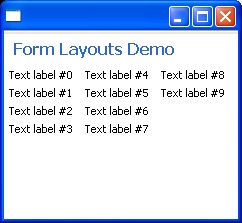
FormLayouts
/******************************************************************************
 * All Right Reserved.
 * Copyright (c) 1998, 2004 Jackwind Li Guojie
 *
 * Created on 2004-6-16 20:22:44 by JACK
 * $Id$
 *
 *****************************************************************************/
import org.eclipse.jface.window.ApplicationWindow;
import org.eclipse.swt.SWT;
import org.eclipse.swt.graphics.Color;
import org.eclipse.swt.layout.FillLayout;
import org.eclipse.swt.layout.GridData;
import org.eclipse.swt.widgets.Composite;
import org.eclipse.swt.widgets.Control;
import org.eclipse.swt.widgets.Label;
import org.eclipse.swt.widgets.Shell;
import org.eclipse.ui.forms.widgets.ColumnLayout;
import org.eclipse.ui.forms.widgets.FormToolkit;
import org.eclipse.ui.forms.widgets.ScrolledForm;
import org.eclipse.ui.forms.widgets.TableWrapData;
import org.eclipse.ui.forms.widgets.TableWrapLayout;

public class FormLayouts extends ApplicationWindow{
  FormToolkit toolkit;
  ScrolledForm form;

  /**
   * @param parentShell
   */
  public FormLayouts(Shell parentShell) {
    super(parentShell);
  }

  private void demoColumnLayout() {
    ColumnLayout layout = new ColumnLayout();
    layout.maxNumColumns = 4;
    form.getBody().setLayout(layout);

    Color color = form.getDisplay().getSystemColor(SWT.COLOR_YELLOW);

    Label label = null;
    for(int i=0; i<10; i++) {
      label = toolkit.createLabel(form.getBody(), "Text label #" + i);
    }

  }

  private void demoTableWrapLayout() {
    TableWrapLayout layout = new TableWrapLayout();
    layout.numColumns = 2;
    form.getBody().setLayout(layout);

    Color color = form.getDisplay().getSystemColor(SWT.COLOR_YELLOW);

    Label label = toolkit.createLabel(form.getBody(), "Some text spans over two columns in the first row.  ", SWT.WRAP);
    TableWrapData data = new TableWrapData();
    data.colspan = 2;
    label.setLayoutData(data);
    label.setBackground(color);

    label = toolkit.createLabel(form.getBody(), "Some text in the first column of the second row. and here is goes on and on ... ... ... ... ", SWT.WRAP);
    label.setBackground(color);
    label = toolkit.createLabel(form.getBody(), "Some text in the second column of the second row. ", SWT.WRAP);
    label.setBackground(color);
  }


  /*
   * (non-Javadoc)
   *
   * @see org.eclipse.jface.window.Window#createContents(org.eclipse.swt.widgets.Composite)
   */
  protected Control createContents(Composite parent) {
    Composite composite = new Composite(parent, SWT.NULL);
    composite.setLayout(new FillLayout());

    // Sets up the toolkit.
    toolkit = new FormToolkit(getShell().getDisplay());

    // Creates a form instance.
    form = toolkit.createScrolledForm(composite);
    form.setLayoutData(new GridData(GridData.FILL_BOTH));

    // Sets title.
    form.setText("Form Layouts Demo");

    // demoTableWrapLayout();
    demoColumnLayout();

    return composite;
  }

  public static void main(String[] args) {
    FormLayouts win = new FormLayouts(null);
    win.setBlockOnOpen(true);

    win.open();
  }

}
Thank with us

