Source Code : FormLayout Complex
Java Is Open Source Programming Language You Can Download From Java and Java Libraries From http://www.oracle.com.
Click Here to download
We provide this code related to title for you to solve your developing problem easily. Libraries which is import in this program you can download from http://www.oracle.com.
Click Here or search from google with Libraries Name you get jar file related it
FormLayout Complex
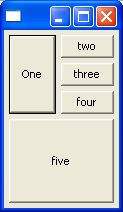
//Send questions, comments, bug reports, etc. to the authors:

//Rob Warner (rwarner@interspatial.com)
//Robert Harris (rbrt_harris@yahoo.com)

import org.eclipse.swt.widgets.*;
import org.eclipse.swt.layout.FormAttachment;
import org.eclipse.swt.layout.FormData;
import org.eclipse.swt.layout.FormLayout;
import org.eclipse.swt.layout.GridData;
import org.eclipse.swt.layout.GridLayout;
import org.eclipse.swt.SWT;

public class FormLayoutComplex {
  public static void main(String[] args) {
    Display display = new Display();
    Shell shell = new Shell(display);
    FormLayout layout = new FormLayout();
    shell.setLayout(layout);
    Button one = new Button(shell, SWT.PUSH);
    one.setText("One");
    FormData data = new FormData();
    data.top = new FormAttachment(0, 5);
    data.left = new FormAttachment(0, 5);
    data.bottom = new FormAttachment(50, -5);
    data.right = new FormAttachment(50, -5);
    one.setLayoutData(data);

    Composite composite = new Composite(shell, SWT.NONE);
    GridLayout gridLayout = new GridLayout();
    gridLayout.marginHeight = 0;
    gridLayout.marginWidth = 0;
    composite.setLayout(gridLayout);
    Button two = new Button(composite, SWT.PUSH);
    two.setText("two");
    GridData gridData = new GridData(GridData.FILL_BOTH);
    two.setLayoutData(gridData);
    Button three = new Button(composite, SWT.PUSH);
    three.setText("three");
    gridData = new GridData(GridData.FILL_BOTH);
    three.setLayoutData(gridData);
    Button four = new Button(composite, SWT.PUSH);
    four.setText("four");
    gridData = new GridData(GridData.FILL_BOTH);
    four.setLayoutData(gridData);
    data = new FormData();
    data.top = new FormAttachment(0, 5);
    data.left = new FormAttachment(one, 5);
    data.bottom = new FormAttachment(50, -5);
    data.right = new FormAttachment(100, -5);
    composite.setLayoutData(data);

    Button five = new Button(shell, SWT.PUSH);
    five.setText("five");
    data = new FormData();
    data.top = new FormAttachment(one, 5);
    data.left = new FormAttachment(0, 5);
    data.bottom = new FormAttachment(100, -5);
    data.right = new FormAttachment(100, -5);
    five.setLayoutData(data);

    shell.pack();
    shell.open();
    while (!shell.isDisposed()) {
      if (!display.readAndDispatch()) {
        display.sleep();
      }
    }
    display.dispose();
  }
}
Thank with us

