Java Is Open Source Programming Language You Can Download From Java and Java Libraries From http://www.oracle.com.
We provide this code related to title for you to solve your developing problem easily. Libraries which is import in this program you can download from http://www.oracle.com.
Draw internationalized styled text on a shell
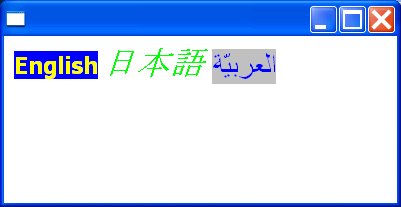
/*
 * TextLayout example snippet: draw internationalized styled text on a shell
 *
 * For a list of all SWT example snippets see
 * http://dev.eclipse.org/viewcvs/index.cgi/%7Echeckout%7E/platform-swt-home/dev.html#snippets
 */
import org.eclipse.swt.SWT;
import org.eclipse.swt.graphics.Color;
import org.eclipse.swt.graphics.Font;
import org.eclipse.swt.graphics.TextLayout;
import org.eclipse.swt.graphics.TextStyle;
import org.eclipse.swt.widgets.Display;
import org.eclipse.swt.widgets.Event;
import org.eclipse.swt.widgets.Listener;
import org.eclipse.swt.widgets.Shell;

public class Snippet145 {

  public static void main(String[] args) {
    Display display = new Display();
    Shell shell = new Shell(display);

    Font font1 = new Font(display, "Tahoma", 14, SWT.BOLD);
    Font font2 = new Font(display, "MS Mincho", 20, SWT.ITALIC);
    Font font3 = new Font(display, "Arabic Transparent", 18, SWT.NORMAL);

    Color blue = display.getSystemColor(SWT.COLOR_BLUE);
    Color green = display.getSystemColor(SWT.COLOR_GREEN);
    Color yellow = display.getSystemColor(SWT.COLOR_YELLOW);
    Color gray = display.getSystemColor(SWT.COLOR_GRAY);

    final TextLayout layout = new TextLayout(display);
    TextStyle style1 = new TextStyle(font1, yellow, blue);
    TextStyle style2 = new TextStyle(font2, green, null);
    TextStyle style3 = new TextStyle(font3, blue, gray);

    layout
        .setText("English u65E5u672Cu8A9E  u0627u0644u0639u0631u0628u064Au0651u0629");
    layout.setStyle(style1, 0, 6);
    layout.setStyle(style2, 8, 10);
    layout.setStyle(style3, 13, 21);

    shell.setBackground(display.getSystemColor(SWT.COLOR_WHITE));
    shell.addListener(SWT.Paint, new Listener() {
      public void handleEvent(Event event) {
        layout.draw(event.gc, 10, 10);
      }
    });
    shell.open();
    while (!shell.isDisposed()) {
      if (!display.readAndDispatch())
        display.sleep();
    }
    font1.dispose();
    font2.dispose();
    font3.dispose();
    layout.dispose();
    display.dispose();
  }
}

