Java Is Open Source Programming Language You Can Download From Java and Java Libraries From http://www.oracle.com.
We provide this code related to title for you to solve your developing problem easily. Libraries which is import in this program you can download from http://www.oracle.com.
Double Buffer
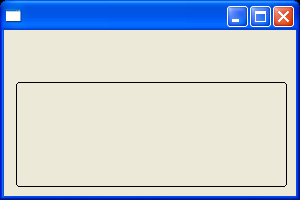
/*******************************************************************************
 * All Right Reserved. Copyright (c) 1998, 2004 Jackwind Li Guojie
 *
 * Created on 2004-4-18 16:12:14 by JACK $Id$
 *
 ******************************************************************************/

import org.eclipse.swt.SWT;
import org.eclipse.swt.events.PaintEvent;
import org.eclipse.swt.events.PaintListener;
import org.eclipse.swt.graphics.GC;
import org.eclipse.swt.graphics.Image;
import org.eclipse.swt.graphics.Point;
import org.eclipse.swt.graphics.Rectangle;
import org.eclipse.swt.layout.FillLayout;
import org.eclipse.swt.widgets.Canvas;
import org.eclipse.swt.widgets.Display;
import org.eclipse.swt.widgets.Shell;

public class DoubleBuffer {
  Display display = new Display();
  Shell shell = new Shell(display);

  public DoubleBuffer() {
    shell.setLayout(new FillLayout());

    final Image imageEclipse = new Image(display, "java2s.gif");

//    final Canvas canvas = new Canvas(shell, SWT.NULL);
//    canvas.addPaintListener(new PaintListener() {
//      public void paintControl(PaintEvent e) {
//        Point size = canvas.getSize();
//
//        int x1 = (int) (Math.random() * size.x);
//        int y1 = (int) (Math.random() * size.y);
//        int x2 = Math.max(canvas.getBounds().width - x1 - 10, 50);
//        int y2 = Math.max(canvas.getBounds().height - y1 - 10, 50);
//
//
//        e.gc.drawRoundRectangle(x1, y1, x2, y2, 5, 5);
//
//        display.timerExec(100, new Runnable() {
//          public void run() {
//            canvas.redraw();
//          }
//        });
//
//      }
//    });

    final Canvas doubleBufferedCanvas = new Canvas(shell, SWT.NO_BACKGROUND);

    doubleBufferedCanvas.addPaintListener(new PaintListener() {
      public void paintControl(PaintEvent e) {
        // Creates new image only absolutely necessary.
        Image image = (Image) doubleBufferedCanvas.getData("double-buffer-image");
        if (image == null
          || image.getBounds().width != doubleBufferedCanvas.getSize().x
          || image.getBounds().height != doubleBufferedCanvas.getSize().y) {
          image =
            new Image(
              display,
            doubleBufferedCanvas.getSize().x,
            doubleBufferedCanvas.getSize().y);
            doubleBufferedCanvas.setData("double-buffer-image", image);
        }

        // Initializes the graphics context of the image.
        GC imageGC = new GC(image);
        imageGC.setBackground(e.gc.getBackground());
        imageGC.setForeground(e.gc.getForeground());
        imageGC.setFont(e.gc.getFont());

        // Fills background.
        Rectangle imageSize = image.getBounds();
        imageGC.fillRectangle(0, 0, imageSize.width + 1, imageSize.height + 1);

        // Performs actual drawing here ...
        Point size = doubleBufferedCanvas.getSize();

        int x1 = (int) (Math.random() * size.x);
        int y1 = (int) (Math.random() * size.y);
        int x2 = Math.max(doubleBufferedCanvas.getBounds().width - x1 - 10, 50);
        int y2 = Math.max(doubleBufferedCanvas.getBounds().height - y1 - 10, 50);


        imageGC.drawRoundRectangle(x1, y1, x2, y2, 5, 5);

        // Draws the buffer image onto the canvas.
        e.gc.drawImage(image, 0, 0);

        imageGC.dispose();

        display.timerExec(100, new Runnable() {
          public void run() {
            doubleBufferedCanvas.redraw();
          }
        });
      }
    });

    shell.setSize(300, 200);
    shell.open();
    //textUser.forceFocus();

    // Set up the event loop.
    while (!shell.isDisposed()) {
      if (!display.readAndDispatch()) {
        // If no more entries in event queue
        display.sleep();
      }
    }

    display.dispose();
  }

  /**
   * Equips the specified canvas with double buffering to reduce flicker.
   *
   * @param canvas
   */
  public static void enableDoubleBuffer(Canvas canvas) {

  }

  public static void main(String[] args) {
    new DoubleBuffer();
  }
}

