Source Code : Demonstrates TreeEditor
Java Is Open Source Programming Language You Can Download From Java and Java Libraries From http://www.oracle.com.
Click Here to download
We provide this code related to title for you to solve your developing problem easily. Libraries which is import in this program you can download from http://www.oracle.com.
Click Here or search from google with Libraries Name you get jar file related it
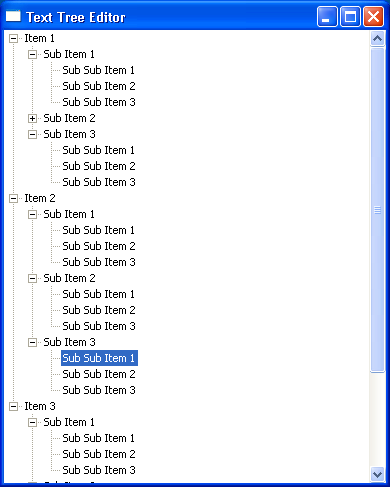
Demonstrates TreeEditor
import org.eclipse.swt.SWT;
import org.eclipse.swt.custom.*;
import org.eclipse.swt.events.*;
import org.eclipse.swt.layout.*;
import org.eclipse.swt.widgets.*;

/**
 * This class demonstrates TreeEditor
 */
public class TextTreeEditor {
  // Constant for how many items to create at each level
  private static final int NUM = 3;

  /**
   * Runs the //Send questions, comments, bug reports, etc. to the authors:

//Rob Warner (rwarner@interspatial.com)
//Robert Harris (rbrt_harris@yahoo.com)application
   */
  public void run() {
    Display display = new Display();
    Shell shell = new Shell(display);
    shell.setText("Text Tree Editor");
    createContents(shell);
    shell.open();
    while (!shell.isDisposed()) {
      if (!display.readAndDispatch()) {
        display.sleep();
      }
    }
    display.dispose();
  }

  /**
   * Creates the contents of the main window
   *
   * @param shell the main window
   */
  public void createContents(Shell shell) {
    shell.setLayout(new FillLayout());

    // Create the tree
    final Tree tree = new Tree(shell, SWT.SINGLE);

    // Fill the tree with data
    for (int i = 0; i < NUM; i++) {
      TreeItem iItem = new TreeItem(tree, SWT.NONE);
      iItem.setText("Item " + (i + 1));
      for (int j = 0; j < NUM; j++) {
        TreeItem jItem = new TreeItem(iItem, SWT.NONE);
        jItem.setText("Sub Item " + (j + 1));
        for (int k = 0; k < NUM; k++) {
          new TreeItem(jItem, SWT.NONE).setText("Sub Sub Item " + (k + 1));
        }
        jItem.setExpanded(true);
      }
      iItem.setExpanded(true);
    }

    // Create the editor and set its attributes
    final TreeEditor editor = new TreeEditor(tree);
    editor.horizontalAlignment = SWT.LEFT;
    editor.grabHorizontal = true;

    // Add a key listener to the tree that listens for F2.
    // If F2 is pressed, we do the editing
    tree.addKeyListener(new KeyAdapter() {
      public void keyPressed(KeyEvent event) {
        // Make sure one and only one item is selected when F2 is pressed
        if (event.keyCode == SWT.F2 && tree.getSelectionCount() == 1) {
          // Determine the item to edit
          final TreeItem item = tree.getSelection()[0];

          // Create a text field to do the editing
          final Text text = new Text(tree, SWT.NONE);
          text.setText(item.getText());
          text.selectAll();
          text.setFocus();

          // If the text field loses focus, set its text into the tree
          // and end the editing session
          text.addFocusListener(new FocusAdapter() {
            public void focusLost(FocusEvent event) {
              item.setText(text.getText());
              text.dispose();
            }
          });

          // If they hit Enter, set the text into the tree and end the editing
          // session. If they hit Escape, ignore the text and end the editing
          // session
          text.addKeyListener(new KeyAdapter() {
            public void keyPressed(KeyEvent event) {
              switch (event.keyCode) {
              case SWT.CR:
                // Enter hit--set the text into the tree and drop through
                item.setText(text.getText());
              case SWT.ESC:
                // End editing session
                text.dispose();
                break;
              }
            }
          });

          // Set the text field into the editor
          editor.setEditor(text, item);
        }
      }
    });
  }

  /**
   * The application entry point
   *
   * @param args the command line arguments
   */
  public static void main(String[] args) {
    new TextTreeEditor().run();
  }
}
Thank with us

