Java Is Open Source Programming Language You Can Download From Java and Java Libraries From http://www.oracle.com.
We provide this code related to title for you to solve your developing problem easily. Libraries which is import in this program you can download from http://www.oracle.com.
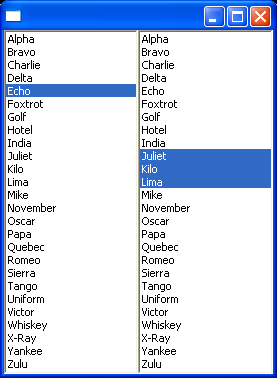
Demonstrates Lists
//Send questions, comments, bug reports, etc. to the authors:

//Rob Warner (rwarner@interspatial.com)
//Robert Harris (rbrt_harris@yahoo.com)

import org.eclipse.swt.SWT;
import org.eclipse.swt.layout.*;
import org.eclipse.swt.widgets.*;

/**
 * This class demonstrates Lists
 */
public class ListExample {
  // Strings to use as list items
  private static final String[] ITEMS = { "Alpha", "Bravo", "Charlie", "Delta",
    "Echo", "Foxtrot", "Golf", "Hotel", "India", "Juliet", "Kilo", "Lima", "Mike",
    "November", "Oscar", "Papa", "Quebec", "Romeo", "Sierra", "Tango", "Uniform",
    "Victor", "Whiskey", "X-Ray", "Yankee", "Zulu"
  };

  public static void main(String[] args) {
    Display display = new Display();
    Shell shell = new Shell(display);
    shell.setLayout(new FillLayout());

    // Create a single-selection list
    List single = new List(shell, SWT.BORDER | SWT.SINGLE | SWT.V_SCROLL);

    // Add the items, one by one
    for (int i = 0, n = ITEMS.length; i < n; i++) {
      single.add(ITEMS[i]);
    }

    // Select the 5th items
    single.select(4);

    // Create a multiple-selection list
    List multi = new List(shell, SWT.BORDER | SWT.MULTI | SWT.V_SCROLL);

    // Add the items all at once
    multi.setItems(ITEMS);

    // Select the 10th through 12th items
    multi.select(9, 11);

    shell.open();
    while (!shell.isDisposed()) {
      if (!display.readAndDispatch()) {
        display.sleep();
      }
    }
    display.dispose();
  }
}

