Java Is Open Source Programming Language You Can Download From Java and Java Libraries From http://www.oracle.com.
We provide this code related to title for you to solve your developing problem easily. Libraries which is import in this program you can download from http://www.oracle.com.
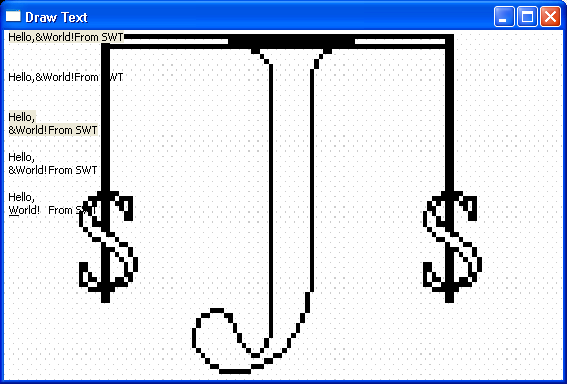
Demonstrates how to draw text
//Send questions, comments, bug reports, etc. to the authors:

//Rob Warner (rwarner@interspatial.com)
//Robert Harris (rbrt_harris@yahoo.com)

import org.eclipse.swt.SWT;
import org.eclipse.swt.events.*;
import org.eclipse.swt.graphics.*;
import org.eclipse.swt.widgets.*;

/**
 * This class demonstrates how to draw text
 */
public class DrawText {
  // The string to draw
  private static final String HELLO = "Hello,
&World!	From SWT";

  /**
   * Runs the application
   */
  public void run() {
    Display display = new Display();
    final Shell shell = new Shell(display);

    // Load an image to use as the background
    final Image image = new Image(display, this.getClass().getResourceAsStream(
        "java2s.gif"));

    shell.addPaintListener(new PaintListener() {
      public void paintControl(PaintEvent event) {
        /* Stretch the image to fill the window*/

        Rectangle rect = shell.getClientArea();
        event.gc.drawImage(image, 0, 0, image.getImageData().width, image
            .getImageData().height, 0, 0, rect.width, rect.height);

        // This will draw the string on one line, with non-printing characters
        // for
 and 	, with an ampersand, and with an opaque background
        event.gc.drawString(HELLO, 5, 0);

        // This will draw the string on one line, with non-printing characters
        // for
 and 	, with an ampersand, and with a transparent background
        event.gc.drawString(HELLO, 5, 40, true);

        // This will draw the string on two lines, with a tab between World! and
        // From, with an ampersand, and with an opaque background
        event.gc.drawText(HELLO, 5, 80);

        // This will draw the string on two lines, with a tab between World! and
        // From, with an ampersand, and with a transparent background
        event.gc.drawText(HELLO, 5, 120, true);

        // This will draw the string on two lines, with a tab between World! and
        // From, with the W underlined, and with a transparent background
        event.gc.drawText(HELLO, 5, 160, SWT.DRAW_MNEMONIC | SWT.DRAW_DELIMITER
            | SWT.DRAW_TAB | SWT.DRAW_TRANSPARENT);
      }
    });
    shell.setText("Draw Text");
    shell.open();
    while (!shell.isDisposed()) {
      if (!display.readAndDispatch()) {
        display.sleep();
      }
    }
    image.dispose();
    display.dispose();
  }

  /**
   * The application entry point
   *
   * @param args the command line arguments
   */
  public static void main(String[] args) {
    new DrawText().run();
  }
}

