Source Code : Stepped ComboBox Example
Java Is Open Source Programming Language You Can Download From Java and Java Libraries From http://www.oracle.com.
Click Here to download
We provide this code related to title for you to solve your developing problem easily. Libraries which is import in this program you can download from http://www.oracle.com.
Click Here or search from google with Libraries Name you get jar file related it
Stepped ComboBox Example
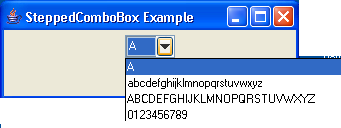
// Example from http://www.crionics.com/products/opensource/faq/swing_ex/SwingExamples.html

/* (swing1.1) */


import java.awt.Dimension;
import java.awt.FlowLayout;
import java.awt.Rectangle;
import java.awt.event.WindowAdapter;
import java.awt.event.WindowEvent;
import java.util.Vector;

import javax.swing.ComboBoxModel;
import javax.swing.JComboBox;
import javax.swing.JFrame;
import javax.swing.UIManager;
import javax.swing.plaf.basic.BasicComboPopup;
import javax.swing.plaf.basic.ComboPopup;
import javax.swing.plaf.metal.MetalComboBoxUI;

/**
 * @version 1.0 12/12/98
 */
public class SteppedComboBoxExample extends JFrame {
  public SteppedComboBoxExample() {
    super("SteppedComboBox Example");

    String[] str = { "A", "abcdefghijklmnopqrstuvwxyz",
        "ABCDEFGHIJKLMNOPQRSTUVWXYZ", "0123456789" };

    SteppedComboBox combo = new SteppedComboBox(str);
    Dimension d = combo.getPreferredSize();
    combo.setPreferredSize(new Dimension(50, d.height));
    combo.setPopupWidth(d.width);

    getContentPane().setLayout(new FlowLayout());
    getContentPane().add(combo);
  }

  public static void main(String args[]) {
    try {
        UIManager.setLookAndFeel("com.sun.java.swing.plaf.windows.WindowsLookAndFeel");
    } catch (Exception evt) {}

    SteppedComboBoxExample f = new SteppedComboBoxExample();
    f.addWindowListener(new WindowAdapter() {
      public void windowClosing(WindowEvent e) {
        System.exit(0);
      }
    });
    f.setSize(300, 100);
    f.show();
  }
}

class SteppedComboBoxUI extends MetalComboBoxUI {
  protected ComboPopup createPopup() {
    BasicComboPopup popup = new BasicComboPopup(comboBox) {

      public void show() {
        Dimension popupSize = ((SteppedComboBox) comboBox)
            .getPopupSize();
        popupSize
            .setSize(popupSize.width,
                getPopupHeightForRowCount(comboBox
                    .getMaximumRowCount()));
        Rectangle popupBounds = computePopupBounds(0, comboBox
            .getBounds().height, popupSize.width, popupSize.height);
        scroller.setMaximumSize(popupBounds.getSize());
        scroller.setPreferredSize(popupBounds.getSize());
        scroller.setMinimumSize(popupBounds.getSize());
        list.invalidate();
        int selectedIndex = comboBox.getSelectedIndex();
        if (selectedIndex == -1) {
          list.clearSelection();
        } else {
          list.setSelectedIndex(selectedIndex);
        }
        list.ensureIndexIsVisible(list.getSelectedIndex());
        setLightWeightPopupEnabled(comboBox.isLightWeightPopupEnabled());

        show(comboBox, popupBounds.x, popupBounds.y);
      }
    };
    popup.getAccessibleContext().setAccessibleParent(comboBox);
    return popup;
  }
}

class SteppedComboBox extends JComboBox {
  protected int popupWidth;

  public SteppedComboBox(ComboBoxModel aModel) {
    super(aModel);
    setUI(new SteppedComboBoxUI());
    popupWidth = 0;
  }

  public SteppedComboBox(final Object[] items) {
    super(items);
    setUI(new SteppedComboBoxUI());
    popupWidth = 0;
  }

  public SteppedComboBox(Vector items) {
    super(items);
    setUI(new SteppedComboBoxUI());
    popupWidth = 0;
  }

  public void setPopupWidth(int width) {
    popupWidth = width;
  }

  public Dimension getPopupSize() {
    Dimension size = getSize();
    if (popupWidth < 1)
      popupWidth = size.width;
    return new Dimension(popupWidth, size.height);
  }
}
Thank with us

