Source Code : Simple Modal Logo Wizard
Java Is Open Source Programming Language You Can Download From Java and Java Libraries From http://www.oracle.com.
Click Here to download
We provide this code related to title for you to solve your developing problem easily. Libraries which is import in this program you can download from http://www.oracle.com.
Click Here or search from google with Libraries Name you get jar file related it
Simple Modal Logo Wizard
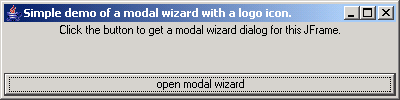
package jwizardcomponent.example;

import java.awt.BorderLayout;
import javax.swing.ImageIcon;
import javax.swing.JButton;
import javax.swing.JFrame;
import javax.swing.JLabel;
import javax.swing.SwingUtilities;
import javax.swing.UIManager;
import javax.swing.WindowConstants;

import jwizardcomponent.Utilities;
import jwizardcomponent.dialog.*;

/**
 * <p>Title: JWizardComponent</p>
 * <p>Description: Swing-Based Wizard Framework for Wizards</p>
 * <p>Copyright (C) 2003 William Ready
 *
 * <br>This library is free software; you can redistribute it and/or
 * <br>modify it under the terms of the GNU Lesser General Public
 * <br>License as published by the Free Software Foundation; either
 * <br>version 2.1 of the License, or (at your option) any later version.
 *
 * <br>This library is distributed in the hope that it will be useful,
 * <br>but WITHOUT ANY WARRANTY; without even the implied warranty of
 * <br>MERCHANTABILITY or FITNESS FOR A PARTICULAR PURPOSE.
 * <br>See the GNU Lesser General Public License for more details.
 *
 * <br>To receive a copy of the GNU Lesser General Public License
 * <br>write to:  The Free Software Foundation, Inc.,
 * <br>59 Temple Place, Suite 330
 * <br>Boston, MA 02111-1307 USA</p>
 *
 * @author Jens Kutschke, jens.kutschke@j-dimension.com, http://www.j-dimension.com
 *
 * @version 1.0
 */

public class SimpleModalLogoJWizard {

    static ImageIcon LOGO;

    public static void main(String [] args) {
        try {

            // optional: set a look and feel
            UIManager.setLookAndFeel(UIManager.getSystemLookAndFeelClassName());

            // create a new frame or use an existing one of your application
            final JFrame mainWindow=new JFrame("Simple demo of a modal wizard with a logo icon.");
            mainWindow.getContentPane().setLayout(new BorderLayout());
            mainWindow.getContentPane().add("North", new JLabel("Click the button to get a modal wizard dialog for this JFrame.", JLabel.CENTER));

            // in this example, we use a button to open a new wizard
            JButton dialogButton=new JButton("open modal wizard");
            dialogButton.addActionListener(new java.awt.event.ActionListener() {
                public void actionPerformed(java.awt.event.ActionEvent e) {

                    // create the modal wizard: the constructor takes the parent frame
                    SimpleLogoJWizardDialog wizardDialog = new SimpleLogoJWizardDialog(mainWindow, LOGO, true);

                    SwingUtilities.updateComponentTreeUI(wizardDialog);
                    wizardDialog.setTitle("Simple Logo JWizardComponent");

                    // add panels to the wizard
                    wizardDialog.getWizardComponents().addWizardPanel(
                    new SimpleLabelWizardPanel(wizardDialog.getWizardComponents(),
                    new JLabel("This")));
                    wizardDialog.getWizardComponents().addWizardPanel(
                    new SimpleLabelWizardPanel(wizardDialog.getWizardComponents(),
                    new JLabel("is")));
                    wizardDialog.getWizardComponents().addWizardPanel(
                    new SimpleLabelWizardPanel(wizardDialog.getWizardComponents(),
                    new JLabel("a")));
                    wizardDialog.getWizardComponents().addWizardPanel(
                    new SimpleLabelWizardPanel(wizardDialog.getWizardComponents(),
                    new JLabel("modal")));
                    wizardDialog.getWizardComponents().addWizardPanel(
                    new SimpleLabelWizardPanel(wizardDialog.getWizardComponents(),
                    new JLabel("wizard!")));
                    wizardDialog.setSize(500, 300);
                    wizardDialog.setDefaultCloseOperation(WindowConstants.DISPOSE_ON_CLOSE);
                    Utilities.centerComponentOnScreen(wizardDialog);

                    // show the wizard
                    wizardDialog.show();
                }
            });
            mainWindow.getContentPane().add("South", dialogButton);
            mainWindow.setSize(400,  100);
            mainWindow.setDefaultCloseOperation(JFrame.EXIT_ON_CLOSE);

            LOGO =
            new ImageIcon("images/logo.jpeg");

            // show the frame
            mainWindow.show();

        } catch (Exception e) {
            e.printStackTrace();
        }
    }

}
Thank with us

