Java Is Open Source Programming Language You Can Download From Java and Java Libraries From http://www.oracle.com.
We provide this code related to title for you to solve your developing problem easily. Libraries which is import in this program you can download from http://www.oracle.com.
MultiLine Table
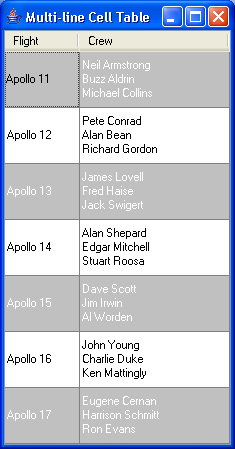
/*
Core SWING Advanced Programming
By Kim Topley
ISBN: 0 13 083292 8
Publisher: Prentice Hall
*/


import java.awt.Color;
import java.awt.Component;
import java.awt.Font;
import java.awt.event.WindowAdapter;
import java.awt.event.WindowEvent;

import javax.swing.Box;
import javax.swing.BoxLayout;
import javax.swing.Icon;
import javax.swing.JComponent;
import javax.swing.JFrame;
import javax.swing.JLabel;
import javax.swing.JPanel;
import javax.swing.JScrollPane;
import javax.swing.JTable;
import javax.swing.SwingConstants;
import javax.swing.UIManager;
import javax.swing.border.Border;
import javax.swing.border.EmptyBorder;
import javax.swing.table.AbstractTableModel;
import javax.swing.table.TableCellRenderer;
import javax.swing.table.TableColumn;
import javax.swing.table.TableColumnModel;

public class MultiLineTable {
  public static void main(String[] args) {
    try {
        UIManager.setLookAndFeel("com.sun.java.swing.plaf.windows.WindowsLookAndFeel");
    } catch (Exception evt) {}

    JFrame f = new JFrame("Multi-line Cell Table");
    JTable tbl = new JTable(new MultiLineTableModel());

    // Create the custom cell renderer
    MultiLineCellRenderer multiLineRenderer = new MultiLineCellRenderer(
        SwingConstants.LEFT, SwingConstants.CENTER);

    TableColumnModel tcm = tbl.getColumnModel();
    tcm.getColumn(0).setPreferredWidth(75);
    tcm.getColumn(0).setMinWidth(75);
    tcm.getColumn(1).setPreferredWidth(150);
    tcm.getColumn(1).setMinWidth(150);

    // Install the multi-line renderer
    tcm.getColumn(0).setCellRenderer(multiLineRenderer);
    tcm.getColumn(1).setCellRenderer(multiLineRenderer);

    // Set the table row height
    tbl.setRowHeight(56);

    // Add the stripe renderer.
    StripedTableCellRenderer.installInTable(tbl, Color.lightGray,
        Color.white, null, null);

    tbl.setAutoResizeMode(JTable.AUTO_RESIZE_OFF);
    tbl.setPreferredScrollableViewportSize(tbl.getPreferredSize());

    JScrollPane sp = new JScrollPane(tbl);
    f.getContentPane().add(sp, "Center");
    f.pack();
    f.addWindowListener(new WindowAdapter() {
      public void windowClosing(WindowEvent evt) {
        System.exit(0);
      }
    });
    f.setVisible(true);
  }
}

class MultiLineTableModel extends AbstractTableModel {
  protected String[] columnNames = { "Flight", "Crew" };

  // Implementation of TableModel interface
  public int getRowCount() {
    return data.length;
  }

  public int getColumnCount() {
    return 2;
  }

  public Object getValueAt(int row, int column) {
    return data[row][column];
  }

  public Class getColumnClass(int column) {
    return (data[0][column]).getClass();
  }

  public String getColumnName(int column) {
    return columnNames[column];
  }

  protected Object[][] data = new Object[][] {
      {
          "Apollo 11",
          new String[] { "Neil Armstrong", "Buzz Aldrin",
              "Michael Collins" } },
      {
          "Apollo 12",
          new String[] { "Pete Conrad", "Alan Bean", "Richard Gordon" } },
      {
          "Apollo 13",
          new String[] { "James Lovell", "Fred Haise", "Jack Swigert" } },
      {
          "Apollo 14",
          new String[] { "Alan Shepard", "Edgar Mitchell",
              "Stuart Roosa" } },
      { "Apollo 15",
          new String[] { "Dave Scott", "Jim Irwin", "Al Worden" } },
      {
          "Apollo 16",
          new String[] { "John Young", "Charlie Duke",
              "Ken Mattingly" } },
      {
          "Apollo 17",
          new String[] { "Eugene Cernan", "Harrison Schmitt",
              "Ron Evans" } } };
}

class MultiLineCellRenderer extends JPanel implements TableCellRenderer {
  public MultiLineCellRenderer(int horizontalAlignment, int verticalAlignment) {
    this.horizontalAlignment = horizontalAlignment;
    this.verticalAlignment = verticalAlignment;
    switch (horizontalAlignment) {
    case SwingConstants.LEFT:
      alignmentX = (float) 0.0;
      break;

    case SwingConstants.CENTER:
      alignmentX = (float) 0.5;
      break;

    case SwingConstants.RIGHT:
      alignmentX = (float) 1.0;
      break;

    default:
      throw new IllegalArgumentException(
          "Illegal horizontal alignment value");
    }

    setLayout(new BoxLayout(this, BoxLayout.Y_AXIS));
    setOpaque(true);
    setBorder(border);

    background = null;
    foreground = null;
  }

  public void setForeground(Color foreground) {
    super.setForeground(foreground);
    Component[] comps = this.getComponents();
    int ncomp = comps.length;
    for (int i = 0; i < ncomp; i++) {
      Component comp = comps[i];
      if (comp instanceof JLabel) {
        comp.setForeground(foreground);
      }
    }
  }

  public void setBackground(Color background) {
    this.background = background;
    super.setBackground(background);
  }

  public void setFont(Font font) {
    this.font = font;
  }

  // Implementation of TableCellRenderer interface
  public Component getTableCellRendererComponent(JTable table, Object value,
      boolean isSelected, boolean hasFocus, int row, int column) {
    removeAll();
    invalidate();

    if (value == null || table == null) {
      // Do nothing if no value
      return this;
    }

    Color cellForeground;
    Color cellBackground;

    // Set the foreground and background colors
    // from the table if they are not set
    cellForeground = (foreground == null ? table.getForeground()
        : foreground);
    cellBackground = (background == null ? table.getBackground()
        : background);

    // Handle selection and focus colors
    if (isSelected == true) {
      cellForeground = table.getSelectionForeground();
      cellBackground = table.getSelectionBackground();
    }

    if (hasFocus == true) {
      setBorder(UIManager.getBorder("Table.focusCellHighlightBorder"));
      if (table.isCellEditable(row, column)) {
        cellForeground = UIManager
            .getColor("Table.focusCellForeground");
        cellBackground = UIManager
            .getColor("Table.focusCellBackground");
      }
    } else {
      setBorder(border);
    }

    super.setForeground(cellForeground);
    super.setBackground(cellBackground);

    // Default the font from the table
    if (font == null) {
      font = table.getFont();
    }

    if (verticalAlignment != SwingConstants.TOP) {
      add(Box.createVerticalGlue());
    }

    Object[] values;
    int length;
    if (value instanceof Object[]) {
      // Input is an array - use it
      values = (Object[]) value;
    } else {
      // Not an array - turn it into one
      values = new Object[1];
      values[0] = value;
    }
    length = values.length;

    // Configure each row of the cell using
    // a separate JLabel. If a given row is
    // a JComponent, add it directly..
    for (int i = 0; i < length; i++) {
      Object thisRow = values[i];

      if (thisRow instanceof JComponent) {
        add((JComponent) thisRow);
      } else {
        JLabel l = new JLabel();
        setValue(l, thisRow, i, cellForeground);
        add(l);
      }
    }

    if (verticalAlignment != SwingConstants.BOTTOM) {
      add(Box.createVerticalGlue());
    }
    return this;
  }

  // Configures a label for one line of the cell.
  // This can be overridden by derived classes
  protected void setValue(JLabel l, Object value, int lineNumber,
      Color cellForeground) {
    if (value != null && value instanceof Icon) {
      l.setIcon((Icon) value);
    } else {
      l.setText(value == null ? "" : value.toString());
    }
    l.setHorizontalAlignment(horizontalAlignment);
    l.setAlignmentX(alignmentX);
    l.setOpaque(false);
    l.setForeground(cellForeground);
    l.setFont(font);
  }

  protected int verticalAlignment;

  protected int horizontalAlignment;

  protected float alignmentX;

  // These attributes may be explicitly set
  // They are defaulted to the colors and attributes
  // of the table
  protected Color foreground;

  protected Color background;

  protected Font font;

  protected static Border border = new EmptyBorder(1, 2, 1, 2);
}

class StripedTableCellRenderer implements TableCellRenderer {
  public StripedTableCellRenderer(TableCellRenderer targetRenderer,
      Color evenBack, Color evenFore, Color oddBack, Color oddFore) {
    this.targetRenderer = targetRenderer;
    this.evenBack = evenBack;
    this.evenFore = evenFore;
    this.oddBack = oddBack;
    this.oddFore = oddFore;
  }

  // Implementation of TableCellRenderer interface
  public Component getTableCellRendererComponent(JTable table, Object value,
      boolean isSelected, boolean hasFocus, int row, int column) {
    TableCellRenderer renderer = targetRenderer;
    if (renderer == null) {
      // Get default renderer from the table
      renderer = table.getDefaultRenderer(table.getColumnClass(column));
    }

    // Let the real renderer create the component
    Component comp = renderer.getTableCellRendererComponent(table, value,
        isSelected, hasFocus, row, column);

    // Now apply the stripe effect
    if (isSelected == false && hasFocus == false) {
      if ((row & 1) == 0) {
        comp.setBackground(evenBack != null ? evenBack : table
            .getBackground());
        comp.setForeground(evenFore != null ? evenFore : table
            .getForeground());
      } else {
        comp.setBackground(oddBack != null ? oddBack : table
            .getBackground());
        comp.setForeground(oddFore != null ? oddFore : table
            .getForeground());
      }
    }

    return comp;
  }

  // Convenience method to apply this renderer to single column
  public static void installInColumn(JTable table, int columnIndex,
      Color evenBack, Color evenFore, Color oddBack, Color oddFore) {
    TableColumn tc = table.getColumnModel().getColumn(columnIndex);

    // Get the cell renderer for this column, if any
    TableCellRenderer targetRenderer = tc.getCellRenderer();

    // Create a new StripedTableCellRenderer and install it
    tc.setCellRenderer(new StripedTableCellRenderer(targetRenderer,
        evenBack, evenFore, oddBack, oddFore));
  }

  // Convenience method to apply this renderer to an entire table
  public static void installInTable(JTable table, Color evenBack,
      Color evenFore, Color oddBack, Color oddFore) {
    StripedTableCellRenderer sharedInstance = null;
    int columns = table.getColumnCount();
    for (int i = 0; i < columns; i++) {
      TableColumn tc = table.getColumnModel().getColumn(i);
      TableCellRenderer targetRenderer = tc.getCellRenderer();
      if (targetRenderer != null) {
        // This column has a specific renderer
        tc.setCellRenderer(new StripedTableCellRenderer(targetRenderer,
            evenBack, evenFore, oddBack, oddFore));
      } else {
        // This column uses a class renderer - use a shared renderer
        if (sharedInstance == null) {
          sharedInstance = new StripedTableCellRenderer(null,
              evenBack, evenFore, oddBack, oddFore);
        }
        tc.setCellRenderer(sharedInstance);
      }
    }
  }

  protected TableCellRenderer targetRenderer;

  protected Color evenBack;

  protected Color evenFore;

  protected Color oddBack;

  protected Color oddFore;
}

