Java Is Open Source Programming Language You Can Download From Java and Java Libraries From http://www.oracle.com.
We provide this code related to title for you to solve your developing problem easily. Libraries which is import in this program you can download from http://www.oracle.com.
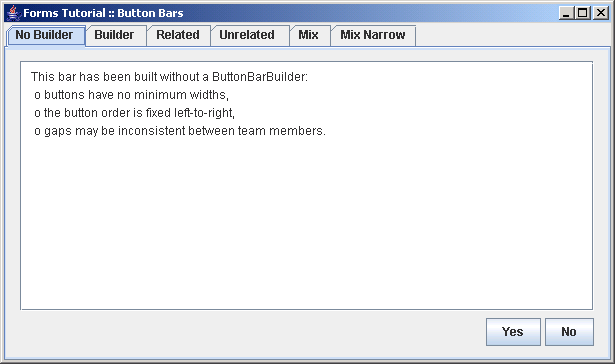
Demonstrates how to build button bars using a ButtonBarBuilder
/*
 * Copyright (c) 2002-2004 JGoodies Karsten Lentzsch. All Rights Reserved.
 *
 * Redistribution and use in source and binary forms, with or without
 * modification, are permitted provided that the following conditions are met:
 *
 *  o Redistributions of source code must retain the above copyright notice,
 *    this list of conditions and the following disclaimer.
 *
 *  o Redistributions in binary form must reproduce the above copyright notice,
 *    this list of conditions and the following disclaimer in the documentation
 *    and/or other materials provided with the distribution.
 *
 *  o Neither the name of JGoodies Karsten Lentzsch nor the names of
 *    its contributors may be used to endorse or promote products derived
 *    from this software without specific prior written permission.
 *
 * THIS SOFTWARE IS PROVIDED BY THE COPYRIGHT HOLDERS AND CONTRIBUTORS "AS IS"
 * AND ANY EXPRESS OR IMPLIED WARRANTIES, INCLUDING, BUT NOT LIMITED TO,
 * THE IMPLIED WARRANTIES OF MERCHANTABILITY AND FITNESS FOR A PARTICULAR
 * PURPOSE ARE DISCLAIMED. IN NO EVENT SHALL THE COPYRIGHT OWNER OR
 * CONTRIBUTORS BE LIABLE FOR ANY DIRECT, INDIRECT, INCIDENTAL, SPECIAL,
 * EXEMPLARY, OR CONSEQUENTIAL DAMAGES (INCLUDING, BUT NOT LIMITED TO,
 * PROCUREMENT OF SUBSTITUTE GOODS OR SERVICES; LOSS OF USE, DATA, OR PROFITS;
 * OR BUSINESS INTERRUPTION) HOWEVER CAUSED AND ON ANY THEORY OF LIABILITY,
 * WHETHER IN CONTRACT, STRICT LIABILITY, OR TORT (INCLUDING NEGLIGENCE
 * OR OTHERWISE) ARISING IN ANY WAY OUT OF THE USE OF THIS SOFTWARE,
 * EVEN IF ADVISED OF THE POSSIBILITY OF SUCH DAMAGE.
 */


import java.awt.Component;
import java.awt.Insets;

import javax.swing.*;

import com.jgoodies.forms.builder.ButtonBarBuilder;
import com.jgoodies.forms.factories.Borders;
import com.jgoodies.forms.layout.CellConstraints;
import com.jgoodies.forms.layout.FormLayout;

/**
 * Demonstrates how to build button bars using a ButtonBarBuilder.
 *
 * @author  Karsten Lentzsch
 * @version $Revision: 1.16 $
 *
 * @see     ButtonBarBuilder
 * @see     com.jgoodies.forms.factories.ButtonBarFactory
 */
public class ButtonBarsExample {

    public static void main(String[] args) {
        try {
            UIManager.setLookAndFeel("com.jgoodies.plaf.plastic.PlasticXPLookAndFeel");
        } catch (Exception e) {
            // Likely PlasticXP is not in the class path; ignore.
        }
        JFrame frame = new JFrame();
        frame.setTitle("Forms Tutorial :: Button Bars");
        frame.setDefaultCloseOperation(WindowConstants.EXIT_ON_CLOSE);
        JComponent panel = new ButtonBarsExample().buildPanel();
        frame.getContentPane().add(panel);
        frame.pack();
        frame.setVisible(true);
    }


    public JComponent buildPanel() {
        JTabbedPane tabbedPane = new JTabbedPane();
        tabbedPane.putClientProperty("jgoodies.noContentBorder", Boolean.TRUE);

        tabbedPane.add(buildButtonBar1Panel(),      "No Builder");
        tabbedPane.add(buildButtonBar2Panel(),      "Builder");
        tabbedPane.add(buildButtonBar3Panel(),      "Related");
        tabbedPane.add(buildButtonBar4Panel(),      "Unrelated ");
        tabbedPane.add(buildButtonMixedBar1Panel(), "Mix");
        tabbedPane.add(buildButtonMixedBar2Panel(), "Mix Narrow");
        return tabbedPane;
    }

    private Component buildButtonBar1Panel() {
        JPanel buttonBar = new JPanel(
            new FormLayout("0:grow, p, 4px, p", "p"));
        buttonBar.add(new JButton("Yes"), "2, 1");
        buttonBar.add(new JButton("No"),  "4, 1");

        return wrap(buttonBar,
            "This bar has been built without a ButtonBarBuilder:
" + " o buttons have no minimum widths,
" +
      " o the button order is fixed left-to-right,
" + " o gaps may be inconsistent between team members.");
    }

    private Component buildButtonBar2Panel() {
        ButtonBarBuilder builder = new ButtonBarBuilder();
        builder.addGlue();
        builder.addGriddedButtons(new JButton[] {
                new JButton("Yes"),
                new JButton("No")
                });
        return wrap(builder.getPanel(),
            "This bar has been built with a ButtonBarBuilder:
" +
            " o buttons have a minimum widths,
" +
      " o the button order honors the platform default,
" +
        " o the button gap is a logical size that follows a style guide.");
    }

    private Component buildButtonBar3Panel() {
        ButtonBarBuilder builder = new ButtonBarBuilder();
        builder.addGlue();
        builder.addGriddedButtons(new JButton[] {
                new JButton("One"),
                new JButton("Two"),
                new JButton("Three")
          });
        return wrap(builder.getPanel(),
            "This bar uses the logical gap for related buttons.
");
    }

    private Component buildButtonBar4Panel() {
        ButtonBarBuilder builder = new ButtonBarBuilder();
        builder.addGlue();
        builder.addGridded(new JButton("One"));
        builder.addUnrelatedGap();
        builder.addGridded(new JButton("Two"));
        builder.addUnrelatedGap();
        builder.addGridded(new JButton("Three"));

        return wrap(builder.getPanel(),
            "This bar uses the logical gap for unrelated buttons.
" +
            "It is a little bit wider than the related gap.");
    }

    private Component buildButtonMixedBar1Panel() {
        ButtonBarBuilder builder = new ButtonBarBuilder();
        builder.addGridded(new JButton("Help"));
        builder.addGlue();
        builder.addUnrelatedGap();
        builder.addFixed(new JButton("Copy to Clipboard"));
        builder.addUnrelatedGap();
        builder.addGriddedButtons(new JButton[] {
                new JButton("OK"),
                new JButton("Cancel")
          });
        return wrap(builder.getPanel(),
            "Demonstrates a glue (between Help and the rest),
" +
            "has related and unrelated buttons and an ungridded button
" +
            "with a default margin (Copy to Clipboard).");
    }

    private Component buildButtonMixedBar2Panel() {
        ButtonBarBuilder builder = new ButtonBarBuilder();
        builder.addGridded(new JButton("Help"));
        builder.addGlue();
        builder.addUnrelatedGap();
        builder.addFixedNarrow(new JButton("Copy to Clipboard"));
        builder.addUnrelatedGap();
        builder.addGriddedButtons(new JButton[] {
                new JButton("OK"),
                new JButton("Cancel")
        });
        return wrap(builder.getPanel(),
            "Demonstrates a glue (between Help and the rest),
" +
            "has related and unrelated buttons and an ungridded button
" +
            "with a narrow margin (Copy to Clipboard).

"+
      "Note that some look&feels do not support the narrow margin
" +
      "feature, and conversely, others have only narrow margins.");
    }


    // Helper Code ************************************************************

    private static Component wrap(Component buttonBar, String text) {
      JTextArea textArea = new JTextArea(text);
      textArea.setMargin(new Insets(6, 10, 4, 6));
        Component textPane = new JScrollPane(textArea);

        FormLayout layout = new FormLayout(
                        "fill:100dlu:grow",
                        "fill:56dlu:grow, 4dlu, p");
        JPanel panel = new JPanel(layout);
        CellConstraints cc = new CellConstraints();
        panel.setBorder(Borders.DIALOG_BORDER);
        panel.add(textPane,    cc.xy(1, 1));
        panel.add(buttonBar,   cc.xy(1, 3));
        return panel;
    }

}

