Source Code : ComboBox Table
Java Is Open Source Programming Language You Can Download From Java and Java Libraries From http://www.oracle.com.
Click Here to download
We provide this code related to title for you to solve your developing problem easily. Libraries which is import in this program you can download from http://www.oracle.com.
Click Here or search from google with Libraries Name you get jar file related it
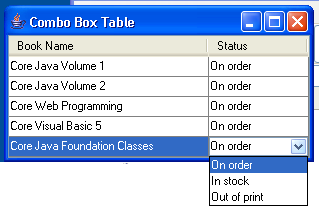
ComboBox Table
/*
Core SWING Advanced Programming
By Kim Topley
ISBN: 0 13 083292 8
Publisher: Prentice Hall
*/


import javax.swing.*;
import javax.swing.table.*;
import java.awt.event.*;

public class ComboBoxTable {
  public static void main(String[] args) {
    try {
        UIManager.setLookAndFeel("com.sun.java.swing.plaf.windows.WindowsLookAndFeel");
    } catch (Exception evt) {}

    JFrame f = new JFrame("Combo Box Table");
    JTable tbl = new JTable(new ComboBoxTableModel());

    // Create the combo box editor
    JComboBox comboBox = new JComboBox(ComboBoxTableModel.getValidStates());
    comboBox.setEditable(true);
    DefaultCellEditor editor = new DefaultCellEditor(comboBox);

    // Assign the editor to the second column
    TableColumnModel tcm = tbl.getColumnModel();
    tcm.getColumn(1).setCellEditor(editor);

    // Set column widths
    tcm.getColumn(0).setPreferredWidth(200);
    tcm.getColumn(1).setPreferredWidth(100);

    // Set row heighht
    tbl.setRowHeight(20);

    tbl.setAutoResizeMode(JTable.AUTO_RESIZE_OFF);
    tbl.setPreferredScrollableViewportSize(tbl.getPreferredSize());

    f.getContentPane().add(new JScrollPane(tbl), "Center");
    f.pack();
    f.addWindowListener(new WindowAdapter() {
      public void windowClosing(WindowEvent evt) {
        System.exit(0);
      }
    });
    f.setVisible(true);
  }
}

class ComboBoxTableModel extends AbstractTableModel {
  // Implementation of TableModel interface
  public int getRowCount() {
    return data.length;
  }

  public int getColumnCount() {
    return COLUMN_COUNT;
  }

  public Object getValueAt(int row, int column) {
    return data[row][column];
  }

  public Class getColumnClass(int column) {
    return (data[0][column]).getClass();
  }

  public String getColumnName(int column) {
    return columnNames[column];
  }

  public boolean isCellEditable(int row, int column) {
    return column == 1;
  }

  public void setValueAt(Object value, int row, int column) {
    if (isValidValue(value)) {
      data[row][column] = value;
      fireTableRowsUpdated(row, row);
    }
  }

  // Extra public methods
  public static String[] getValidStates() {
    return validStates;
  }

  // Protected methods
  protected boolean isValidValue(Object value) {
    if (value instanceof String) {
      String sValue = (String)value;

      for (int i = 0; i < validStates.length; i++) {
        if (sValue.equals(validStates[i])) {
          return true;
        }
      }
    }

    return false;
  }

  protected static final int COLUMN_COUNT = 2;

  protected static final String[] validStates = {
    "On order", "In stock", "Out of print"
  };

  protected Object[][] data = new Object[][] {
    { "Core Java Volume 1", validStates[0] },
    { "Core Java Volume 2", validStates[0] },
    { "Core Web Programming", validStates[0] },
    { "Core Visual Basic 5", validStates[0] },
    { "Core Java Foundation Classes", validStates[0] }
  };

  protected static final String[] columnNames = {
    "Book Name", "Status"
  };

}
Thank with us

