Source Code : Various layouts
Java Is Open Source Programming Language You Can Download From Java and Java Libraries From http://www.oracle.com.
Click Here to download
We provide this code related to title for you to solve your developing problem easily. Libraries which is import in this program you can download from http://www.oracle.com.
Click Here or search from google with Libraries Name you get jar file related it
Various layouts
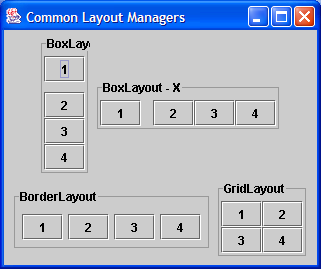
import java.awt.BorderLayout;
import java.awt.FlowLayout;
import java.awt.GridLayout;
import java.awt.event.WindowAdapter;
import java.awt.event.WindowEvent;
import java.awt.event.WindowListener;

import javax.swing.Box;
import javax.swing.BoxLayout;
import javax.swing.JButton;
import javax.swing.JFrame;
import javax.swing.JPanel;
import javax.swing.border.TitledBorder;

public class CommonLayouts extends JFrame {
  public CommonLayouts() {
    super("Common Layout Managers");
    setSize(500, 380);

    JPanel desktop = new JPanel();
    getContentPane().add(desktop);

    JPanel fr1 = new JPanel();
    fr1.setBorder(new TitledBorder("FlowLayout"));
    fr1.setLayout(new FlowLayout());
    fr1.add(new JButton("1"));
    fr1.add(new JButton("2"));
    fr1.add(new JButton("3"));
    fr1.add(new JButton("4"));
    desktop.add(fr1, 0);

    JPanel fr2 = new JPanel();
    fr2.setBorder(new TitledBorder("GridLayout"));
    fr2.setLayout(new GridLayout(2, 2));
    fr2.add(new JButton("1"));
    fr2.add(new JButton("2"));
    fr2.add(new JButton("3"));
    fr2.add(new JButton("4"));
    desktop.add(fr2, 0);

    JPanel fr3 = new JPanel();
    fr3.setBorder(new TitledBorder("BorderLayout"));
    fr3.add(new JButton("1"), BorderLayout.NORTH);
    fr3.add(new JButton("2"), BorderLayout.EAST);
    fr3.add(new JButton("3"), BorderLayout.SOUTH);
    fr3.add(new JButton("4"), BorderLayout.WEST);
    desktop.add(fr3, 0);

    JPanel fr4 = new JPanel();
    fr4.setBorder(new TitledBorder("BoxLayout - X"));
    fr4.setLayout(new BoxLayout(fr4, BoxLayout.X_AXIS));
    fr4.add(new JButton("1"));
    fr4.add(Box.createHorizontalStrut(12));
    fr4.add(new JButton("2"));
    fr4.add(Box.createGlue());
    fr4.add(new JButton("3"));
    fr4.add(Box.createHorizontalGlue());
    fr4.add(new JButton("4"));
    desktop.add(fr4, 0);

    JPanel fr5 = new JPanel();
    fr5.setBorder(new TitledBorder("BoxLayout - Y"));
    fr5.setLayout(new BoxLayout(fr5, BoxLayout.Y_AXIS));
    fr5.add(new JButton("1"));
    fr5.add(Box.createVerticalStrut(10));
    fr5.add(new JButton("2"));
    fr5.add(Box.createGlue());
    fr5.add(new JButton("3"));
    fr5.add(Box.createVerticalGlue());
    fr5.add(new JButton("4"));
    desktop.add(fr5, 0);

    WindowListener wndCloser = new WindowAdapter() {
      public void windowClosing(WindowEvent e) {
        System.exit(0);
      }
    };
    addWindowListener(wndCloser);
    setVisible(true);
  }

  public static void main(String argv[]) {
    new CommonLayouts();
  }
}
Thank with us

